Etc mapping structure | Community
Skip to main content
Level 3
January 21, 2026
Question

Etc mapping structure

  • January 21, 2026
  • 6 replies
  • 124 views

Greetings,
We have a strange issue with our etc mapping structure, our project has a lot of domains and all of them are under etc/map, the recommendation for a better structure was to follow this guide
/etc/map/
         https/

                 www.example.com.443/

                           rulenodes
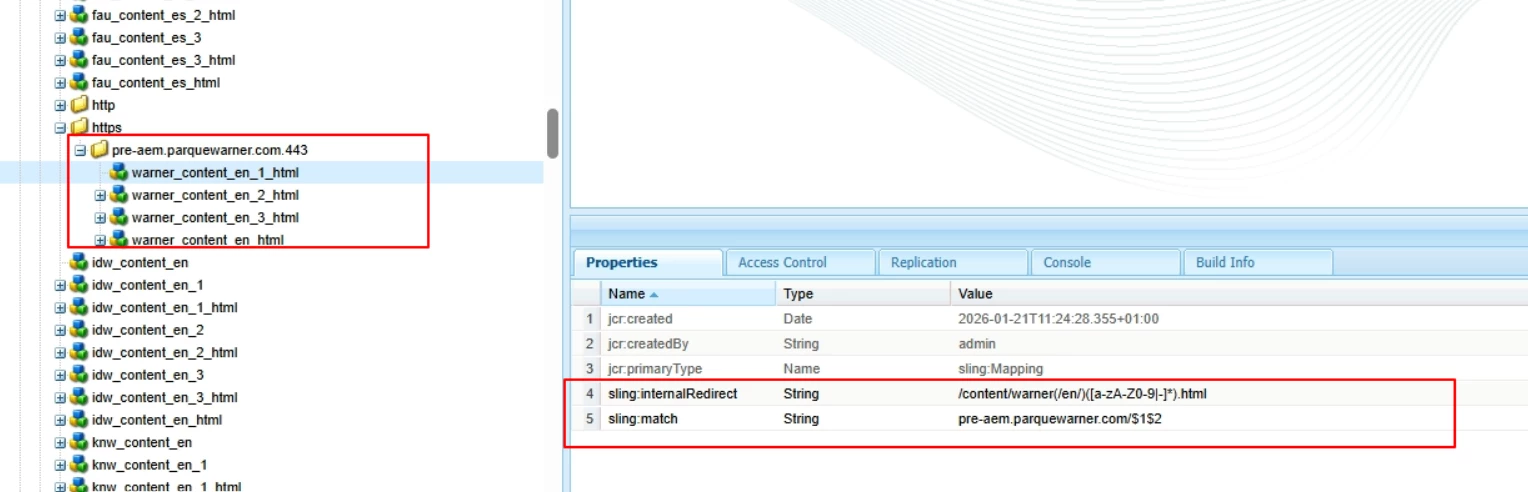


But this approach makes it so the domain disappears
leaving https: //matchedPath

We do not know how to format the sling:internalRedirect and sling:match properties in order for the rules to work like they do under just etc

Any help would be appreciated

Best Regards,

Daniel

6 replies

Level 2
January 21, 2026

Hi Daniel

Please check below fix ,if it will fix your issue! 😊

Problem:

     Under /etc/map/https/.443/, Sling consumes the scheme, domain, and port before evaluating rules. If sling:match contains the domain again, mappings fail and the request loses the expected URL structure.

Root Cause:

Inside /etc/map/https/.443/, Sling only matches the URL path, not the full URL.

Fix:

1. Remove domain from sling:match. Example: sling:match = /([a-zA-Z0-9-]+)\.html

2. Use only internal path in sling:internalRedirect. Example: sling:internalRedirect = /content/warner/en/$1.html

Result:

The domain no longer disappears, and mappings resolve correctly

Best regards,

Jyothirmai Kanigolla

Level 3
January 28, 2026

Hello ​@Jyo234678 removing the url from sling match does not resolve the issue, and the domain is still removed if we separate the domains in subfolders/subnodes
 

Best Regards

MeasurableBusinessResults
Level 3
January 21, 2026

Your internalRedirect regex matches too much, the slash before /en needs to be outside of the parentheses and you need to remove the domain from sling:match


Just simplify it like:
/content/warner/(en/[a-zA-Z0-9|-]*).html

/$1


See also:
https://sling.apache.org/documentation/the-sling-engine/mappings-for-resource-resolution.html#reverse-outgoing-mapping

MeasurableBusinessResults
Level 3
January 21, 2026

Just leave out the domain and simplify the regex, do


/content/warner/(en/[a-zA-Z0-9|-]*).html

/$1


See also
https://sling.apache.org/documentation/the-sling-engine/mappings-for-resource-resolution.html#reverse-outgoing-mapping

Level 3
January 26, 2026

Hello thanks for answering, doing it that way still deletes the domain

Maybe the folder route should be different?


Best Regards

konstantyn_diachenko
Community Advisor
Community Advisor
January 21, 2026

Hi ​@DanielMa63 ,


@MeasurableBusinessResults, suggested a good idea to solve it. To make it more correct, you can refer this this documentation: https://sling.apache.org/documentation/the-sling-engine/mappings-for-resource-resolution.html#regular-expressions-for-reverseoutgoing-mappings

Example how can you fix it:

/etc/map
      +-- http
           +-- pre-aem.parquewarner.com.443
           |    +-- sling:internalRedirect = "/content/warner(/en/)([a-zA-Z0-9|-]*).html"
           |    +-- sling:match = "$1$2”

Kostiantyn Diachenko, Community Advisor, Certified Senior AEM Developer, creator of free AEM VLT Tool, maintainer of AEM Tools plugin.
Level 3
January 26, 2026

Hello thanks for answering, the solution suggested still results in the domain being deleted


Best Regards

konstantyn_diachenko
Community Advisor
Community Advisor
January 26, 2026

Hi ​@DanielMa63 , could you please try such setup?


/etc/map
      +-- https
           +-- pre-aem.parquewarner.com
           |    +-- sling:internalRedirect = "/content/warner(/en/)([a-zA-Z0-9|-]*).html"
           |    +-- sling:match = "$1$2”


Kostiantyn Diachenko, Community Advisor, Certified Senior AEM Developer, creator of free AEM VLT Tool, maintainer of AEM Tools plugin.
Level 2
January 22, 2026

Hi Daniel

Problem:

Under /etc/map/https/.443/, Sling consumes the scheme, domain, and port before evaluating rules. If sling:match contains the domain again, mappings fail and the request loses the expected URL structure.

Root Cause:

Inside /etc/map/https/.443/, Sling only matches the URL path, not the full URL.

Fix: 1. Remove domain from sling:match. Example: sling:match = /([a-zA-Z0-9-]+)\.html

2. Use only internal path in sling:internalRedirect. Example: sling:internalRedirect = /content/warner/en/$1.html

Result:

The domain no longer disappears, and mappings resolve correctly


Thanks and regards,

Jyothirmai A

Level 3
January 26, 2026

Hello thanks for answering, your suggestion does not work sadly, it does not apply the rule at all it seems and it leaves the whole content path

Best Regards

PGURUKRISHNA
Level 4
January 24, 2026

Hey ​@DanielMa63 

When using:


/etc/map/https/www.example.com.443/

Use this and only this format:


sling:match = ^/your-path/(.*)$ sling:internalRedirect = /content/your-project/en/your-target/$1

Do NOT put https:// or www.example.com in either property.

Community Advisor
January 27, 2026

It appears that the forward (internal) and reverse Sling mappings are currently mixed. Ideally, the Dispatcher should forward the full content path to the publisher, which makes forward mapping optional. In this case, enabling sling:internalRedirect alone is sufficient, and sling:match is not required for forward mapping.


The reverse mapping (map) should then translate the internal content path back to the public-facing DNS URL. This requires configuring both sling:internalRedirect and sling:match.

Please refer to Configure Sling Mappings for Resource Resolution in Adobe Experience Manager(AEM) — Deep Dive | by Albin Issac | Medium for more details


Regards

Albin

Albin Issac – Medium

Level 3
January 28, 2026

Hello ​@AlbinIs1 

Even following the structure shown in the article the result is the same

Best Regards