
Does the Classic Content Fragment Component Work in 6.5 LTS? | Community
Skip to main content
AEM_Dan
Level 3
March 12, 2026
Solved

Does the Classic Content Fragment Component Work in 6.5 LTS?

  • March 12, 2026
  • 4 replies
  • 24 views

We still use the foundation content fragment component (/libs/dam/cfm/components/contentfragment).  It is listed as deprecated but is still functional in recent 6.5 SPs and I haven’t seen any documentation that it has been removed.

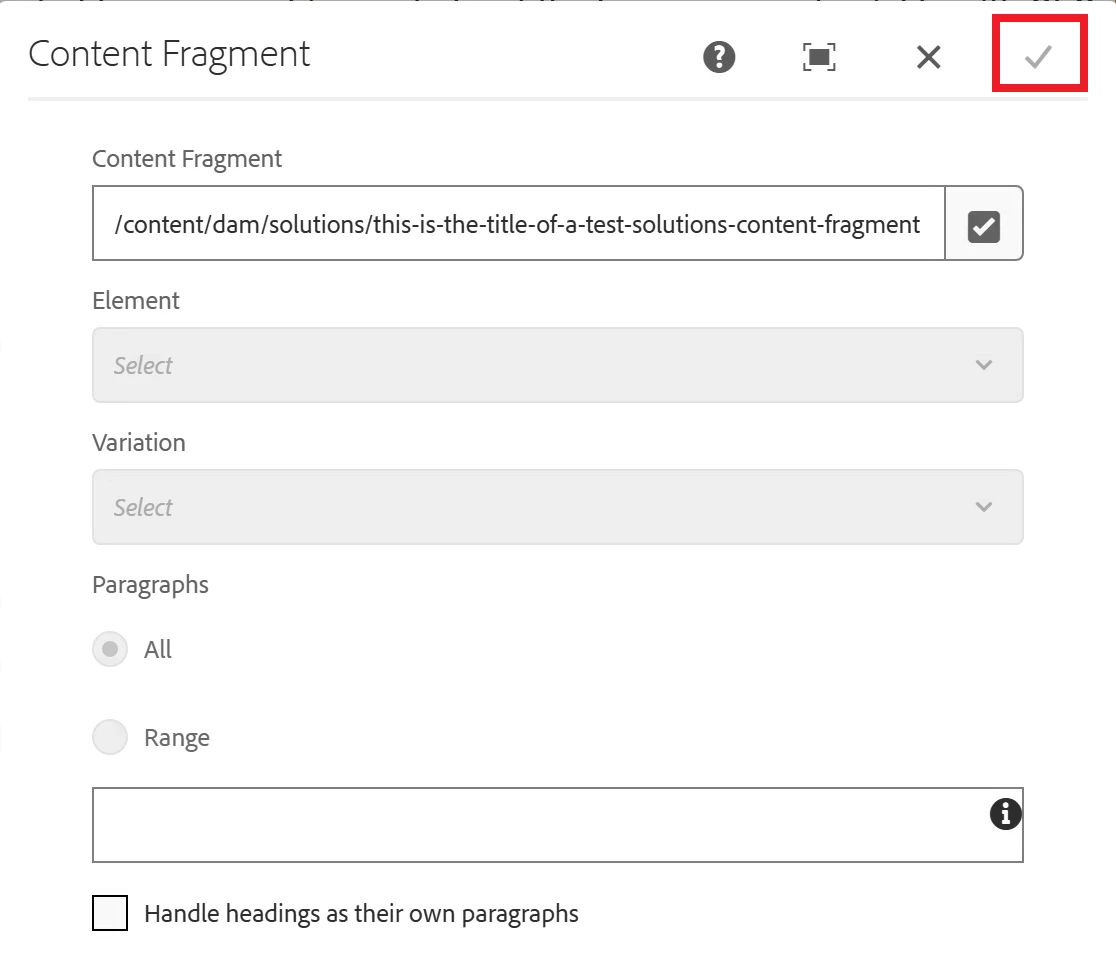
We are having issues with it in 6.5 LTS.  After adding it to a page and selecting the content fragment, the check is greyed out.  Existing content fragments components still render correctly but switching to a different fragment causes the check to grey out also.


Best answer by VishalKa5

Hi ​@AEM_Dan ,


In Adobe Experience Manager 6.5 LTS, the classic Content Fragment component
/libs/dam/cfm/components/contentfragment is deprecated but not removed.

Key Points:

  1. The foundation Content Fragment component still exists in 6.5 LTS, mainly for backward compatibility.

  2. Existing components on pages should continue to render correctly, which matches your observation.

  3. The greyed-out check button during fragment selection may happen due to UI compatibility changes or dialog issues in LTS.

  4. Since it is deprecated, Adobe does not actively maintain it.

  5. Adobe recommends using the Core Content Fragment Component for new implementations.

Conclusion: The classic component still works in AEM 6.5 LTS, but since it is deprecated, some authoring issues may appear, and moving to the Core Component version is the recommended approach.


Thanks,
Vishal

4 replies

BrianKasingli
Community Advisor and Adobe Champion
March 12, 2026

Hello ​@AEM_Dan ,

The greyed-out checkmark could indicate that the component is not validating the selected fragment correctly. One possible reason is that the Content Fragment Model may not be properly connected or configured for the fragment you are selecting.

For example:

  • The fragment may have been created using a Content Fragment Model that is no longer enabled in the configuration.
  • The model might not be associated with the folder where the fragment is stored.
  • The component may not properly recognize the model-based fragment, which can cause the dialog validation to fail and disable the checkmark.

Since the foundation Content Fragment component is deprecated, Adobe recommends migrating to the Core Components Content Fragment component, which has better support for Content Fragment Models and modern AEM versions. So I think you should start planning for the component upgrade.

If possible, I would suggest:

  • Verifying that the Content Fragment Model is enabled and correctly associated with the fragment’s folder.
  • Testing with the Core Components Content Fragment component to see if the fragment can be selected and saved normally.

I hope this helps.

VishalKa5
VishalKa5Accepted solution
Level 6
March 13, 2026

Hi ​@AEM_Dan ,


In Adobe Experience Manager 6.5 LTS, the classic Content Fragment component
/libs/dam/cfm/components/contentfragment is deprecated but not removed.

Key Points:

  1. The foundation Content Fragment component still exists in 6.5 LTS, mainly for backward compatibility.

  2. Existing components on pages should continue to render correctly, which matches your observation.

  3. The greyed-out check button during fragment selection may happen due to UI compatibility changes or dialog issues in LTS.

  4. Since it is deprecated, Adobe does not actively maintain it.

  5. Adobe recommends using the Core Content Fragment Component for new implementations.

Conclusion: The classic component still works in AEM 6.5 LTS, but since it is deprecated, some authoring issues may appear, and moving to the Core Component version is the recommended approach.


Thanks,
Vishal

AmitVishwakarma
Community Advisor
Community Advisor
March 13, 2026

Hi ​@AEM_Dan 

1. Does /libs/dam/cfm/components/contentfragment "work" on AEM 6.5 LTS?

2. What does the greyed-out checkmark mean in 6.5 LTS?

  • The greyed-out "check" after selecting a fragment is a dialog validation failure in that deprecated component (typically around model-based fragments, folder/model association, or newer UI behavior).
  • On 6.5 LTS, this is effectively a regression in a deprecated component; there is no guarantee of a fix. Engineering and support are focused on the Core Content Fragment Component, not the foundation one. https://experienceleague.adobe.com/en/docs/experience-manager-core-components/using/versions

Treat the classic CF component as render-only legacy and move off it:

  1. Stop using the foundation CF component for new authoring
    • Remove it from allowed components / policies / templates where possible.
    • Adobe's own docs explicitly flag the foundation CF component as deprecated and recommend Core Components instead.
  2. Adopt the Core Content Fragment Component for authoring
    • Use apps/core/wcm/components/contentfragment/v1/contentfragment (via a proxy component in /apps/...).
    • This component is fully supported and explicitly marked compatible with AEM 6.5 and 6.5 LTS
  3. Migrate content over time
    • Leave existing legacy instances in place if they still render correctly.
    • For pages where authors need to change the fragment (and hit the greyed-out check), replace the legacy instance with the Core CF component and re-select the fragment there.
    • If you have many such instances, plan a scripted/Modernize-Tools-based refactor from the foundation component to the core component.
Amit Vishwakarma - Adobe Commerce Champion 2025 | 16x Adobe certified | 4x Adobe SME
AEM_Dan
AEM_DanAuthor
Level 3
March 16, 2026

Thanks for the insight.  I figured as much.  We will pursue the core component method.