Display custom messages to end user on AEM UI once after workflow execution is completed | Community
Skip to main content
December 12, 2024
Solved

Display custom messages to end user on AEM UI once after workflow execution is completed

  • December 12, 2024
  • 3 replies
  • 988 views

Hi Team,
I have a requirement related to AEM 6.5.13 version, Is there any possibility to display a custom success or failure message to end user UI once after Workflow which is triggered by end user is completed ?
let me know the approach or steps if available.

Thanks,

Manohar

This post is no longer active and is closed to new replies. Need help? Start a new post to ask your question.
Best answer by Tethich

Hi @manohar_killamsetty 
 
Thinking of this in a top-down manner, first approach that comes into my mind would be:
 
1. First I would think of how to display in TouchUI the notification message. That would require to develop a custom clientlib, with a JS script that would contain the creation and display of Alert, or a Dialog which will contain your message for the end user.

const displayWorkflowStatus = (workflowStatus) { let alert = new Coral.Alert().set({ variant: 'info', content: { innerHTML: workflowStatus } }); let element = document.querySelector('some_page_element'); element.appendChild(alert); }


2. Second, I would think of a way fit a piece of code in the TouchUI normal functionality. That would imply to register my clientlib to some existing category or listen to some known event. This part I find it a bit tricky, cause I am not sure how to ensure that message will popup no matter where in TouchUI you are. Maybe you can narrow it down to only few screens, and will be easier.


I would try to see if any of these events may help:
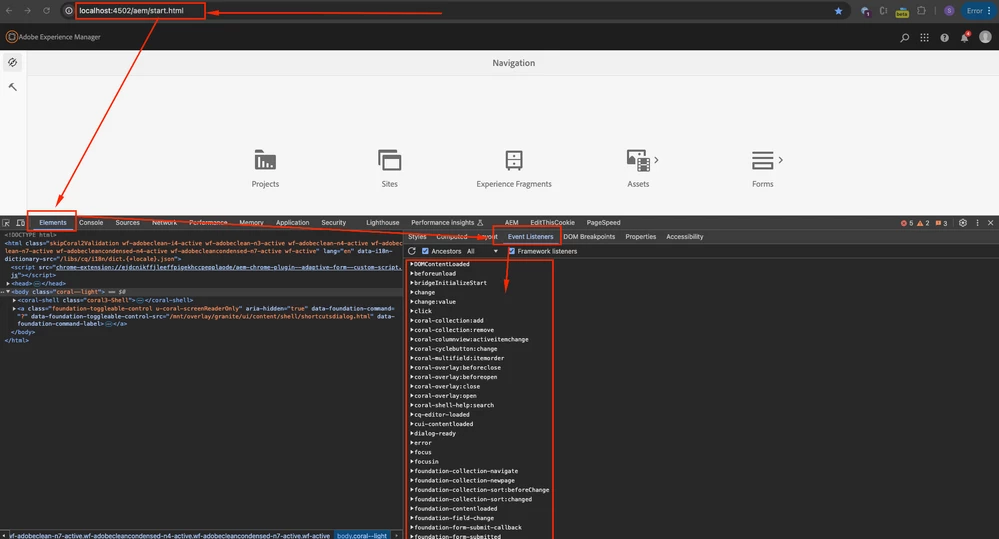
 

In JS I would do smth like:

(function($) { $(document).on("foundation-contentloaded", function() { // add here my logic of checking the workflow servlet and display the message checkWorkflowStatus(); }); })($, $(document));


3. Third I would write an Ajax function in the same clientlib that will periodically call a backend servlet to find out if the workflow is still running or it has ended.


const checkWorkflowStatus = () => { // check priodically setInterval(function() { let workflowStatus = getWorkflowStatus(); displayWorkflowStatus(workflowStatus); }, 5000); } const getWorkflowStatus = () => { $.ajax({ url: /my/servlet/path, method: 'GET', async: false, dataType: 'text', timeout: 15000, headers: { 'Content-Type': 'application/json; charset=utf-8' } }) .done(function(response) { return JSON.parse(response); }) .fail(function (jqXHR, textStatus, errorThrown) { return errorThrown; }); }


4. Forth, I would write a Sling servlet that would have to check the status of your workflow and return the info to your clientlib: https://experienceleague.adobe.com/en/docs/experience-manager-65/content/implementing/developing/extending-aem/extending-workflows/workflows-program-interaction



3 replies

PRATHYUSHA_VP
Community Advisor
Community Advisor
December 12, 2024
Tethich
Community Advisor
TethichCommunity AdvisorAccepted solution
Community Advisor
December 12, 2024

Hi @manohar_killamsetty 
 
Thinking of this in a top-down manner, first approach that comes into my mind would be:
 
1. First I would think of how to display in TouchUI the notification message. That would require to develop a custom clientlib, with a JS script that would contain the creation and display of Alert, or a Dialog which will contain your message for the end user.

const displayWorkflowStatus = (workflowStatus) { let alert = new Coral.Alert().set({ variant: 'info', content: { innerHTML: workflowStatus } }); let element = document.querySelector('some_page_element'); element.appendChild(alert); }


2. Second, I would think of a way fit a piece of code in the TouchUI normal functionality. That would imply to register my clientlib to some existing category or listen to some known event. This part I find it a bit tricky, cause I am not sure how to ensure that message will popup no matter where in TouchUI you are. Maybe you can narrow it down to only few screens, and will be easier.


I would try to see if any of these events may help:


In JS I would do smth like:

(function($) { $(document).on("foundation-contentloaded", function() { // add here my logic of checking the workflow servlet and display the message checkWorkflowStatus(); }); })($, $(document));


3. Third I would write an Ajax function in the same clientlib that will periodically call a backend servlet to find out if the workflow is still running or it has ended.


const checkWorkflowStatus = () => { // check priodically setInterval(function() { let workflowStatus = getWorkflowStatus(); displayWorkflowStatus(workflowStatus); }, 5000); } const getWorkflowStatus = () => { $.ajax({ url: /my/servlet/path, method: 'GET', async: false, dataType: 'text', timeout: 15000, headers: { 'Content-Type': 'application/json; charset=utf-8' } }) .done(function(response) { return JSON.parse(response); }) .fail(function (jqXHR, textStatus, errorThrown) { return errorThrown; }); }


4. Forth, I would write a Sling servlet that would have to check the status of your workflow and return the info to your clientlib: https://experienceleague.adobe.com/en/docs/experience-manager-65/content/implementing/developing/extending-aem/extending-workflows/workflows-program-interaction


anupampat
Community Advisor
Community Advisor
December 13, 2024

Hi @manohar_killamsetty ,


For this you will have to overlay /libs/dam/gui/coral/components/admin/timeline/events/workflow/clientlibs/workflow/workflow.js script where you can listen to the workflow events and determine how you want to handle your requirement

function getWorkflowStatus(workflowUri){ $.ajax({ url: workflowUri+"/.json", data: "", success: function(response,status,req) { if(response.state == 'COMPLETED'){ createPathWithRedirect(workflowUri+"/metaData.json"); }else{ if(counter<5){ setTimeout(function(){getWorkflowStatus(workflowUri);},1000); }else{ processingDialog.variant="warning"; processingDialog.content.innerHTML ="Request is timed out, Please <a href=/editor.html"+ response.targetPath+"> Click here</a> to navigate to target path"; } } }, error: function() { responeError(); console.log("Error in Getting Response"); } }); }

You have to tweak the code around -  /libs/dam/gui/coral/components/admin/timeline/events/workflow/clientlibs/workflow/workflow.js

proceed.addEventListener("click", function() { $.ajax({ url: form.attr("action"), type: form.attr("method") || "post", data: data, ....

 There's no easy way of doing this other than playing around this JS but hope you can get a head start.


Regards,

Anupam Patra