Deleting the tag in AEM as cloud service | Community
Skip to main content
Level 7
May 21, 2025
Solved

Deleting the tag in AEM as cloud service

  • May 21, 2025
  • 3 replies
  • 874 views

Hello Team,


I am using AEM as a cloud service. Created a tag.

Created a content fragment. In this, I have few fields along with tag field. I have used the above tag in this CF. Consider that, I have used the tags in few more content fragment as well. Now, I wanted to delete the tags. At that time, it shows that "Total x references for tag "...." Please confirm the action for the tag(s).
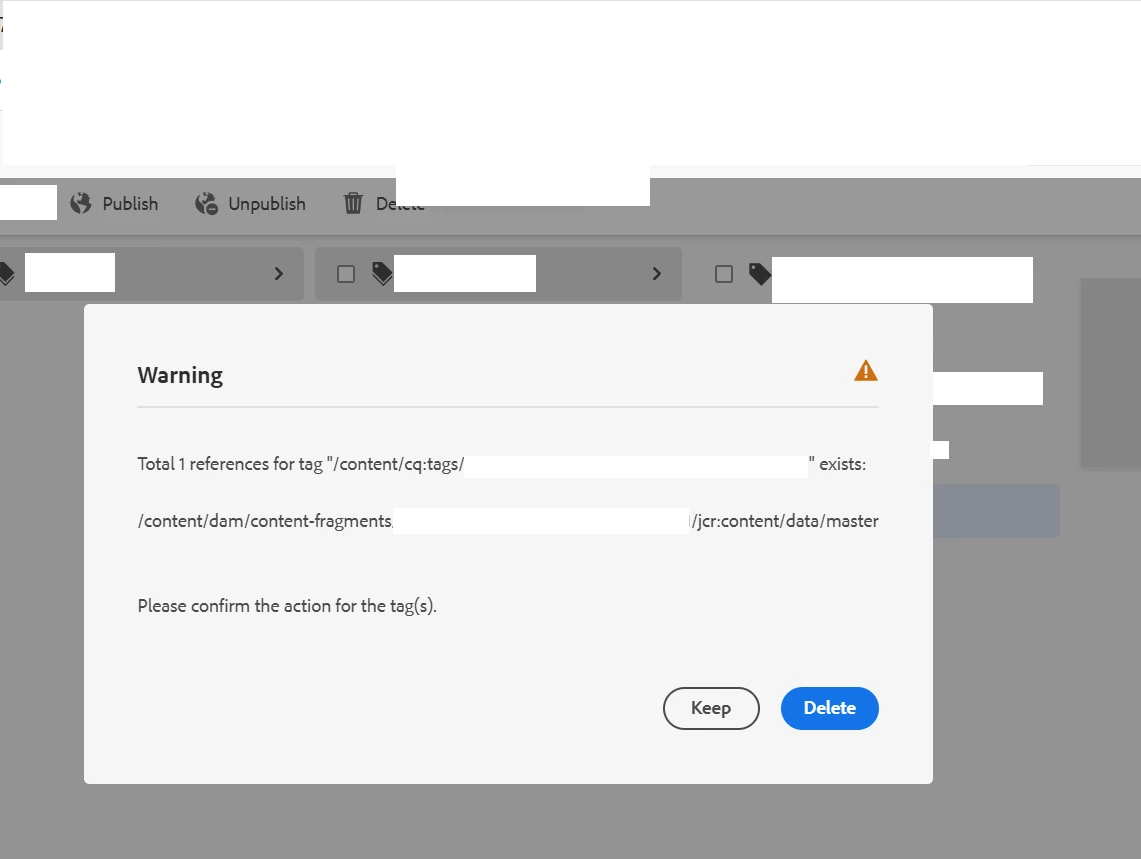


Still, I have deleted the tag.

Now, when I open the content fragment(in this, I have referred the tag, that is now deleted), this shows error message. "Field contains invalid tag".  Note: Content fragment opened in Content fragment editor UI

Note: Still, I can modify the tag field or any other fields, which is present in content fragment. 

Wanted to know, is this expected behavior ?

As per my assumption,

1: If I try to delete the tags and if this tag has references, it should be deleted from that CF. Or else, author should not be able to delete the tags that has some references.


Thanks in advance.

cc @arunpatidar @lukasz-m  @estebanbustamante 

This post is no longer active and is closed to new replies. Need help? Start a new post to ask your question.
Best answer by AmitVishwakarma

Hi @mahesh_gunaje ,

AEM does not auto-remove tag references from content (like CFs) when you delete the tag.

When a tag is deleted from the tag namespace, all the places that referred to it still contain the tag ID in their properties.

Since that tag no longer exists in /content/cq:tags, it is now considered invalid and hence, shows the warning in the CF editor.

This is by design: AEM does not force-remove or auto-clean tag references because:

  - Tags can be used in many types of content.

  - Automatically modifying content across the repository can be risky.

  - Authors are expected to clean up references manually.


Option 1: Clean up references before deleting

Use the Tag Manager Console or a custom query/tool to:

Find all pages, assets, or CFs that use the tag.

Remove or replace the tag manually in those places.

After all references are removed => delete the tag.

Option 2: Post-cleanup (if tag already deleted)

If you already deleted the tag:

Open the affected Content Fragments.

Remove the invalid tag value from the tag field.

Save the CF. It will now be clean.

Or automate this with a script if there are hundreds of CFs.


Use an AEM query like this:

SELECT * FROM [nt:unstructured] WHERE [cq:tags] = 'your:deletedTag' AND ISDESCENDANTNODE('/content')

This will return nodes (pages, assets, CFs) where the deleted tag was still assigned.

Yes, many authors feel the same. But Adobe intentionally gives that flexibility with a warning, not a hard block because:

  - You might want to delete a tag and clean up manually later.

  - Some use cases involve migration or taxonomy cleanup where temporary inconsistency is acceptable.


Regards,
Amit

3 replies

arunpatidar
Community Advisor
Community Advisor
May 21, 2025

Hi @mahesh_gunaje 

I think this is expected behavior. Tags can be associated with various elements such as Pages, Assets, Workflows, Content Fragments,XF and more. Due to this wide usage, it's not feasible to restrict deleting only for references — this approach is unreliable.

Therefore, the way to delete a tag is directly through the Tag Console.

Arun Patidar
Level 7
May 22, 2025

Thanks @arunpatidar  for your help 

AmitVishwakarma
Community Advisor
AmitVishwakarmaCommunity AdvisorAccepted solution
Community Advisor
May 22, 2025

Hi @mahesh_gunaje ,

AEM does not auto-remove tag references from content (like CFs) when you delete the tag.

When a tag is deleted from the tag namespace, all the places that referred to it still contain the tag ID in their properties.

Since that tag no longer exists in /content/cq:tags, it is now considered invalid and hence, shows the warning in the CF editor.

This is by design: AEM does not force-remove or auto-clean tag references because:

  - Tags can be used in many types of content.

  - Automatically modifying content across the repository can be risky.

  - Authors are expected to clean up references manually.


Option 1: Clean up references before deleting

Use the Tag Manager Console or a custom query/tool to:

Find all pages, assets, or CFs that use the tag.

Remove or replace the tag manually in those places.

After all references are removed => delete the tag.

Option 2: Post-cleanup (if tag already deleted)

If you already deleted the tag:

Open the affected Content Fragments.

Remove the invalid tag value from the tag field.

Save the CF. It will now be clean.

Or automate this with a script if there are hundreds of CFs.


Use an AEM query like this:

SELECT * FROM [nt:unstructured] WHERE [cq:tags] = 'your:deletedTag' AND ISDESCENDANTNODE('/content')

This will return nodes (pages, assets, CFs) where the deleted tag was still assigned.

Yes, many authors feel the same. But Adobe intentionally gives that flexibility with a warning, not a hard block because:

  - You might want to delete a tag and clean up manually later.

  - Some use cases involve migration or taxonomy cleanup where temporary inconsistency is acceptable.


Regards,
Amit

Level 7
May 22, 2025

Thanks @amitvishwakarma  for your help. Makes sense tom me.

aanchal-sikka
Community Advisor
Community Advisor
May 22, 2025

@mahesh_gunaje 


AEM maintains a cq:movedTo and cq:backLinks etc when an tag is moved. Which works well when tag is moved. The pages/assets look like they are referencing to a new tag.


However, incase of delete we still have dangling references. Even if we delete tag via Tags Console.

These dangling references are cleaned up, when we add a new tag, but until then they are present.


I would suggest to raise an Adobe ticket as well, to share the error details.

Aanchal Sikka
Level 7
May 22, 2025

Thanks @aanchal-sikka  for your reply. Anyhow, this is not breaking the functionality. I mean, still I can author the content fragment, So, team is fine with this.