Default OOTB of generating sitemap in AEM are not working | Adobe Higher Education
Skip to main content
Level 3
December 22, 2021
Resuelto

Default OOTB of generating sitemap in AEM are not working

  • December 22, 2021
  • 3 respuestas
  • 5070 visualizaciones

Hi All,


I am facing issue while generating sitemap.xml, We have followed AEM document "https://experienceleague.adobe.com/docs/experience-manager-learn/sites/seo/sitemaps.html?lang=en" but it not works.

Currently we are using AEM as a cloud service, we also checked it on 3 different machines but observed same issue, can you please help to resolve.

Please find a video for your reference "https://www.loom.com/share/0b84322697f24eddb8824c7badff42e1"


Thanks in advance
Este tema ha sido cerrado para respuestas.
Mejor respuesta de RajaShankar

Hi @bhagchand

I hope you have a redirect/Vanity for http://localhost:4503/content/ranosys-website/global to http://localhost:4503/global instead you should revoke that redirect and try as shown below

http://localhost:4503/content/ranosys-website/global.sitemap.xml

Note:

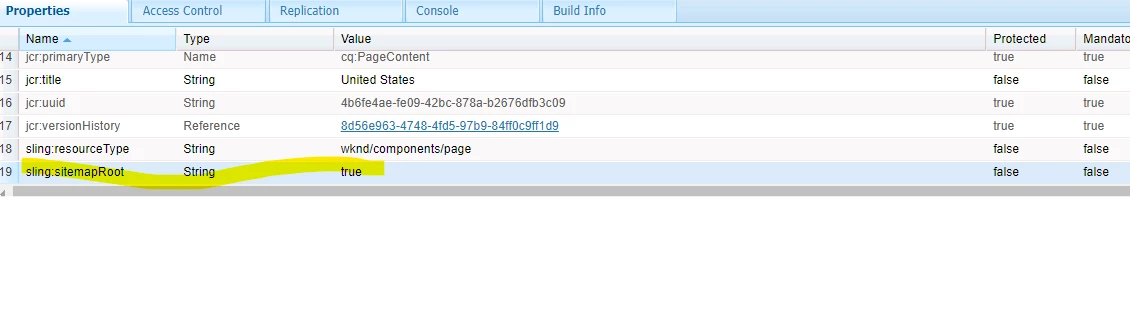
Site map functionality is available with AEM 6.5.11 and also in AEMaaCs. Make sure you are using appropriate version. Also once you enable the sitemap for a particular page you can verify whether the following value is been set 


3 respuestas

Kishore_Kumar_
Level 9
December 22, 2021

Hi @bhagchand ,


Try using sitemap as a selector and xml as extension. Can you check once in author env with below url, 


http://localhost:4502/content/ranosys-website/global.sitemap.xml 


If it works publish sitemap configs and content changes to publisher and check.

Level 3
December 23, 2021

Hi @kishore_kumar_ ,


Thanks a lot, Yes I am able to open this 

http://localhost:4502/content/ranosys-website/global.sitemap.xml 

Is there any way to make sitemap at root level  like this http://localhost:4502/content/ranosys-website/sitemap.xml 


Thanks in advance

Kishore_Kumar_
Level 9
December 23, 2021

Hi @bhagchand ,


Can u try unchecking "Generate Sitemap" in global page property and check the same property in ranosys-website.

Shubham_borole
Community Advisor
Community Advisor
December 22, 2021

Hi @bhagchand I didn't see you activated the global page in your local author.


Also I see that the url you are hitting should be lolcalhost:4503/content/ranosys-website/global.sitemap.xml based on the url that is used in demo video. 


Can you try that please?

Level 3
December 23, 2021

Thanks a lot, let me check 

RajaShankar
Community Advisor
RajaShankarCommunity AdvisorRespuesta
Community Advisor
December 22, 2021

Hi @bhagchand

I hope you have a redirect/Vanity for http://localhost:4503/content/ranosys-website/global to http://localhost:4503/global instead you should revoke that redirect and try as shown below

http://localhost:4503/content/ranosys-website/global.sitemap.xml

Note:

Site map functionality is available with AEM 6.5.11 and also in AEMaaCs. Make sure you are using appropriate version. Also once you enable the sitemap for a particular page you can verify whether the following value is been set 


Level 3
December 23, 2021

Thanks a lot, let me try