Solved
Date value is not populating in page and not retain in dialog
HI,
I am not able to populate the Date value from datepicker. Please find the JCR nodes below:
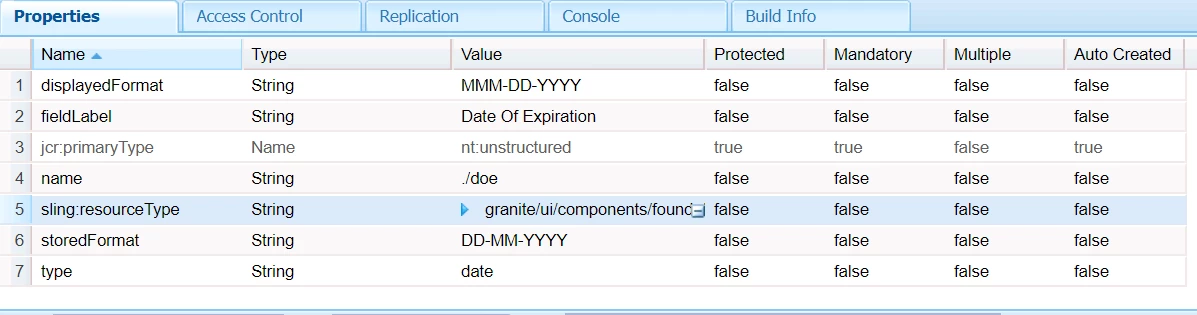
code in sightly <h1>${properties.doe}</h1>
Regards,
Sandhya.
HI,
I am not able to populate the Date value from datepicker. Please find the JCR nodes below:
code in sightly <h1>${properties.doe}</h1>
Regards,
Sandhya.
Hi sandhya,
For the value storage datetime will work as we discussed. Seems like format in sightly is not working in 6.2. So we need to write a formatter like below for your component.
package apps.project.components.author.componentname;
import java.text.SimpleDateFormat;
import java.util.Calendar;
import com.adobe.cq.sightly.WCMUsePojo;
public class DateFormatter extends WCMUsePojo {
private String formattedDate;
@Override
public void activate() {
Calendar date = get("date", Calendar.class);
String format = get("format",String.class);
SimpleDateFormat formatter = new SimpleDateFormat(format);
formattedDate = formatter.format(date.getTime());
}
public String getFormattedDate() {
return formattedDate;
}
}
<sly data-sly-use.date="${'DateFormatter' @ date=properties.doe,format='dd/MM/yyyy'}">
    ${date.formattedDate}
</sly>
Enter your E-mail address. We'll send you an e-mail with instructions to reset your password.