data-sly-resource | Cannot find servlet to handle resource error | Community
Skip to main content
October 3, 2017
Solved

data-sly-resource | Cannot find servlet to handle resource error

  • October 3, 2017
  • 15 replies
  • 8105 views

Hello,

I am new to HTL (formerly known as Sightly) and am trying to understand its data-sly-resource attribute.

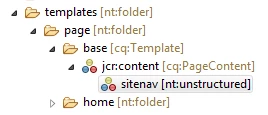
  •      I've added a node to my template which has a jcr:primaryType=nt:unstructured and sling:resourceType=/apps/myproject/components/structure/templates/sitenav (this is a navigation bar component). 
  •      Also, the template has a sling:resourceType set to /apps/myproject/components/structure/templates/basepage.

apps/myproject/templates/page/base

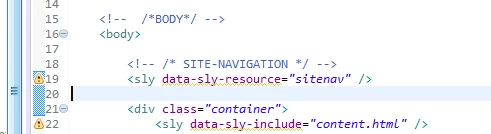
Further, the data-sly-resource="sitenav" is added in the /apps/components/structure/templates/basepage/basepage.html (basepage is the component that the template point to with sling:resourceType.

/apps/myproject/components/structure/templates/basepage/basepage.html

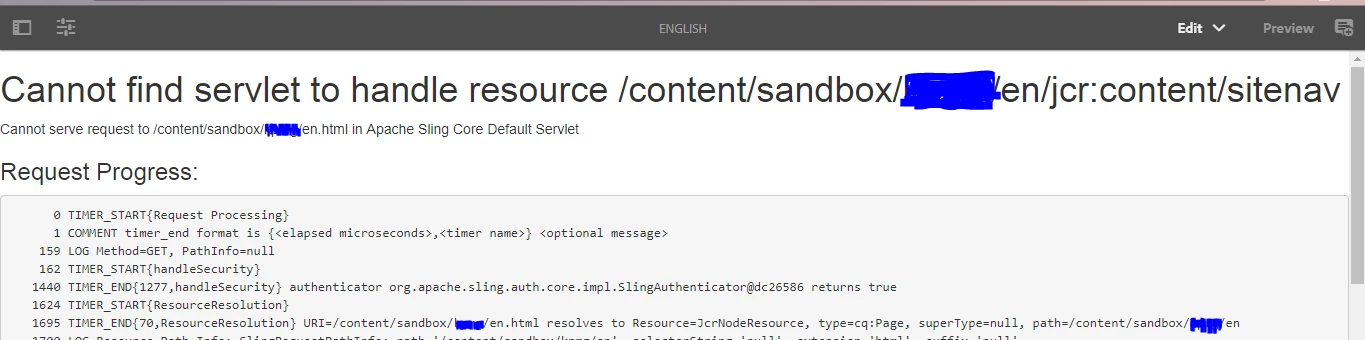
Now, on creating a webpage with the above mentioned template, I was expecting the Site-navigation to appear on the page, instead this is the result:

Webpage

It'll be great if someone can help me understand what I'm doing wrong here?

Also, when I add the entire path of the sitenav component...

path for resourceType...

it works....

Webpage works...with Site Navigation at the top...

Thanks in advance

smacdonald2008​, if possible, please look into this.  Thanks!

This post is no longer active and is closed to new replies. Need help? Start a new post to ask your question.
Best answer by smacdonald2008

- we show how to reference HTL component in the article that i pointed you to. I recommend that you take the time to go through this.

You will learn how to use syntax such as:

<div data-sly-resource="${'header' @ resourceType='summit_toys/components/structure/header'}"></div>

<div data-sly-resource="${'navigation' @ resourceType='summit_toys/components/structure/navigation'}"></div>

<div data-sly-include="content.html"></div>

<div data-sly-resource="${'footer' @ resourceType='summit_toys/components/structure/footer'}"></div>

Also for HTL general questions - refer to the spec here: htl-spec/SPECIFICATION.md at master · Adobe-Marketing-Cloud/htl-spec · GitHub

15 replies

viveksachdeva
Community Advisor
Community Advisor
October 4, 2017

From what I think, node name is mandatory and resource type is optional. So you can shorten it by removing the resourceType from it only.

VeenaVikraman
Community Advisor
Community Advisor
October 4, 2017

Yes that is correct. But I still have confusion for the

<sly data-sly-resource="<name>" />

smacdonald2008
smacdonald2008Accepted solution
Level 10
October 4, 2017

- we show how to reference HTL component in the article that i pointed you to. I recommend that you take the time to go through this.

You will learn how to use syntax such as:

<div data-sly-resource="${'header' @ resourceType='summit_toys/components/structure/header'}"></div>

<div data-sly-resource="${'navigation' @ resourceType='summit_toys/components/structure/navigation'}"></div>

<div data-sly-include="content.html"></div>

<div data-sly-resource="${'footer' @ resourceType='summit_toys/components/structure/footer'}"></div>

Also for HTL general questions - refer to the spec here: htl-spec/SPECIFICATION.md at master · Adobe-Marketing-Cloud/htl-spec · GitHub

October 5, 2017

Hi Veena,

The data-sly-resource="<name>" would work anytime the node with that particular 'name' is available either under the template(/apps/<project>/templates/<templatename>/jcr:content) or under page(/content/<cq:Page>/jcr:content).  Screenshots are included for reference:

template.../apps/<project>/templates/<templatename>/jcr:content

page....(/content/<cq:Page>/jcr:content)

Saying this, I would now prefer to include the entire path of the component to reference it to avoid manual work of inserting the component on every page that is created.

Thanks & Regards,

VeenaVikraman
Community Advisor
Community Advisor
October 5, 2017

Thanks Akash   That was something which I never explored