Customise Create Workflow Warning Dialog message | Community
Skip to main content
Level 3
April 14, 2025
Solved

Customise Create Workflow Warning Dialog message

  • April 14, 2025
  • 2 replies
  • 535 views

Hi,


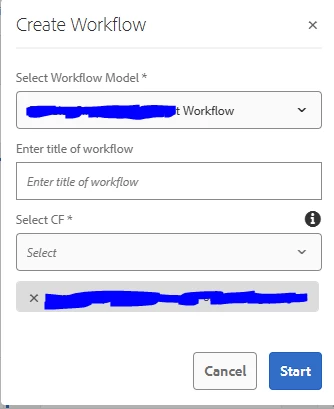
I have added a custom dropdown field by overlaying `/libs/dam/gui/content/assets/jcr:content/actions/selection/create/items/createworkflow`, alongside the "Select Workflow Model" option, which appears when the "Create Workflow" button is clicked. Currently, when the "Start" button is clicked, a warning popup displays the message: "You are going to trigger {0} workflow on {1} asset(s). Please confirm to proceed." This message comes from `/libs/dam/gui/coral/components/admin/timeline/events/workflow/clientlibs/workflow/workflow.js`.


With the new dropdown field, the message now reads: "You are going to trigger {workflow model name and content fragment model name} workflow on {1} asset(s). Please confirm to proceed." This occurs because the `workflow.js` script uses `var workflowName = form.find("coral-select-item[selected]").text();`, which appends the text of the selected dropdown values. The custom dropdown I introduced is also a dropdown, leading to the concatenation of the workflow model name and content fragment name without spaces in the warning message.


While I could overlay this `workflow.js` into `/apps`, the environment we are using is a shared tenant, and we do not want this message to impact other tenants. Additionally, the custom client library we introduced only loads if "dam.gui.coral.common.admin.timeline.events.workflow" is added as a category along with the custom category name.


We are using AEM6.5. Could someone please suggest how we can modify the message without affecting other tenants and the client library name?



@arunpatidar @EstebanBustamante

This post is no longer active and is closed to new replies. Need help? Start a new post to ask your question.
Best answer by arunpatidar

Hi @divyat3 

You cannot restrict loading clientlibs for multiple project but you can write a condition within javascript based on path to skip execution for other projects.

2 replies

arunpatidar
Community Advisor
Community Advisor
April 14, 2025

Hi @divyat3 

You can try overlay the workflow.js and put a condition in javascript to execute a custom message if payload paths from your tenant.

Arun Patidar
DivyaT3Author
Level 3
April 22, 2025

Hi @arunpatidar 


Even if I overlay workflow.js under /apps, I have to give the clientlib category name as "dam.gui.coral.common.admin.timeline.events.workflow" along with custom clientlb category name; otherwise, this clientlib will not load. Additionally, this clientlib, placed under /apps, loads on all possible pages irrespective of the condition in the JS. Is there a way to restrict the JS to load only on specific projects?

arunpatidar
Community Advisor
arunpatidarCommunity AdvisorAccepted solution
Community Advisor
April 22, 2025

Hi @divyat3 

You cannot restrict loading clientlibs for multiple project but you can write a condition within javascript based on path to skip execution for other projects.

Arun Patidar
kautuk_sahni
Community Manager
Community Manager
June 23, 2025

@divyat3 Did you find the suggestions helpful? If you need more information, please let us know. If a response resolved your issue, kindly mark it as correct to help others in the future. Alternatively, if you discovered a solution on your own, we'd appreciate it if you could share it with the community. Thank you.

Kautuk Sahni