
Custom UI Console for AEM Groups and Users | Community
Skip to main content
Rohan_Garg
Community Advisor
Community Advisor
July 17, 2023

Custom UI Console for AEM Groups and Users

  • July 17, 2023
  • 2 replies
  • 1224 views

Hi AEM Community,


I have a requirement to create custom UI console for AEM Groups and Users.

We want to search user by the email and then apply CRUD operations on Group memberships.
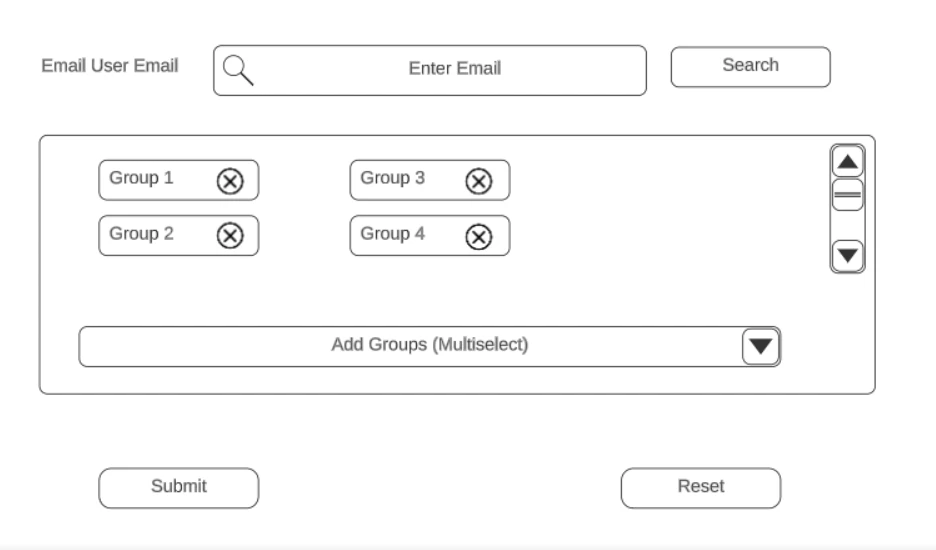

Upon submit button we want to maintain a log of the changes made and store the changes in a YAML file for user configuration.

What would be the best approach to do so ?


The current AEM Users and Groups console works as below - 

Click on Users Tile in Security - redirects to /security/users.html

Select a user from the listing - redirects to /mnt/overlay/granite/security/content/v2/usereditor.html%2Fhome%2Fusers%2Fwknd%2Fl28HasMYWAMHAaGkv-Lj


This request returns coral response for all the tabs - Details | Groups | Keystore | Profiles | Impersonators


Approach 1 - Should we overlay these calls and add a new event to Save and Close button to update the YAML?

If yes, is there a documentation on these API calls for /security/users.html and /mnt/overlay/granite/security/content/v2/usereditor.html ?


Approach 2 - Create a custom Coral UI console from scratch. Add an omni search component filtered for emails and user User Management APIs to fetch and save Groups along with YAML Updation.


Any other approaches for the same problem would also be welcomed!


Thanks in advance,

Rohan Garg

This post is no longer active and is closed to new replies. Need help? Start a new post to ask your question.

2 replies

Nishant-Singh
Adobe Employee
Adobe Employee
July 17, 2023

I would suggest to use AEM OOTB features for User and Groups Management.

As in Approach 1 - if you only want to update YAML file for log details then you can do with the help of Sling filter.

when you save any user details with OOTB UI then there is a POST call with url -

/home/users/<user-id>.userprops.html

You can write a filter as below  - 

@8220494
@SlingServletFilter(scope = {SlingServletFilterScope.REQUEST},
pattern = "/home/users/.*",
extensions = {"html"},
selectors = {"userprops"},
methods = {"POST"})

public class TrackLogFilter implements Filter {
private static final Logger log = LoggerFactory.getLogger(TrackLogFilter.class);
@9944223
public void init(FilterConfig filterConfig) throws ServletException {
}

@9944223
public void doFilter(ServletRequest request, ServletResponse response, FilterChain chain)
throws IOException, ServletException {

//Logic to track the LOG and write in YAML file.

chain.doFilter(request, response);

}

Note : this will make some impact on the performance.


Rohan_Garg
Community Advisor
Community Advisor
July 17, 2023

@nishant-singh - Thank you for the reply! In case of using OOTB Users and Groups, there are few things I need to overlay and modify. Do you have any pointers to the documentation for below files?

API calls for -

  • /security/users.html
  • /mnt/overlay/granite/security/content/v2/usereditor.html 
Nishant-Singh
Adobe Employee
Adobe Employee
July 17, 2023

if you want to do some modifications in OOTB UI then better to go with Javascript approach and not overlay OOTB code.

Example to add fields in User editor :

http://experience-aem.blogspot.com/2015/09/aem-61-touch-ui-add-new-fields-to-user-editor-and-save-to-profile.html

for /security/users.html screen modification you can get the reference from below post : 

http://experience-aem.blogspot.com/2015/09/aem-61-touch-ui-add-new-column-to-assets-console-list-view.html


Rohan_Garg
Community Advisor
Community Advisor
July 19, 2023

Hi All,


So the way we implemented this by custom console as shown below- 

1.  Call below servlet and get authorizable data for the user with input email ID 

/bin/security/authorizables.json

2. Maintain 2 arrays - one for available custom groups and other for current assigned custom groups.

Filter and maintain the arrays using JS until the user clicks on Save/Submit button


3. Once user clicks on Save trigger another servlet passing principal ID for the groups to the servlet.

Iterate over the List checking if the user is already member of the group or not. If not then add the member to the group.

boolean userAdded = userGroup.addMember(userManager.getAuthorizable(principalName));

4. Send 200 OK response and triggered forced reload.


Note - This solution was built only to assign users custom groups that were created for our project.