Custom Table Component | Community
Skip to main content
April 20, 2022
Solved

Custom Table Component

  • April 20, 2022
  • 2 replies
  • 4177 views

Hi, 


I'm trying to build a table component from scratch as the existing OOTB table is deprecated for  AEM 6.5. 

I wanted to include a component inside a table cell and should be able to edit it. For example, I want to include an image component in the last column of the table, I should be able to add it via dialog and edit it in page.


I got to know that it is not possible with the existing Core Text component table structure as RTE plugins would not allow adding a component inside a cell except text input. 


So, I tried to add custom dialog with multifield inputs and output the table as below.


<table width="100%" cellspacing="0" cellpadding="1" border="1"> <!--/* Get all child resources */--> <div data-sly-list.rowsMultifield="${resource.getChildren}"> <div data-sly-test="${rowsMultifield.name == 'rows'}"> <ul data-sly-list.rows="${rowsMultifield.getChildren}"> <tr> <!--/* Get all child resources */--> <div data-sly-list.cellMultifield="${rows.getChildren}"> <!--/* Keep only the countries multifield and iterate over its children */--> <ul data-sly-test="${cellMultifield.name == 'cells'}" data-sly-list.cell="${cellMultifield.getChildren}"> <div data-sly-test="${properties.headerRow && (rowsList.index == 0)}"> <th> <sly data-sly-resource="${ 'rows/{0}/cells/{1}/*' @ format=[rows.name,cell.name], resourceType='macnicagwi/components/content/text', decorationTagName='div', cssClassName='header-row'}"> </sly> </th> </div> <div data-sly-test="${properties.headerRow && (rowsList.index != 0) }"> <th data-sly-test="${properties.headerColumn && (cellList.index == 0)}"> <sly data-sly-resource="${ 'rows/{0}/cells/{1}/*' @ format=[rows.name,cell.name], resourceType='macnicagwi/components/content/text', decorationTagName='div', cssClassName='header-column'}"> </sly> </th> <td data-sly-test="${properties.headerColumn && (cellList.index != 0)}"> <sly data-sly-resource="${ 'rows/{0}/cells/{1}/*' @ format=[rows.name,cell.name], resourceType=cell.type, decorationTagName='div'}"> </sly> </td> <td data-sly-test="${!properties.headerColumn}"> <sly data-sly-resource="${ 'rows/{0}/cells/{1}/*' @ format=[rows.name,cell.name], resourceType=cell.type, decorationTagName='div'}"> </sly> </td> </div> <div data-sly-test="${!properties.headerRow}"> <th data-sly-test="${properties.headerColumn && (cellList.index == 0)}"> <sly data-sly-resource="${ 'rows/{0}/cells/{1}/*' @ format=[rows.name,cell.name], resourceType='macnicagwi/components/content/text', decorationTagName='div', cssClassName='header-column'}"> </sly> </th> <td data-sly-test="${properties.headerColumn && (cellList.index != 0)}"> <sly data-sly-resource="${ 'rows/{0}/cells/{1}/*' @ format=[rows.name,cell.name], resourceType=cell.type, decorationTagName='div'}"> </sly> </td> <td data-sly-test="${!properties.headerColumn}"> <sly data-sly-resource="${ 'rows/{0}/cells/{1}/*' @ format=[rows.name,cell.name], resourceType=cell.type, decorationTagName='div'}"> </sly> </td> </div> </ul> </div> </tr> </ul> </div> </div> </table>

And this is the dialog
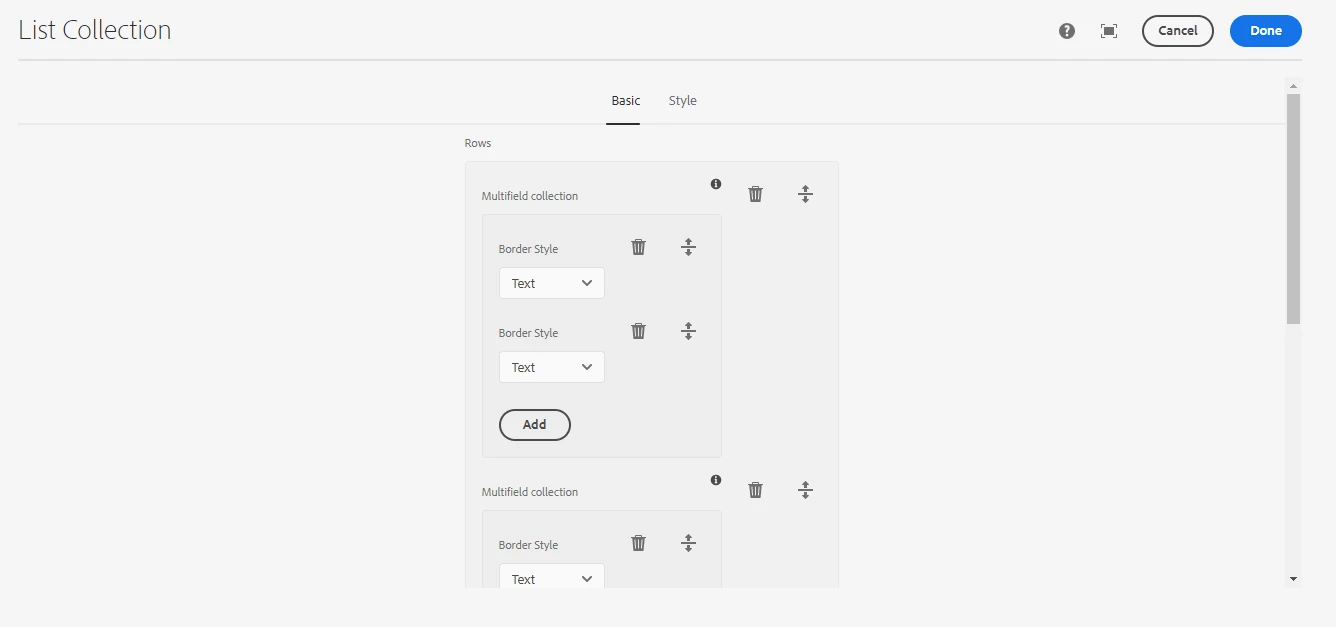
So, the problem is everytime I add a new multifield and click on done, the entire table data is getting refactored to the beginning. All the edited data is getting lost. 

 

How do I retain the data in case if I add a new row or a cell?

OR, in short,  how to add a component in a table cell ?@


This post is no longer active and is closed to new replies. Need help? Start a new post to ask your question.
Best answer by milind_bachani

Hi @vijay_karthik ,


Here is a tutorial to have a table component and also customising it in AEM :
https://www.youtube.com/watch?v=RRqovsPq5Lo

Please refer the same, let us know if you have any further concerns.

Thanks.

2 replies

milind_bachani
Adobe Employee
milind_bachaniAdobe EmployeeAccepted solution
Adobe Employee
April 20, 2022

Hi @vijay_karthik ,


Here is a tutorial to have a table component and also customising it in AEM :
https://www.youtube.com/watch?v=RRqovsPq5Lo

Please refer the same, let us know if you have any further concerns.

Thanks.

July 19, 2024

<!-- /apps/your-project/components/custom-table/custom-table.html -->
<div class="custom-table">
<table>
<thead>
<tr>
<!-- Generate table headers -->
<sly data-sly-use.table="com.example.CustomTable">
<sly data-sly-repeat.header="${table.getHeaders()}">
<th>${header}</th>
</sly>
</sly>
</tr>
</thead>
<tbody>
<!-- Generate table rows and columns based on the provided data -->
<sly data-sly-use.table="com.example.CustomTable">
<sly data-sly-repeat.row="${table.getRows()}">
<tr>
<sly data-sly-repeat.col="${table.getColumns()}">
<td>Row ${row.index + 1}, Col ${col.index + 1}</td>
</sly>
</tr>
</sly>
</sly>
</tbody>
</table>
</div>

July 19, 2024

custom-table
└── cq:dialog
├── content
│ └── items
│ └── root
│ ├── jcr:primaryType: nt:unstructured
│ ├── sling:resourceType: cq/gui/components/authoring/dialog
│ └── items
│ └── tab1
│ ├── jcr:primaryType: nt:unstructured
│ ├── sling:resourceType: cq/gui/components/authoring/dialog/tab
│ ├── title: Table Properties
│ └── items
│ └── columns
│ ├── jcr:primaryType: nt:unstructured
│ ├── sling:resourceType: cq/gui/components/authoring/dialog/column
│ ├── items
│ │ └── column
│ │ ├── jcr:primaryType: nt:unstructured
│ │ ├── sling:resourceType: cq/gui/components/authoring/dialog/fieldset
│ │ ├── items
│ │ │ ├── rows
│ │ │ │ ├── jcr:primaryType: nt:unstructured
│ │ │ │ ├── sling:resourceType: cq/gui/components/authoring/dialog/numberfield
│ │ │ │ ├── fieldLabel: Rows
│ │ │ │ ├── name: ./rows
│ │ │ │ ├── allowBlank: false
│ │ │ │ ├── minValue: 1
│ │ │ │ └── xtype: numberfield
│ │ │ ├── columns
│ │ │ │ ├── jcr:primaryType: nt:unstructured
│ │ │ │ ├── sling:resourceType: cq/gui/components/authoring/dialog/numberfield
│ │ │ │ ├── fieldLabel: Columns
│ │ │ │ ├── name: ./columns
│ │ │ │ ├── allowBlank: false
│ │ │ │ ├── minValue: 1
│ │ │ │ └── xtype: numberfield
│ │ │ ├── tableHeaders
│ │ │ │ ├── jcr:primaryType: nt:unstructured
│ │ │ │ ├── sling:resourceType: cq/gui/components/authoring/dialog/multifield
│ │ │ │ ├── fieldLabel: Table Headers
│ │ │ │ └── field
│ │ │ │ ├── jcr:primaryType: nt:unstructured
│ │ │ │ ├── sling:resourceType: cq/gui/components/authoring/dialog/textfield
│ │ │ │ ├── name: ./headers
│ │ │ │ └── allowBlank: false
│ │ └── jcr:primaryType: nt:unstructured
│ └── jcr:primaryType: nt:unstructured
└── jcr:primaryType: nt:unstructured


Java code:
======

package com.example;

import org.apache.sling.api.resource.Resource;
import org.apache.sling.models.annotations.DefaultInjectionStrategy;
import org.apache.sling.models.annotations.Model;
import org.apache.sling.models.annotations.injectorspecific.Self;
import org.apache.sling.models.annotations.injectorspecific.ValueMapValue;

import java.util.List;

@Model(adaptables = Resource.class, defaultInjectionStrategy = DefaultInjectionStrategy.OPTIONAL)
public class CustomTable {

@Self
private Resource resource;

@ValueMapValue
private int rows;

@ValueMapValue
private int columns;

@ValueMapValue
private List<String> headers;

public int getRows() {
return rows;
}

public int getColumns() {
return columns;
}

public List<String> getHeaders() {
return headers;
}
}


July 19, 2024

<jcr:root xmlns:sling="http://sling.apache.org/jcr/sling/1.0"
xmlns:cq="http://www.day.com/jcr/cq/1.0"
xmlns:jcr="http://www.jcp.org/jcr/1.0"
jcr:primaryType="cq:Dialog"
cq:dialogType="floating">
<content jcr:primaryType="nt:unstructured" sling:resourceType="cq/gui/components/authoring/dialog">
<items jcr:primaryType="nt:unstructured">
<root jcr:primaryType="nt:unstructured">
<items jcr:primaryType="nt:unstructured">
<tab1 jcr:primaryType="nt:unstructured" sling:resourceType="cq/gui/components/authoring/dialog/tab" title="Table Properties">
<items jcr:primaryType="nt:unstructured">
<columns jcr:primaryType="nt:unstructured" sling:resourceType="cq/gui/components/authoring/dialog/column">
<items jcr:primaryType="nt:unstructured">
<column jcr:primaryType="nt:unstructured" sling:resourceType="cq/gui/components/authoring/dialog/fieldset">
<items jcr:primaryType="nt:unstructured">
<rows jcr:primaryType="nt:unstructured" sling:resourceType="cq/gui/components/authoring/dialog/numberfield"
fieldLabel="Rows"
name="./rows"
allowBlank="{Boolean}false"
minValue="{Long}1"
xtype="numberfield"/>
<columns jcr:primaryType="nt:unstructured" sling:resourceType="cq/gui/components/authoring/dialog/numberfield"
fieldLabel="Columns"
name="./columns"
allowBlank="{Boolean}false"
minValue="{Long}1"
xtype="numberfield"/>
<tableHeaders jcr:primaryType="nt:unstructured" sling:resourceType="cq/gui/components/authoring/dialog/multifield"
fieldLabel="Table Headers">
<field jcr:primaryType="nt:unstructured" sling:resourceType="cq/gui/components/authoring/dialog/textfield"
name="./headers"
allowBlank="{Boolean}false"/>
</tableHeaders>
</items>
</column>
</items>
</columns>
</items>
</tab1>
</items>
</root>
</items>
</content>
</jcr:root>