


Create Static Template with AEM | AEM Community Blog Seeding
Create Static Template with AEM by Vishang
Abstract
These are my notes which I have taken while learning AEM
Static templates are created in apps🗂️ directory

Go to CRXDE lite
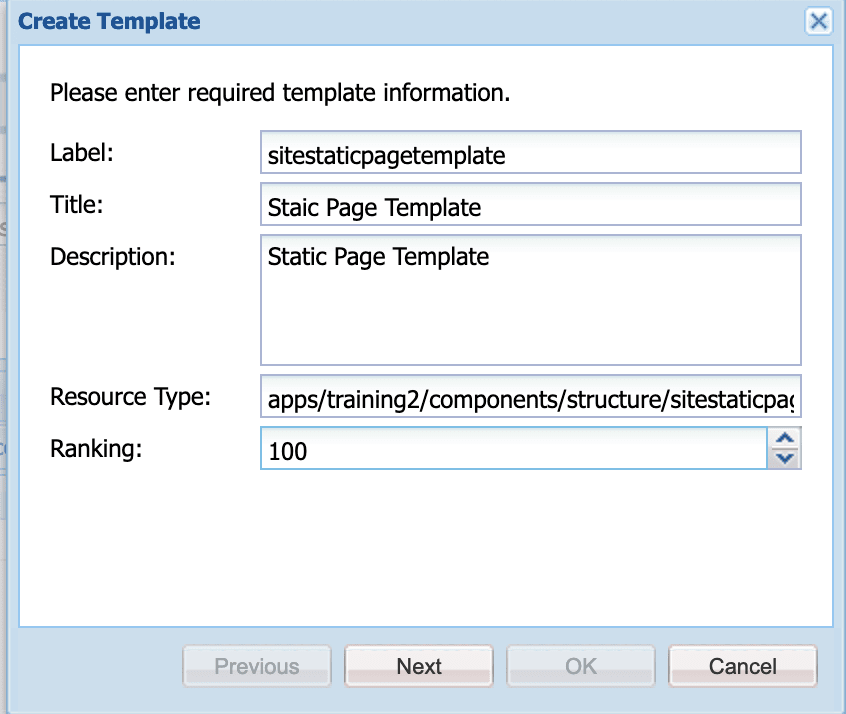
Navigate to apps/your-project-folder/templates/~create template

If you're starting fresh. You may need to create "Your project folder" and "templates" folder under apps directory

Image description

In resource type add the path to your page structure. This will be a page rendering component.

I have added /apps/training2/components/structure/staticpagetemplate Again create the folder structure if this does not exists

Click next

Allowed Paths
I want this available under my content path so i have added
/content/*

Click next

You can further restrict the template by choosing Allowed Parents and Allowed Children. I kept it blank and click ok 👌

📄 Now create your page rendering components under apps/your-project-folder

Create folders like apps/your-project-foolder/components

Inside the component folder create /content and /structure folders

Create a components inside structure folder

Use resource super type to /libs/wcm/foundation/components/page
so rather than creating page component from scratch. we are inheriting it from out of the box page component.
Read Full Blog
Create Static Template with AEM
Q&A
Please use this thread to ask the related questions.