Content sync between Env in AEMaaCS | Community
Skip to main content
Level 2
March 4, 2025
Solved

Content sync between Env in AEMaaCS

  • March 4, 2025
  • 3 replies
  • 2002 views

We need to synchronize site content between the Production and lower environments daily. Specifically, we want to pull site content from Production to the QA environment, ensuring both the Author and Publisher instances remain in sync. However, since we are using AEM as a Cloud Service, the Content Copy Tool is not a viable option as it only supports syncing between Author instances and operates on-demand, rather than automatically.
What will be our best option to achieve this?

This post is no longer active and is closed to new replies. Need help? Start a new post to ask your question.
Best answer by sarav_prakash

Ah. sounds then it becomes 2 step process. 

  1. Jenkins to package and downsync into author
  2. Bulk Tree activation with `onlyActivated` filter 

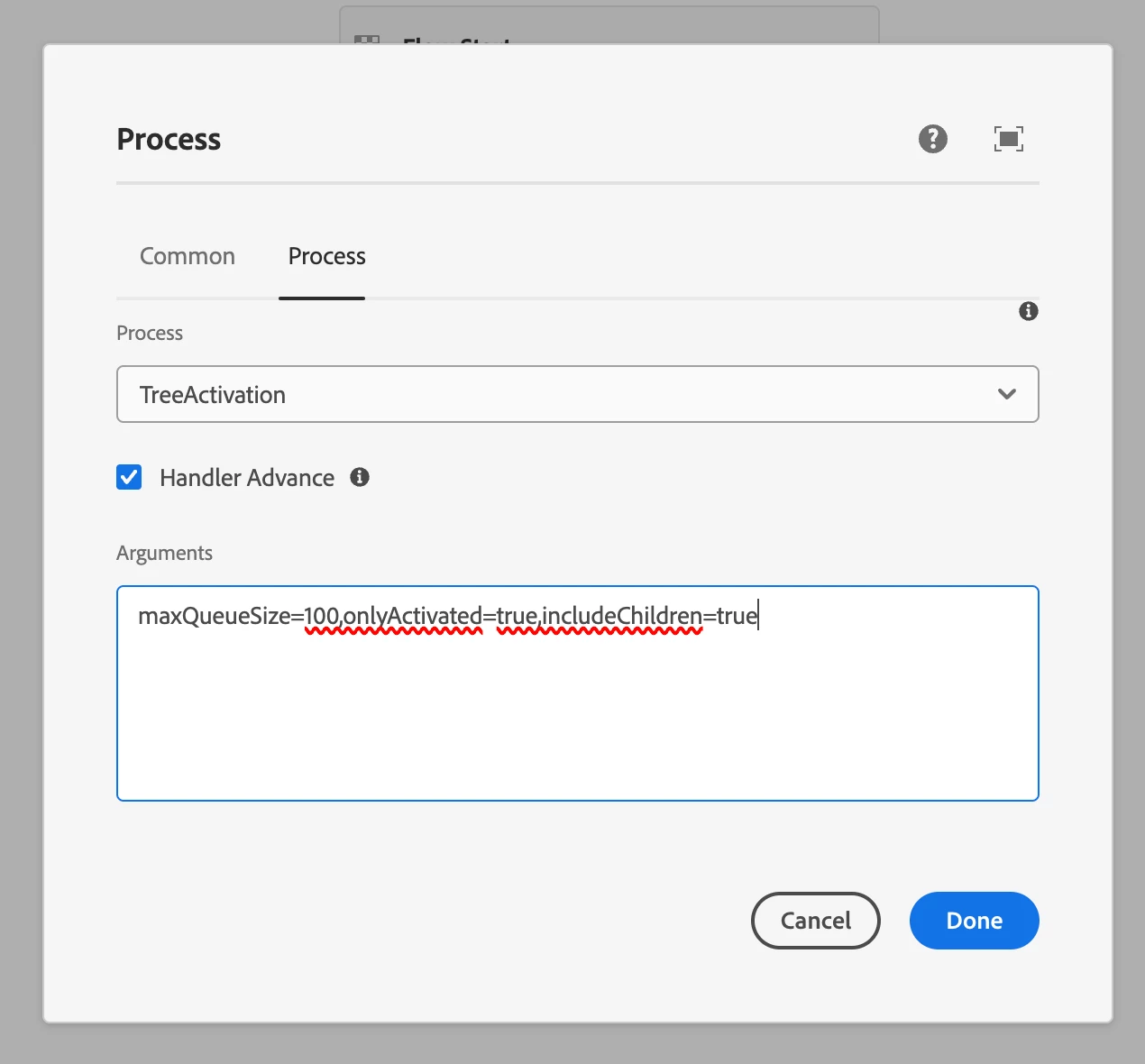
Please refer to this article by Tad Reeves. So AEM introduced this newer `TreeActivation` process step that is resilient. Say 50,000 pages are to be published. We set maxQueueSize=100. The process step will split paths in chunks of 100 and publishes. `onlyActivated` filter ensure not to activate unpublished pages. But main beauty, is its non-disruptive nature. Say QA team is also publishing on DEV when this expensive workflow runs. The workflow publishes first chunk, then checks if other user activations are waiting in distribution queue, if yes prioritizes user initiated activations, and then resumes workflow. We used this in our job, to publish half million assets. Ran for 3 days, but completely agnostic in background. 
 

Another idea might be

  1. Jenkins to package and downsync into author. Replicate package to publisher
  2. Workflow to query using querybuilder, the activationstatus and manually unpublish. 

Second way is easier if lesser pages only needs to be unpublished. 


3 replies

konstantyn_diachenko
Community Advisor
Community Advisor
March 4, 2025

Hi @agyawa ,


As far a I know, you can't schedule content sync in AEMaaCS via content set. By the way, when you copy content from prod to stage via Content Copy Tool, it syncs only author environments. So, publishers won't have new synced data and it will require activation.


You can create a custom solution by implementing next steps:
1) Create AEM packages via CRX package manager. I mean packages, because I would suggest to split content, dam, config, etc.

2) Create scheduler that will trigger AEM packages rebuilding by cron.

3) Create scheduler that will download AEM packages and install them on author.

4) Create listener or service that will publish installed data to publisher.


This solution can be implemented either directly on AEM or in any build system like a script. I would suggest to implement AEM solution, because it will be easy to maintain, configure and extend. You can implement it as AEM workflow.


Best regards,

Kostiantyn Diachenko. 

Kostiantyn Diachenko, Community Advisor, Certified Senior AEM Developer, creator of free AEM VLT Tool, maintainer of AEM Tools plugin.
agyawaAuthor
Level 2
March 4, 2025

Thank you for the suggestion @konstantyn_diachenko 

sarav_prakash
Community Advisor
Community Advisor
March 4, 2025

Echoing konstantyn reply, Content Copy tool has its limitations

Instead, we have a jenkins job that runs every saturday 1AM. It rebuilds content package in production, downloads to jenkins server, uploads into dev env author; installs; replicates

This is build step command inside the job 

echo "################Rebuild Package in PROD#####################" curl -u ${AEM_USERNAME}:${PASSWORD} -X POST https://author-p**-e**.adobeaemcloud.com/crx/packmgr/service/.json/etc/packages/my_packages/content-sync-from-prod.zip?cmd=build sleep 60 echo "##################Download Package from PROD#################" curl -u ${AEM_USERNAME}:${PASSWORD} 'https://author-p**-e**.adobeaemcloud.com/crx/packmgr/download.jsp?_charset_=utf-8&path=/etc/packages/my_packages/content-sync-from-prod.zip' -o content-sync-from-prod.zip sleep 10 echo "########################Upload to DEV Author#################" curl -u ${AEM_USERNAME}:${PASSWORD} -F force=true -F package=@"${WORKSPACE}/content-sync-from-prod.zip" https://author-p**-e**.adobeaemcloud.com/crx/packmgr/service/.json/?cmd=upload sleep 30 echo "##########################Installing package to DEV Author###################" curl -u ${AEM_USERNAME}:${PASSWORD} -X POST https://author-p**-e**.adobeaemcloud.com/crx/packmgr/service/.json/etc/packages/my_packages/content-sync-from-prod.zip?cmd=install sleep 60 echo "##########################Publish package from DEV Author to DEV Publish#####################" curl -u ${AEM_USERNAME}:${PASSWORD} -X POST -F path="/etc/packages/my_packages/content-sync-from-prod.zip" -F cmd="activate" https://author-p**-e**.adobeaemcloud.com/bin/replicate.json


You can copy paste this script into your jenkins job, fix the server urls, create content package and schedule the jenkins job. 

agyawaAuthor
Level 2
March 4, 2025

@sarav_prakash  In Prod, when authors have unpublished few pages in past 7 days, but not deleted them from author instance, Once the package is created, those unpublished pages are also included in it. After re-uploading to dev and replicating the package, those unpublished pages will become available in Dev Publish. So, Prod publish and Dev publish are not in sync. 

sarav_prakash
Community Advisor
sarav_prakashCommunity AdvisorAccepted solution
Community Advisor
March 4, 2025

Ah. sounds then it becomes 2 step process. 

  1. Jenkins to package and downsync into author
  2. Bulk Tree activation with `onlyActivated` filter 

Please refer to this article by Tad Reeves. So AEM introduced this newer `TreeActivation` process step that is resilient. Say 50,000 pages are to be published. We set maxQueueSize=100. The process step will split paths in chunks of 100 and publishes. `onlyActivated` filter ensure not to activate unpublished pages. But main beauty, is its non-disruptive nature. Say QA team is also publishing on DEV when this expensive workflow runs. The workflow publishes first chunk, then checks if other user activations are waiting in distribution queue, if yes prioritizes user initiated activations, and then resumes workflow. We used this in our job, to publish half million assets. Ran for 3 days, but completely agnostic in background. 


Another idea might be

  1. Jenkins to package and downsync into author. Replicate package to publisher
  2. Workflow to query using querybuilder, the activationstatus and manually unpublish. 

Second way is easier if lesser pages only needs to be unpublished. 


rampai
Community Advisor
Community Advisor
March 5, 2025

Hi @agyawa,


The aio cli for cloud manager can come in handy here. You can create a cron job that runs the aio cli commands to schedule the content copy using respective content sets and then for distribution to publish tier, use Publish content tree workflow with onlyActivated set to true.


Example command:

aio cloudmanager:content-flow:create ENVIRONMENTID CONTENTSETID DESTENVIRONMENTID INCLUDEACL [TIER]


If you need the ability to revert the changes then go for package manager but install only in author and then use Publish content tree workflow with onlyActivated set to true. Replicating packages to publish can cause issues especially since direct access to publish is blocked in AEM as Cloud service.


It is always easier to get a report of published pages from author if you use AEM workflow to distribute. 


Thanks, 

Ram