ColorField issue in dialog AEM 6.5 | Community
Skip to main content
Level 2
January 17, 2025
Solved

ColorField issue in dialog AEM 6.5

  • January 17, 2025
  • 3 replies
  • 957 views

Hi Everyone,

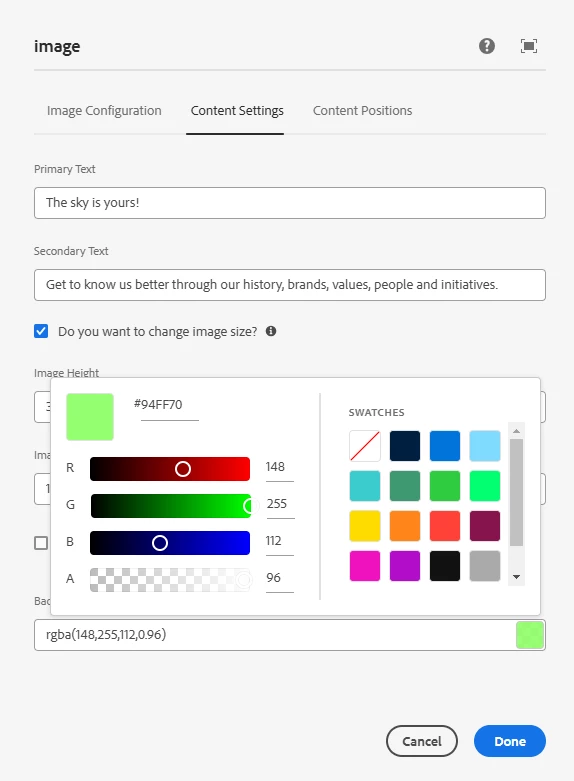
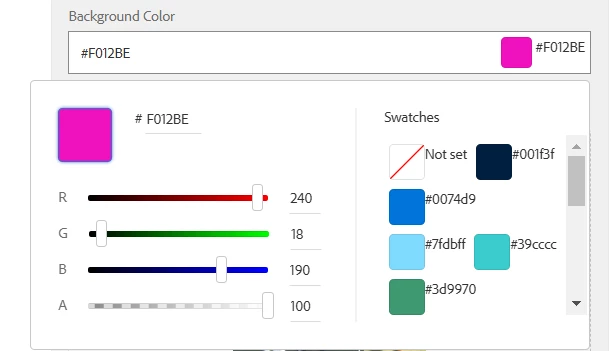
    I am using colorfield in my custom component dialog. In 6.5 version the color palette field looks different compare to sdk version, is there any reason? I need UI looks like sdk version which looks better.


AEM SDK:
 

AEM 6.5:
 

resourceType:

granite/ui/components/coral/foundation/form/colorfield
Best answer by AmitVishwakarma

To match the ColorField UI from AEM SDK version in AEM 6.5:

  1. Override Styles: Add custom CSS to adjust the ColorField appearance to match the SDK version.
  2. Use Granite UI version: Try using the older granite/ui/components/coral/foundation/form/colorpicker resourceType if possible.
  3. Coral UI Customization: Explore Coral UI customization options to modify the default appearance in AEM 6.5.

Custom CSS is the quickest approach if you're aiming for a visual match.

3 replies

kapil_rajoria
Community Advisor
Community Advisor
January 17, 2025

Hi @jooca, please check if the granite.ui version is same for both of them by going to:
http://localhost:4502/system/console/bundles and search granite.ui
Check the version for com.adobe.granite.ui.clientlibs

The colorfield in AEM SDK one is looking fine.

Also, please make sure you are using the latest AEM service package.

joocaAuthor
Level 2
January 17, 2025

it looks like granite.ui versions are different in 6.5 & sdk.
6.5 - 1.0.92.CQ650-B0006

sdk - 1.1.20

MukeshYadav_
Community Advisor
Community Advisor
January 17, 2025

Hi @jooca ,

You are right, colorfield has different look & feel in AEM cloud sdk and 6.x.

However in general we use swatch variant to discourage author to use any random color selection.

You may use swatch variant & set other properties with a minor css code to maintain look similar to could.

For ex


<picker jcr:primaryType="nt:unstructured" sling:resourceType="granite/ui/components/coral/foundation/form/colorfield" name="./color" showDefaultColors="{Boolean}false" showProperties="{Boolean}false" showSwatches="{Boolean}true" variant="swatch"> <items jcr:primaryType="nt:unstructured"> <empty jcr:primaryType="nt:unstructured" name="No Color" value=""/> <grey jcr:primaryType="nt:unstructured" name="Grey" value="#474747"/> <orange jcr:primaryType="nt:unstructured" name="Orange" value="#d04a02"/> <red jcr:primaryType="nt:unstructured" name="Red" value="#e0301e"/> </items> </picker>


You can put below css to hide hex color code which can be redundant if color are easily distinguishable

.coral3-ColorInput--swatch label {
display: none;
}


Thanks

AmitVishwakarma
Community Advisor
AmitVishwakarmaCommunity AdvisorAccepted solution
Community Advisor
January 19, 2025

To match the ColorField UI from AEM SDK version in AEM 6.5:

  1. Override Styles: Add custom CSS to adjust the ColorField appearance to match the SDK version.
  2. Use Granite UI version: Try using the older granite/ui/components/coral/foundation/form/colorpicker resourceType if possible.
  3. Coral UI Customization: Explore Coral UI customization options to modify the default appearance in AEM 6.5.

Custom CSS is the quickest approach if you're aiming for a visual match.