Clientlib-base doesn't load in the environments | Community
Skip to main content
Level 4
December 6, 2023
Solved

Clientlib-base doesn't load in the environments

  • December 6, 2023
  • 1 reply
  • 914 views

Hello, what happens is that I have a problem that does not load the client-base in AEM environments, more specifically the min.js file, and this causes errors such as the Image component doesn't render the image.

The strange thing is that previously this didn't happen, this is an example of an environment when the file was imported.
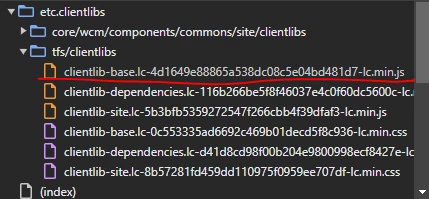


And this is an actual example that the file is not imported
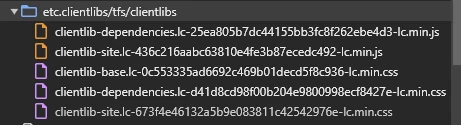

And is in the path: ui.apps > src > main > content > jcr_root > apps > tfs > clientlibs > clientlib-base
What can be the problem that cause this or how can I debug to find why the issue.
This is the code that I have on my .content.xml file

<?xml version="1.0" encoding="UTF-8"?>
    jcr:primaryType="cq:ClientLibraryFolder"
    allowProxy="{Boolean}true"
    categories="[tfs.base]"
    embed="[core.wcm.components.accordion.v1,core.wcm.components.tabs.v1,core.wcm.components.carousel.v1,core.wcm.components.image.v2,core.wcm.components.breadcrumb.v2,core.wcm.components.search.v1,core.wcm.components.form.text.v2,core.wcm.components.pdfviewer.v1.custom,core.wcm.components.commons.datalayer.v1,tfs.grid]"/>

This post is no longer active and is closed to new replies. Need help? Start a new post to ask your question.
Best answer by Sudheer_Sundalam

@aaron_dempwolff,

There could multiple reasons that might be causing this issue.

I would check logs while building the frontend.ui module and  also error.log file while accessing the page where this clientlib should be loaded.

In the page template's customheaderlibs.html and customfooterlibs.html files, make sure you are including tfs.base client lib using the clientlib template call.

1 reply

Sudheer_Sundalam
Community Advisor
Sudheer_SundalamCommunity AdvisorAccepted solution
Community Advisor
December 6, 2023

@aaron_dempwolff,

There could multiple reasons that might be causing this issue.

I would check logs while building the frontend.ui module and  also error.log file while accessing the page where this clientlib should be loaded.

In the page template's customheaderlibs.html and customfooterlibs.html files, make sure you are including tfs.base client lib using the clientlib template call.