
Author Dialog Multi Select Render Auto Sorting | Community
Skip to main content
Sady_Rifat
Community Advisor
Community Advisor
October 4, 2024
Solved

Author Dialog Multi Select Render Auto Sorting

  • October 4, 2024
  • 4 replies
  • 1352 views

Hello members,
I have a multi-select field. I select multiple values from the select box.

After submitting the dialog, values are saved according to my selected order.
The problem is when I reopen the dialog, it sort alphabetically. How do I prevent this?
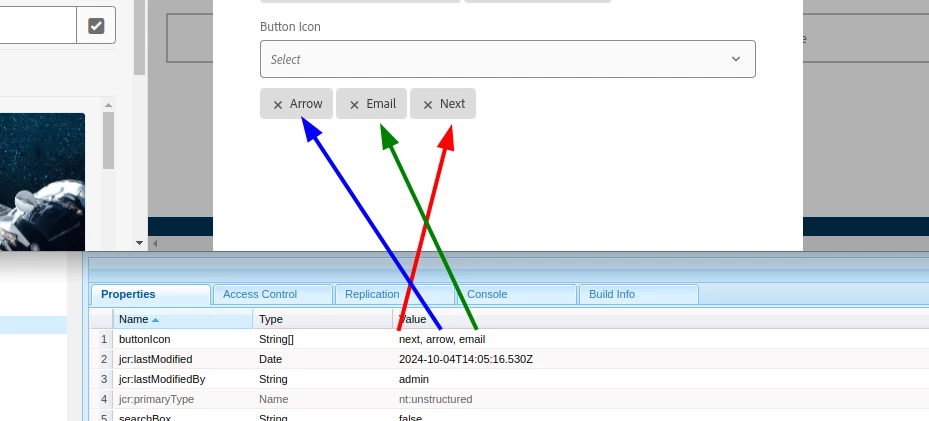


This is my sample code,

<buttonIcon jcr:primaryType="nt:unstructured" sling:resourceType="granite/ui/components/coral/foundation/form/select" multiple="true" fieldLabel="Button Icon" name="./buttonIcon"> <items jcr:primaryType="nt:unstructured"> <arrow jcr:primaryType="nt:unstructured" text="Arrow" value="arrow"/> <email jcr:primaryType="nt:unstructured" text="Email" value="email"/> <next jcr:primaryType="nt:unstructured" text="Next" value="next"/> <check jcr:primaryType="nt:unstructured" text="Check" value="check"/> </items> </buttonIcon>

 

This post is no longer active and is closed to new replies. Need help? Start a new post to ask your question.
Best answer by AsifChowdhury

Hi @sady_rifat 

As per the documentation of granite select component: https://developer.adobe.com/experience-manager/reference-materials/6-5/granite-ui/api/jcr_root/libs/granite/ui/components/coral/foundation/form/select/index.html


There is a property called "ordered".  Maybe you can try this.


- Asif Ahmed

4 replies

EstebanBustamante
Community Advisor and Adobe Champion
October 4, 2024

Hi,


From what I can see in the AEM Granite Select implementation, the options are already sorted in the backend, rather than when the HTML is being built (see line 276 of /libs/granite/ui/components/coral/foundation/form/select/render.jsp). Therefore, an overlay won’t work in this case. Your best option would be to tweak this using JavaScript.


Hope this helps.

Esteban Bustamante
Sady_Rifat
Community Advisor
Community Advisor
October 7, 2024

can you please provide some hints to tweak this using JavaScript?

EstebanBustamante
Community Advisor and Adobe Champion
October 7, 2024

Hey, sure! First, you’ll need to get the actual order from the backend (property), this could be an ajax call to a custom servlet or something like that. With that order, you can simply use JavaScript to reorder the positions of the tags. The following snippet will work for reordering:

// Make sure to get a unique ID, a nested selector would work const tagList = document.querySelector('#coral-id-660'); const tags = Array.from(tagList.querySelectorAll('coral-tag')); // The order as an array of values. This would likely come from the BE const order = ['zz', 'email']; // Adjust the order as needed // Create a mapping from value to tag for quick access const tagMap = new Map(tags.map(tag => [tag.getAttribute('value'), tag])); // Reorder the tags based on the specified order const orderedTags = order.map(value => tagMap.get(value)).filter(tag => tag !== undefined); // Clear the existing tag list tagList.innerHTML = ''; // Append the ordered tags back to the tag list orderedTags.forEach(tag => tagList.appendChild(tag));

You can see the snippet in action:

Hope this helps


Esteban Bustamante
AsifChowdhury
Community Advisor
AsifChowdhuryCommunity AdvisorAccepted solution
Community Advisor
October 7, 2024

Hi @sady_rifat 

As per the documentation of granite select component: https://developer.adobe.com/experience-manager/reference-materials/6-5/granite-ui/api/jcr_root/libs/granite/ui/components/coral/foundation/form/select/index.html


There is a property called "ordered".  Maybe you can try this.


- Asif Ahmed

h_kataria
Community Advisor
Community Advisor
October 7, 2024

Hi @sady_rifat 
Actually it is not sorting it alphabetically but rather just showing it in the order in which values are present in the dialog. So, in your example even if you would select "check" and then "next", "check" would still appear after "next" since thats the order in the dialog, Granite select component seems to be setting the selected element based on that order only. So you can possibly override /libs/granite/ui/components/coral/foundation/form/select/render.jsp and change the order of iteration for elements. Something like 

Set<Resource> modifiedList = new LinkedHashSet<Resource>(); List<Resource> newitms = IteratorUtils.toList(cmp.getItemDataSource().iterator()); String[] actualItems = cmp.getValue().get("buttonIcon",String[].class); if(actualItems != null) { for(String newVal : actualItems) { for(Resource itm : newitms) { Config newoptionCfg = new Config(itm); String value = cmp.getExpressionHelper().getString(newoptionCfg.get("value", String.class)); if(value.equals(newVal)){ modifiedList.add(itm); } } } modifiedList.addAll(newitms); itemIterator = modifiedList.iterator(); }

This is only sample, and I have not tested it fully. Please refine it further as per your needs. 
Note : this will also change the default ordering of elements in dialog as well. So, elements will start appearing in the drop down in which they were selected. 
Hope this helps 

kautuk_sahni
Community Manager
Community Manager
October 16, 2024

@sady_rifat Did you find the suggestions helpful? Please let us know if you require more information. Otherwise, please mark the answer as correct for posterity. If you've discovered a solution yourself, we would appreciate it if you could share it with the community. Thank you!

Kautuk Sahni
