Assets Admin Search Rail | Community
Skip to main content
Level 3
August 26, 2024
Solved

Assets Admin Search Rail

  • August 26, 2024
  • 1 reply
  • 597 views

Hi,
We have a requirement to select default folder field from the dropdown after selecting a particular path in AEMAACS.
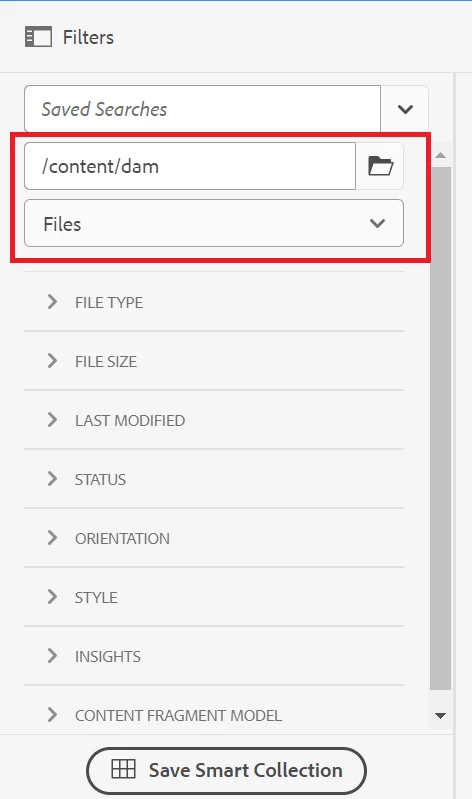
let's say we select the path as "/content/dam/exampleA" for this path in dropdown folder field needs to be selected as default.
Is there any way that can be done using the OOTB functionality?
please help us trying to solve above requirement.

Thanks

This post is no longer active and is closed to new replies. Need help? Start a new post to ask your question.
Best answer by EstebanBustamante

Hi, 

I don't think there is an OOTB way to do this unless you overlay and update the original script that build that page. Alternatively, you could use JS to achieve such functionality. Something like the below would work:

// Find all elements with the specified tag and class var elements = document.querySelectorAll('coral-selectlist-item-content._coral-Menu-itemLabel'); // Iterate over the elements to find the one with the specific text elements.forEach(function(element) { if (element.textContent.trim() === 'Files & Folders') { // Click the element if the text matches element.click(); } });

Keep in mind that the above code should be triggered once the button is loaded on the screen.

Hope this helps.

1 reply

EstebanBustamante
Community Advisor and Adobe Champion
EstebanBustamanteCommunity Advisor and Adobe ChampionAccepted solution
Community Advisor and Adobe Champion
August 26, 2024

Hi, 

I don't think there is an OOTB way to do this unless you overlay and update the original script that build that page. Alternatively, you could use JS to achieve such functionality. Something like the below would work:

// Find all elements with the specified tag and class var elements = document.querySelectorAll('coral-selectlist-item-content._coral-Menu-itemLabel'); // Iterate over the elements to find the one with the specific text elements.forEach(function(element) { if (element.textContent.trim() === 'Files & Folders') { // Click the element if the text matches element.click(); } });

Keep in mind that the above code should be triggered once the button is loaded on the screen.

Hope this helps.

Esteban Bustamante