Asset Metadata Schema - Giving Access to Non-Admins
We've been working to separate all of our agency websites' permissions so that instead of the agencies coming to our team for creating Asset Metadata Schemas, they will be able to create these schemas themselves.
Currently, I had searched tooth and nail, and the closest I could get was via this Experience League article (https://experienceleague.adobe.com/docs/experience-manager-65/content/assets/administer/metadata-schemas.html?lang=en#) that specifies under the section "Grant access to metadata schemas":
"The Metadata Schema feature is available to administrators only. However, administrators can provide access to non-administrators by modifying some permissions. Provide the non-administrator users create, modify, and delete permissions on the /conf folder."
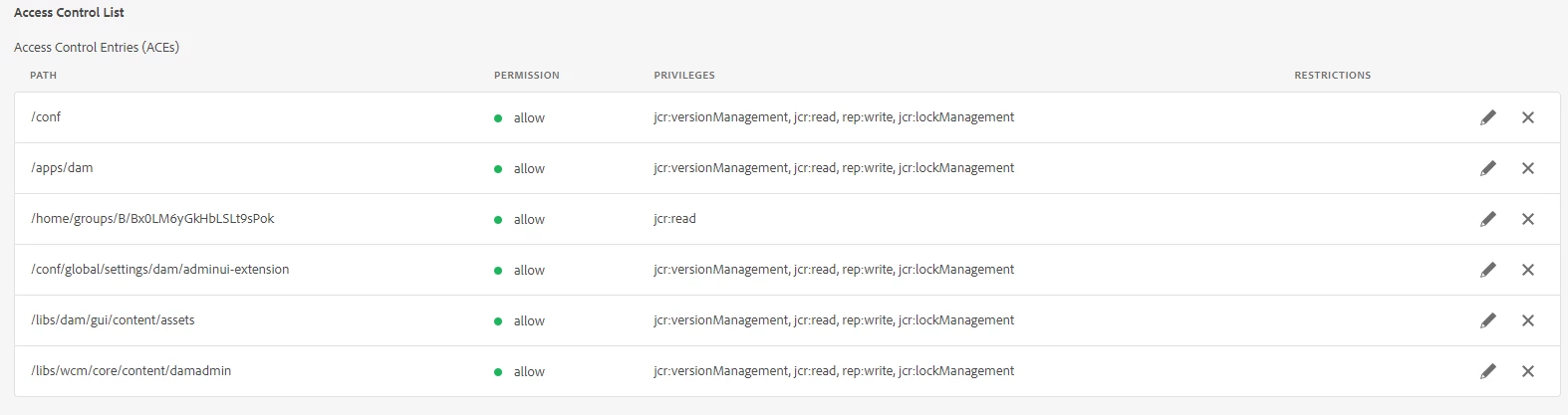
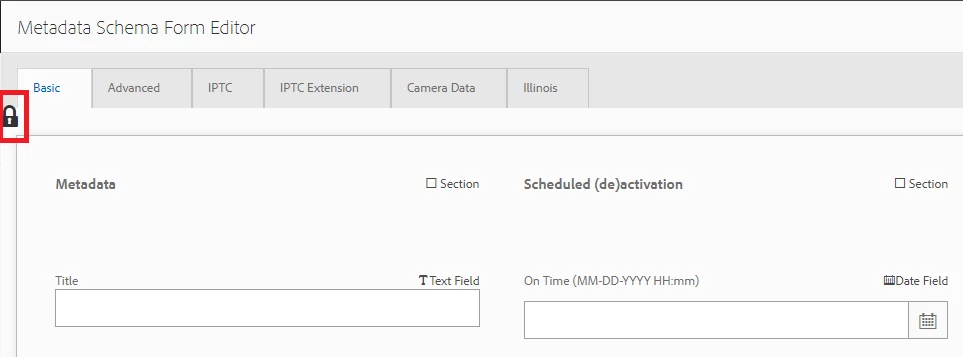
Setting the permissions as specified to our created Group does in fact allow the user to enter the schema after clicking "edit", but when the form opens, it has a "lock" across it, allowing no fields to be added, deleted, or updated/edited. I have found other articles mentioning combinations of read/write/create/delete access to other locations such as "/libs/dam/gui/content/assets" and "libs/wcm/core/content/damadmin", but came up empty with results. Our path "/conf/global/settings/dam/adminui-extension" also seems to consistently disallow the Modify here as "noneffective." Not sure if this could be a root issue but is the next step we are looking at.
Any help is greatly appreciated. I feel like we're just missing a couple extra access permissions to allow actual editing within the metadata schema form editor. My actual Admin account does no help, as I have all rights/permissions across the platform, making it impossible to deduce what exactly is needed or where. I figured this would be something that could be handled in a more standard fashion, but is honestly giving us some issues. Maybe a fresh set of eyes and ears can help.
Thank you in advance for anyone that jumps in!