Anyone help me to resolve this Error "com.day.cq.wcm.api,version=[1.30,2) -- Cannot be resolved" | Community
Skip to main content
October 18, 2023
Solved

Anyone help me to resolve this Error "com.day.cq.wcm.api,version=[1.30,2) -- Cannot be resolved"

  • October 18, 2023
  • 5 replies
  • 6027 views

Facing this Error, Please help me I tried every past community solution.

Best answer by SanthoshMa2
Adobe Experience Manager SDK 2022.11.9850.20221116T162329Z-220900
 
 
if you are using AEMaaCS
 
step1 : go to localhost:4502/system/console/productinfo you see aem sdk version copy the SDK version
 
eg: Adobe Experience Manager (2022.11.9850.20221116T162329Z)
 
step2 : Search for sdk version in google : 2022.11.9850.20221116T162329Z, you will see an extra 6digit number after -
 
 e.g : Adobe Experience Manager SDK 2022.11.9850.20221116T162329Z-220900
 
step3 : search for aem.sdk.api in the project and replace the value in pom.xml
 
<aem.sdk.api>2023.1.10912.20230130T173736Z-230100</aem.sdk.api> to 
<aem.sdk.api>2022.11.9850.20221116T162329Z-220900</aem.sdk.api>
 
step4 : give the build and deploy, it worked for me.
 
Thanks
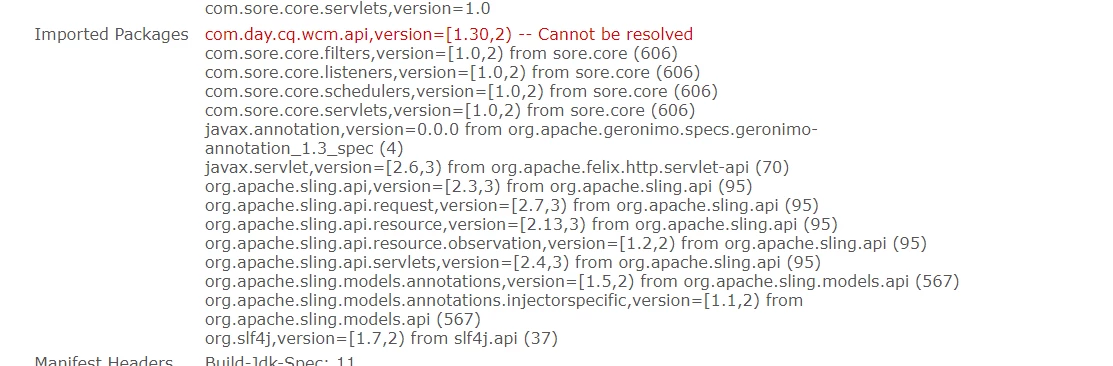
5 replies

Sady_Rifat
Community Advisor
Community Advisor
October 18, 2023

Hello @samsri ,

You can see this similar thread,

https://experienceleaguecommunities.adobe.com/t5/adobe-experience-manager/com-day-cq-wcm-api-cannot-be-resolved/td-p/385695 

If it's not helping you please let me know the following details. Your AEM service pack version and the Uber Jar you are using that version.
Is it a fresh project? If so, what was the Archetype?

Keerthi0555
Level 5
October 19, 2023

I'm also facing same issue , if u solved this issue let us know.

aanchal-sikka
Community Advisor
Community Advisor
October 18, 2023

Hello @samsri 


Please go to http://localhost:4502/system/console/depfinder

Check which version of API is available (Version column)


You might need to

  • upgrade either update the uber jar version in code
  • Install Service pack (for AEM 6.5)
  • Use latest SDK (for AEMaaCS)


Aanchal Sikka
kautuk_sahni
Community Manager
Community Manager
October 19, 2023

@samsri Did you find the suggestions from users helpful? Please let us know if more information is required. Otherwise, please mark the answer as correct for posterity. If you have found out solution yourself, please share it with the community.

Kautuk Sahni
kautuk_sahni
Community Manager
Community Manager
October 26, 2023

@samsri If you have found out solution yourself, please share it with the community.

Kautuk Sahni
January 3, 2024

Hi,


I am facing the same issue while creating a new project or importing wknd sites. I am using AEM 6.5 and have used archetype 46,47,48,49. I am able to build and deploy the project successfully. But once i deploy the project and verify the bundles i can see the bundle - Bundle Name (Adobe Experience Manager Core WCM Components Core Bundlecom.adobe.cq.core.wcm.components.core) and Bundle ID(585) and the version is 2.19.0 which is not getting started. When i expand the bundles it is showing the below error. Could anyone please help here


Imported Packages

com.adobe.aem.wcm.seo,version=[1.0,2) -- Cannot be resolved but is not required
com.adobe.aem.wcm.seo.localization,version=[1.0,2) -- Cannot be resolved but is not required

com.day.cq.wcm.api,version=[1.28,2) -- Cannot be resolved

org.apache.sling.api.servlets,version=[2.3,3) -- Cannot be resolved

December 3, 2024

Hi ,


Face same issue pls let us know the solution to resolve the same.

SanthoshMa2Accepted solution
Level 2
April 10, 2025
Adobe Experience Manager SDK 2022.11.9850.20221116T162329Z-220900
 
 
if you are using AEMaaCS
 
step1 : go to localhost:4502/system/console/productinfo you see aem sdk version copy the SDK version
 
eg: Adobe Experience Manager (2022.11.9850.20221116T162329Z)
 
step2 : Search for sdk version in google : 2022.11.9850.20221116T162329Z, you will see an extra 6digit number after -
 
 e.g : Adobe Experience Manager SDK 2022.11.9850.20221116T162329Z-220900
 
step3 : search for aem.sdk.api in the project and replace the value in pom.xml
 
<aem.sdk.api>2023.1.10912.20230130T173736Z-230100</aem.sdk.api> to 
<aem.sdk.api>2022.11.9850.20221116T162329Z-220900</aem.sdk.api>
 
step4 : give the build and deploy, it worked for me.
 
Thanks
September 18, 2025

If I use AEM on-premise, what steps do I need to follow?