Oct 18, 2023 11:51 AM UTC
Solved

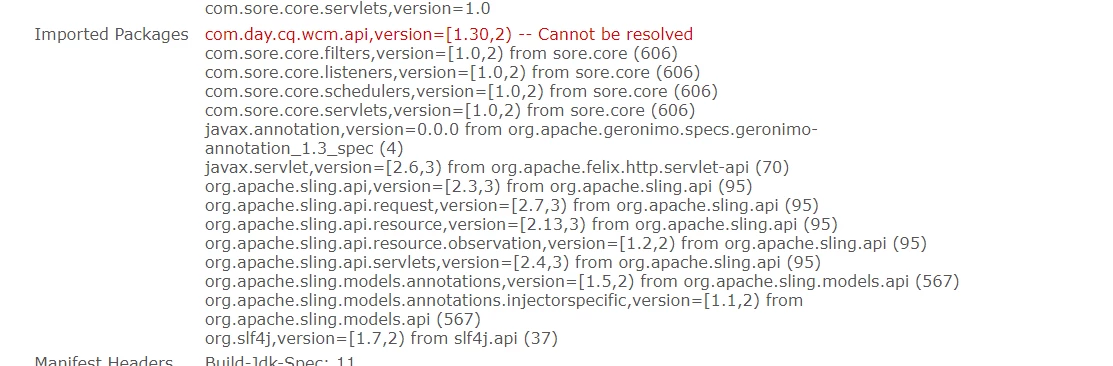
Anyone help me to resolve this Error "com.day.cq.wcm.api,version=[1.30,2) -- Cannot be resolved"

Facing this Error, Please help me I tried every past community solution.

This post is no longer active and is closed to new replies. Need help? Start a new post to ask your question.
SanthoshMa2Accepted solution
Level 2
Apr 10, 2025 6:42 AM UTC
Adobe Experience Manager SDK 2022.11.9850.20221116T162329Z-220900
 
 
if you are using AEMaaCS
 
step1 : go to localhost:4502/system/console/productinfo you see aem sdk version copy the SDK version
 
eg: Adobe Experience Manager (2022.11.9850.20221116T162329Z)
 
step2 : Search for sdk version in google : 2022.11.9850.20221116T162329Z, you will see an extra 6digit number after -
 
 e.g : Adobe Experience Manager SDK 2022.11.9850.20221116T162329Z-220900
 
step3 : search for aem.sdk.api in the project and replace the value in pom.xml
 
<aem.sdk.api>2023.1.10912.20230130T173736Z-230100</aem.sdk.api> to 
<aem.sdk.api>2022.11.9850.20221116T162329Z-220900</aem.sdk.api>
 
step4 : give the build and deploy, it worked for me.
 
Thanks
9 replies

Sady_Rifat
Community Advisor
Community Advisor
Oct 18, 2023 12:19 PM UTC

Hello @samsri ,

You can see this similar thread,

https://experienceleaguecommunities.adobe.com/t5/adobe-experience-manager/com-day-cq-wcm-api-cannot-be-resolved/td-p/385695 

If it's not helping you please let me know the following details. Your AEM service pack version and the Uber Jar you are using that version.
Is it a fresh project? If so, what was the Archetype?

Translate
Keerthi0555
Level 5
Oct 19, 2023 10:10 AM UTC

I'm also facing same issue , if u solved this issue let us know.

Translate
aanchal-sikka
Community Advisor
Community Advisor
Oct 18, 2023 1:08 PM UTC

Hello @samsri 


Please go to http://localhost:4502/system/console/depfinder

Check which version of API is available (Version column)


You might need to

  • upgrade either update the uber jar version in code
  • Install Service pack (for AEM 6.5)
  • Use latest SDK (for AEMaaCS)


Translate
Aanchal Sikka
kautuk_sahni
Level 9
Oct 19, 2023 8:31 AM UTC

@samsri Did you find the suggestions from users helpful? Please let us know if more information is required. Otherwise, please mark the answer as correct for posterity. If you have found out solution yourself, please share it with the community.

Translate
Kautuk Sahni
kautuk_sahni
Level 9
Oct 26, 2023 9:25 AM UTC

@samsri If you have found out solution yourself, please share it with the community.

Translate
Kautuk Sahni
Jan 3, 2024 8:13 AM UTC

Hi,


I am facing the same issue while creating a new project or importing wknd sites. I am using AEM 6.5 and have used archetype 46,47,48,49. I am able to build and deploy the project successfully. But once i deploy the project and verify the bundles i can see the bundle - Bundle Name (Adobe Experience Manager Core WCM Components Core Bundlecom.adobe.cq.core.wcm.components.core) and Bundle ID(585) and the version is 2.19.0 which is not getting started. When i expand the bundles it is showing the below error. Could anyone please help here


Imported Packages

com.adobe.aem.wcm.seo,version=[1.0,2) -- Cannot be resolved but is not required
com.adobe.aem.wcm.seo.localization,version=[1.0,2) -- Cannot be resolved but is not required

com.day.cq.wcm.api,version=[1.28,2) -- Cannot be resolved

org.apache.sling.api.servlets,version=[2.3,3) -- Cannot be resolved

Translate
Dec 3, 2024 1:22 PM UTC

Hi ,


Face same issue pls let us know the solution to resolve the same.

Translate
SanthoshMa2Accepted solution
Level 2
Apr 10, 2025 6:42 AM UTC
Adobe Experience Manager SDK 2022.11.9850.20221116T162329Z-220900
 
 
if you are using AEMaaCS
 
step1 : go to localhost:4502/system/console/productinfo you see aem sdk version copy the SDK version
 
eg: Adobe Experience Manager (2022.11.9850.20221116T162329Z)
 
step2 : Search for sdk version in google : 2022.11.9850.20221116T162329Z, you will see an extra 6digit number after -
 
 e.g : Adobe Experience Manager SDK 2022.11.9850.20221116T162329Z-220900
 
step3 : search for aem.sdk.api in the project and replace the value in pom.xml
 
<aem.sdk.api>2023.1.10912.20230130T173736Z-230100</aem.sdk.api> to 
<aem.sdk.api>2022.11.9850.20221116T162329Z-220900</aem.sdk.api>
 
step4 : give the build and deploy, it worked for me.
 
Thanks
Translate
New Member
Sep 18, 2025 6:11 AM UTC

If I use AEM on-premise, what steps do I need to follow?

Translate