AEMaaCS + dispatcher config: How important is available_host? | Community
Skip to main content
jayv25585659
Level 8
July 9, 2024
Solved

AEMaaCS + dispatcher config: How important is available_host?

  • July 9, 2024
  • 3 replies
  • 919 views

I've worked in an AMS setup in the past and at the time we only created a symlink in enabled_hosts to files in available_hosts.


what's the better idea?


option 1: create the same file (with same contents) in both available_hosts and enabled_host

option 2: create the file only in enabled_host


Thanks!


PS. I'm on windows so I cannot create  a symlink.

This post is no longer active and is closed to new replies. Need help? Start a new post to ask your question.
Best answer by Rohan_Garg

Hi @jayv25585659,


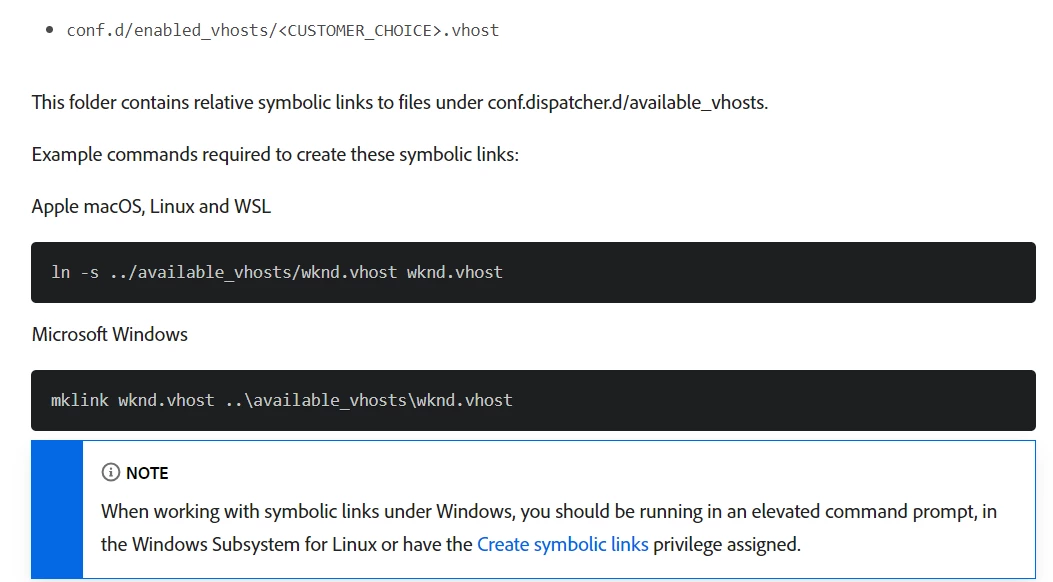
You can create symlinks on windows - 

Syntax — mklink <link> <target>

Reference Link - Validating Dispatcher Files


Hope this helps!

Rohan Garg

3 replies

aanchal-sikka
Community Advisor
Community Advisor
July 10, 2024

@jayv25585659 


AEM cloud now supports USE_SOURCES_DIRECTLY

https://experienceleague.adobe.com/en/docs/experience-manager-cloud-service/content/implementing/content-delivery/validation-debug#migrating 


With the option enabled, we need not use symlinks. But, can check-in files in enabled_vhost.

Please verify once. 

Aanchal Sikka
Rohan_Garg
Community Advisor
Rohan_GargCommunity AdvisorAccepted solution
Community Advisor
July 10, 2024

Hi @jayv25585659,


You can create symlinks on windows - 

Syntax — mklink <link> <target>

Reference Link - Validating Dispatcher Files


Hope this helps!

Rohan Garg

BrianKasingli
Community Advisor and Adobe Champion
July 12, 2024

Configuring available_host enhances security by explicitly defining acceptable hosts. This prevents unauthorized access and ensures only requests from trusted sources are processed. By restricting the hosts that can serve content, you can mitigate potential security risks and ensure that only trusted sources have access to your AEM environment.

You can totally add Symbolic Links in your codebase, just install gitbash, https://git-scm.com/downloads. It will be your Linux based command line. Next you'd want to setup the symbolic links https://www.youtube.com/watch?v=_8HyqxxN4dA&ab_channel=LarrySmith


Once you are done with the links, you can check in the code.