AEMaaCS DEV deployment failing in "Build transform" step | Adobe Higher Education
Skip to main content
jayv25585659
Level 8
July 29, 2024
Respondido

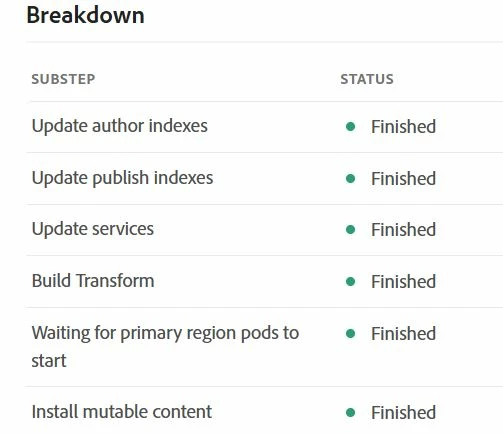
AEMaaCS DEV deployment failing in "Build transform" step

  • July 29, 2024
  • 3 respostas
  • 1621 Visualizações

The only changes I made include:

  • adding ACS commons into my maven project
  • some component changes

all/pom.xml


<embedded> <artifactId>acs-aem-commons-all</artifactId> <target>/apps/myhost-vendor-packages/container/install</target> <filter>true</filter> <isAllVersionsFilter>true</isAllVersionsFilter> </embedded> ... ... <dependency> <groupId>com.adobe.acs</groupId> <artifactId>acs-aem-commons-all</artifactId> <classifier>cloud</classifier> <version>6.6.2</version> <type>zip</type> </dependency>


core/pom.xml


<dependency> <groupId>com.adobe.acs</groupId> <artifactId>acs-aem-commons-bundle</artifactId> <version>6.6.2</version> <scope>provided</scope> </dependency>


all/vault/filter.xml


<filter root="/apps/myhost-vendor-packages"/> </workspaceFilter>


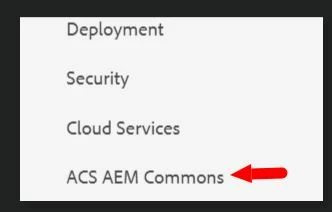
I built/installed the project locally first, I can see ACS commons option in Tools.
 

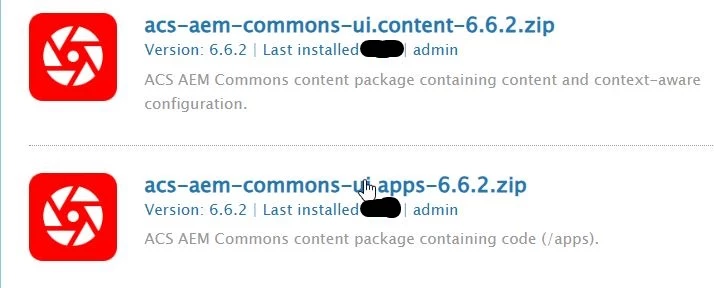
I can also see these 2 packages has been installed
 

I downloaded and viewed the log BUT nothing jumps out to me that should cause the error. Here's a link to the logs => https://pastebin.com/A4h2rrzr


Any ideas what could be wrong and how to fix? Thanks


UPDATE: I reverted my changes (removed adding ACS commons to my maven project) and the DEV deployment pipeline has successfully completed.
Este tópico foi fechado para respostas.
Melhor resposta por AMANATH_ULLAH

@jayv25585659 

Please follow below steps to install ACS commons in AEMaaCS

  1. Add the below dependency to your all project's pom.xml
    <dependency>
        <groupId>com.adobe.acs</groupId>
        <artifactId>acs-aem-commons-ui.content</artifactId>
        <version>6.6.2</version>
        <type>zip</type>
        <classifier>min</classifier>
    </dependency>
    
    <dependency>
        <groupId>com.adobe.acs</groupId>
        <artifactId>acs-aem-commons-ui.apps</artifactId>
        <version>6.6.2</version>
        <type>zip</type>
        <classifier>min</classifier> 
    </dependency>
  2. Add the below embed properties in your all project's pom.xml.
    <embedded>
                        <groupId>com.adobe.acs</groupId>
                        <artifactId>acs-aem-commons-ui.apps</artifactId>
                        <type>zip</type>
                        <target>/apps/myhost-packages/application/install</target>
                    </embedded>
                    <embedded>
                        <groupId>com.adobe.acs</groupId>
                        <artifactId>acs-aem-commons-ui.content</artifactId>
                        <type>zip</type>
                        <target>/apps/myhost-packages/content/install</target>
                    </embedded>
  3. Add the below dependency to your core project's pom.xml
    <dependency>
        <groupId>com.adobe.acs</groupId>
        <artifactId>acs-aem-commons-bundle</artifactId>
        <version>6.6.2</version>
        <scope>provided</scope>
    </dependency>

3 Respostas

AMANATH_ULLAH
Community Advisor
Community Advisor
July 29, 2024

@jayv25585659 

Please follow below steps to install ACS commons in AEMaaCS

  1. Add the below dependency to your all project's pom.xml
    <dependency>
        <groupId>com.adobe.acs</groupId>
        <artifactId>acs-aem-commons-ui.content</artifactId>
        <version>6.6.2</version>
        <type>zip</type>
        <classifier>min</classifier>
    </dependency>
    
    <dependency>
        <groupId>com.adobe.acs</groupId>
        <artifactId>acs-aem-commons-ui.apps</artifactId>
        <version>6.6.2</version>
        <type>zip</type>
        <classifier>min</classifier> 
    </dependency>
  2. Add the below embed properties in your all project's pom.xml.
    <embedded>
                        <groupId>com.adobe.acs</groupId>
                        <artifactId>acs-aem-commons-ui.apps</artifactId>
                        <type>zip</type>
                        <target>/apps/myhost-packages/application/install</target>
                    </embedded>
                    <embedded>
                        <groupId>com.adobe.acs</groupId>
                        <artifactId>acs-aem-commons-ui.content</artifactId>
                        <type>zip</type>
                        <target>/apps/myhost-packages/content/install</target>
                    </embedded>
  3. Add the below dependency to your core project's pom.xml
    <dependency>
        <groupId>com.adobe.acs</groupId>
        <artifactId>acs-aem-commons-bundle</artifactId>
        <version>6.6.2</version>
        <scope>provided</scope>
    </dependency>
Amanath Ullah
jayv25585659
Level 8
July 29, 2024

according to this site (click here for link), "In ACS AEM Commons 6.0.0, the main dependency artifact ID was renamed from acs-aem-commons-content to acs-aem-commons-all."


but I'll test your suggestion. Thanks

(all I'm saying is that your suggestion goes against the suggestion in the ACS documentation)


arunpatidar
Community Advisor
Community Advisor
July 29, 2024
kautuk_sahni
Community Manager
Community Manager
August 1, 2024

@jayv25585659 Did you find the suggestions from users helpful? Please let us know if you require more information. Otherwise, please mark the answer as correct for posterity. If you've discovered a solution yourself, we would appreciate it if you could share it with the community. Thank you!

Kautuk Sahni