AEMaaCS | Assets Metadata field limit | Community
Skip to main content
Level 2
July 4, 2023
Solved

AEMaaCS | Assets Metadata field limit

  • July 4, 2023
  • 5 replies
  • 1852 views

Is there any limit for no. of metadata fields ? like if we can add only this much amount of metadata fields to a Metadata Schema Forms ?


As I have created a Metada Schema Form and I have added a total 64 metadata fields for a custom metadata tab. And after applying this Metadata Schema Form to a folder/asset, when I'm checking metadata details in properties section of an asset, I see a strange pattern:

From 1 to 44 all the metadata fields are showing properly but after that alternate metadata fields are missing, which are: field no. 45, 47, 49, 51, 53, 55, 57, 59, 61 and 63 are missing.

And when checking back the Metadata Schema Form, these fields are not there, they automatically gets deleted.

So, I again added the missing fields, saved it and checked again but nothing happens. The fields are still missing.


Any idea why this is happening ?

Is there any limitation or best practices that only a particular no. of metadata fields should be there ?

This post is no longer active and is closed to new replies. Need help? Start a new post to ask your question.
Best answer by SivakumarKanoori

hi @sanchay1 :


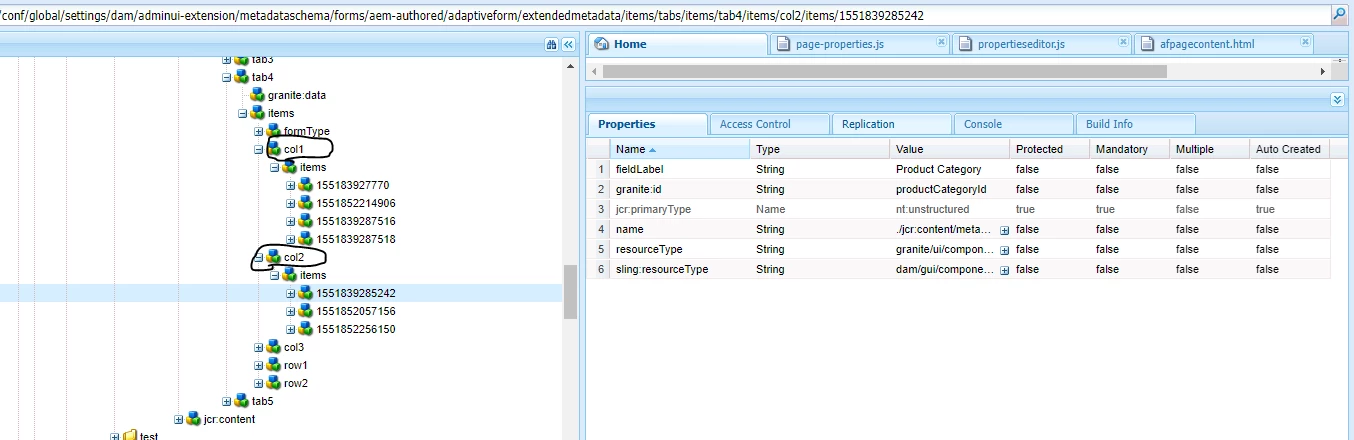
When you add a new fields to the metadata , you might have added as column specific .Then the fields you see will store in the crx as below.


As per the above screen shot, under tab 4 you can see the col 1 and col2 and col 3.


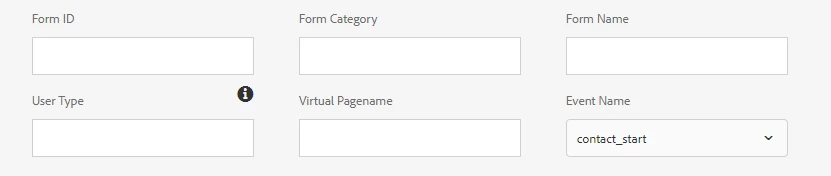
Form id and userType will store under col1.

Form category and Virtual Programme store under Col2. 


The alternate fileds will store under the  col2. Check that struture exists in your crx/de or not. 


If exist , but not displaying means then there is any customization causing this issue.


Thanks,

Siva


5 replies

SivakumarKanoori
Community Advisor
SivakumarKanooriCommunity AdvisorAccepted solution
Community Advisor
July 5, 2023

hi @sanchay1 :


When you add a new fields to the metadata , you might have added as column specific .Then the fields you see will store in the crx as below.


As per the above screen shot, under tab 4 you can see the col 1 and col2 and col 3.


Form id and userType will store under col1.

Form category and Virtual Programme store under Col2. 


The alternate fileds will store under the  col2. Check that struture exists in your crx/de or not. 


If exist , but not displaying means then there is any customization causing this issue.


Thanks,

Siva


Thanks,Siva
sanchay1Author
Level 2
July 5, 2023

Hi Siva,


Thank you for this wonderful solution.

As you said, I have checked the structure in CRX and what I found is that metadata fields are not getting stored in Column 2 and 3.

In Column 2 only 7 metadata fields got stored and in Column 3 only 9 metadata fields got stored.

And rest all are getting stored in Column 1.


Any suggestion what can I do for this?


Thanks,

Sanchay

aanchal-sikka
Community Advisor
Community Advisor
July 5, 2023

@sanchay1 


As @sivakumarkanoori  mentioned, please verify:

- the structure in CRXDE

- Network call when you add the fields and save the Metadata schema. Are all the fields being submitting.

- console + error logs when you save schema


64 fields on a single Tab seems a lot of Metadata. For better visibility, you should consider splitting it into multiple more-specific tabs. That would provide better experience to authors as well.

Aanchal Sikka
Shashi_Mulugu
Community Advisor
Community Advisor
July 5, 2023

I see some super cool responses by @aanchal-sikka @sivakumarkanoori .


Also how are you adding these fields, if you making thus schema form from your ides, make sure when you copy paste your existing fields to create new fields, dynamic node numbers are unique..

DPrakashRaj
Community Advisor
Community Advisor
July 6, 2023

I would suggest you to copy the default metadata field and create a custom based on copied default metadata. In this way you will have basic layout of default metadata and on top of default one you can add your custom property via code. Hope this will help you in seeking up the layout for your metadata 

krishna_garikapati
Level 3
December 30, 2023

The issue is due to "sling.default.max.parameters" and "request.max.file.count" limits. By default the this value is set to 10K to limit the DDoS attacks. You can raise this limit in OSGI configuration but this is not a viable solution.

I would suggest the below.
1. If the metadata is coming from other integrated products such as Workfront. maintain these fields in Workfront or other systems and have the value stored as a text field or tag in AEM(DAM). This will be a solution if it's intended to not modify anything directly in AEM.
2. Restructure and segregate your data so you can split the metadata schema into multiple and apply them at folder level(it is not possible to apply multiple metadata schemas to a single folder).
3. Raise a field service engagement with adobe to understand your scenario and suggest solution.

Adobe is already aware of this limitation and they should defiantly work on a permanent fix.