AEM6.3 Autocomplete with smart search for touch ui | Community
Skip to main content
srinivas_chann1
Level 7
August 13, 2019
Solved

AEM6.3 Autocomplete with smart search for touch ui

  • August 13, 2019
  • 19 replies
  • 7435 views

Hi,

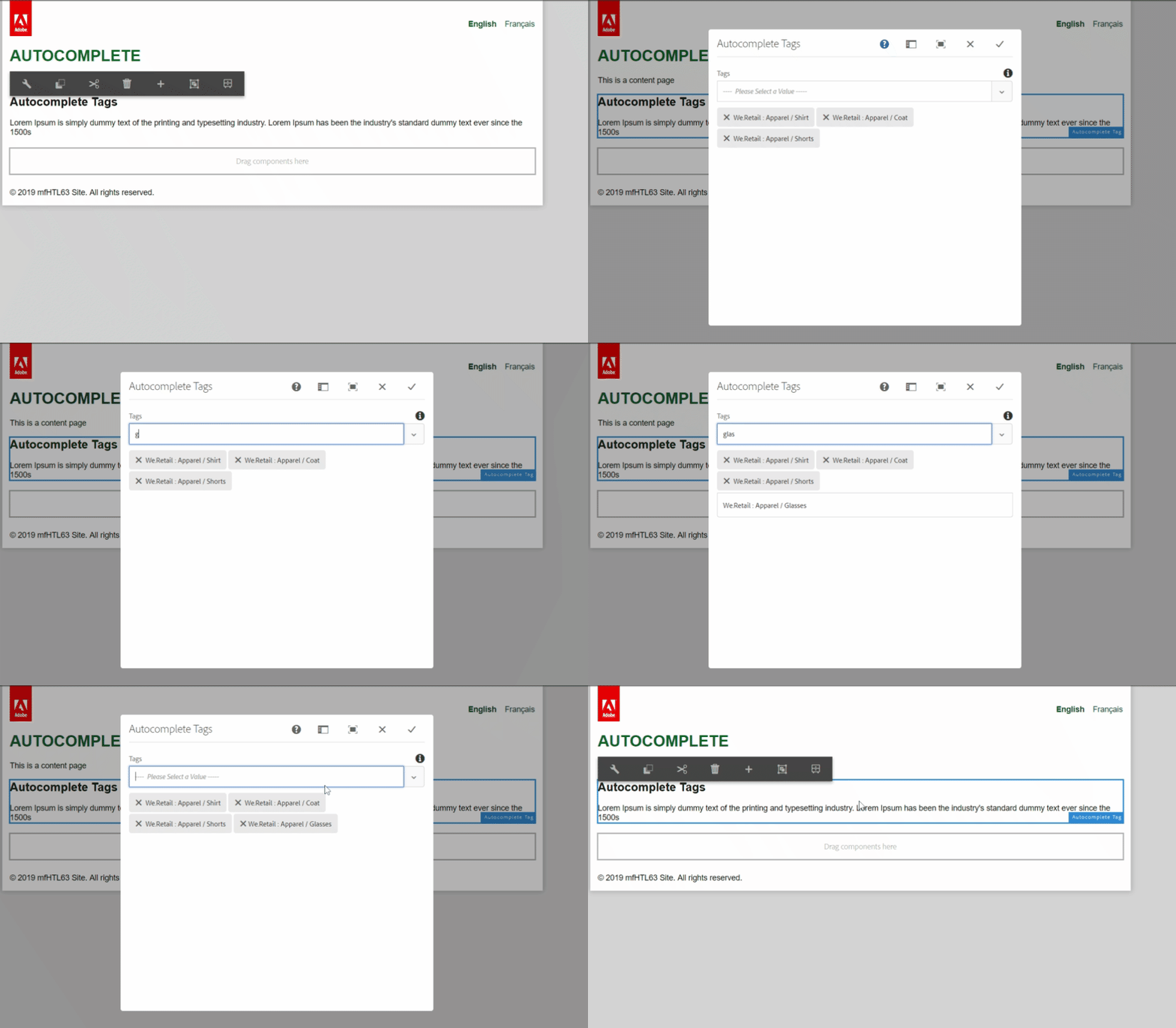
I have the below autocomplete tag getting populated in the touch ui ,but it is not of smart search and have to type in full tag path.Similar to that is mentioned in AEM6.3 Touch ui autocomplete not working for tags for namespaces

When i type in any particular tag it does not show any reference at all. Even though the tag is present. So it the full tag name that appears is Content tag: checking / abc.  I need to type in the full tag Content tag: checking / abc  only then it filters .I need some thing like if i type in abc it must show up the tag

Things i tried:-

I tried with adding mode="contains" but does not effect the search. Please let me know  if i could customize any files that will solve this problem.

<tag

         jcr:primaryType="nt:unstructured"

         sling:resourceType="granite/ui/components/coral/foundation/form/autocomplete"

         fieldLabel=" Asset Tags"

          multiple="{Boolean}true"

         name="./assetTags"

         mode="contains">

          <datasource

           jcr:primaryType="nt:unstructured"

           sling:resourceType="cq/gui/components/common/datasources/tags"/>

          <options

           jcr:primaryType="nt:unstructured"

           sling:resourceType="granite/ui/components/coral/foundation/form/autocomplete/list"/>

          <values

           jcr:primaryType="nt:unstructured"

           sling:resourceType="granite/ui/components/coral/foundation/form/autocomplete/tags"/>

                                    </tag>

Thanks

This post is no longer active and is closed to new replies. Need help? Start a new post to ask your question.
Best answer by arunpatidar

Hi,

I am not sure what is the issue at your end but it works fine for me

Code :

(function($, $document) {

    "use strict";

    $document.on("dialog-ready", function() {

        $(document).on("keyup", "#productTagListTagcomp div>input.js-coral-Autocomplete-textfield", function() {

            applyFilter($(this).val().toLowerCase(), $("ul.js-coral-Autocomplete-selectList.coral-SelectList li"));

        });

         $(document).on("click", "#productTagListTagcomp ul.js-coral-Autocomplete-selectList.coral-SelectList li.is-highlighted", function() {

            $(this).closest('ul').removeClass("is-visible").removeClass("is-below");

        });

    });

    function applyFilter(txtVal, filterList) {

            filterList.each(function() {

                if ($(this).text().toLowerCase().indexOf(txtVal) > 0) {

                    setTimeout(() => {

                            $(this).removeClass("is-hidden", false)

                            $(this).closest('ul').addClass("is-visible").addClass("is-below");

                        },

                        100);

                }

            });

        }

})($, $(document));

19 replies

srinivas_chann1
Level 7
August 15, 2019

I tried below but does not have any effect on touch ui autocomplete. Please let me know i  missed out any thing

Under the file

/libs/clientlibs/granite/coralui3/js/CUI.Autocomplete.js

By default, "mode" is set to "starts", i changed it to "contains" but still the touch ui autocomplete is not providing an smart search and need to type all the required text

defaults: {

      mode: 'contains', // filter mode ['starts', 'contains']

      disabled: false,

      ignorecase: true,

      delay: 200,

      multiple: false,

      forceselection: false,

      selectlistConfig: null,

      tagConfig: null,

      // @warning do not use this

      //

      // future feature

      // allows to bypass element search and pass elements

      // will allow to evalute this solution

      predefine: {}

    },

srinivas_chann1
Level 7
August 16, 2019

Any inputs from any one my above query will helpful.

arunpatidar
Community Advisor
Community Advisor
August 16, 2019

Hi,

That is OOTB functionality.

You can write your own filter e.g.

https://blogs.perficientdigital.com/2019/05/03/how-to-add-a-filter-to-aem-granite-select-widget/

Arun Patidar
srinivas_chann1
Level 7
August 16, 2019

Hi,

Thanks a lot for your inputs . I copied the script and added it under categorizes="[cq.authoring.dialog]" .But when i tried the smart search under autocomplete of above dialog code it does not still do smart search .

Also the dialog is not closing when i click the [x] on the dialog window.

Please let me know how could i solve it.

arunpatidar
Community Advisor
Community Advisor
August 16, 2019

Hi,

This code is for not autocomplete instead of select type. I shared this for your reference you can get the part of the script which does filtering.

Arun Patidar
srinivas_chann1
Level 7
August 18, 2019

Hi,

I did the below but still it does not show up smart search on autocomplete .Any inputs on this will help.

Step1:-

I added an granite:id to tag xml i.e granite:id productTagListTagcomp

Step2:-

Noticed that from OOTB mechanism that when some types in any key it  adds the below class in

a> in "ul js-coral-Autocomplete-selectList"  it adds  class "is-visible"

b>in "li" it adds class "is-hidden"  for the items not to display

Step3:-

I added the below custom code

$('#productTagListTagcomp input[type=text]').bind('keyup', function(e) {

var filterText=$(this).val();

hidedisplayselection(filterText);

});

function hidedisplayselection(filterText){

var diaplaytheselectList=false;

$('#productTagListTagcomp li').each(function(index){// id of ul

var itemText=$(this).text();

var bothNotEmpty = itemText && filterText;

var match =       bothNotEmpty  &&   itemText.toLowerCase().includes(filterText.toLowerCase());//check if it contains

var eitherIsEmpty = !itemText || !filterText;

$(this).addClass("class", "is-hidden");//first hide the class

if (eitherIsEmpty || match) {

console.log("here show il text");

$(this).removeClass('is-hidden'); //if match then show the class

     diaplaytheselectList=true;

    }

});

//we add class in select list so that it shows the list in the selection pop up

if(diaplaytheselectList){

$('#productTagListTagcomp ul').find('.js-coral-Autocomplete-selectList').addClass("class","is-visible is-above");

}

}

Step4:- I noticed that it hits the console log but does not remove the class "is-hidden" and also neither adds the class "is-visible is-above" . I am thinking may be the OOTB code is blocking from this happening.

Please needs your inputs as how could i proceed based on my above finding.

Thanks

arunpatidar
Community Advisor
Community Advisor
August 18, 2019

Yes, This can be possible. you can add a delay of 100 ms to delay your event execution and please exclude OOTB filter match criteria as well.

e.g. you can just type below code in console and type input text(not very fast), this will filter the option.

$(document).on("keyup", "#productTagListTagcomp div>input.js-coral-Autocomplete-textfield", function() {

    applyFilter($(this).val().toLowerCase(), $("ul.js-coral-Autocomplete-selectList.coral-SelectList li"));

});

function applyFilter(txtVal, filterList) {

    filterList.each(function() {

        if ($(this).text().toLowerCase().indexOf(txtVal) > 0) {

            setTimeout(() => {

                    $(this).closest('ul').addClass("is-visible").addClass("is-below");

                    $(this).removeClass("is-hidden", false)

                },

                100);

        }

    });

}

Arun Patidar
srinivas_chann1
Level 7
August 19, 2019

Hi,

Thanks for the inputs .Now the smart search works .But i noticed 2 issues on the above.

1>The class "is-visible" must be added after "is-hidden" is completed so did the below change and then the pop up with list came up on smart search. Please let me know if you see any change in the below code to make it look better

$(document).on("keyup", "#productTagListTagcomp div>input.js-coral-Autocomplete-textfield", function() {

    applyFilter($(this).val().toLowerCase(), $("ul.js-coral-Autocomplete-selectList.coral-SelectList li"));

});

//apply "is-hidden" class first

function applyFilter(txtVal, filterList) {

    filterList.each(function() {

        if ($(this).text().toLowerCase().indexOf(txtVal) > 0) {

            setTimeout(() => {

$(this).removeClass("is-hidden", false)

                },

                100);

     }

    });

//apply "is-visible" class latter

filterList.each(function() {

        if ($(this).text().toLowerCase().indexOf(txtVal) > 0) {

            setTimeout(() => {

                    $(this).closest('ul').addClass("is-visible").addClass("is-below");

                },

                100);

        }

    });

}

}

2> After we select an option from select the pop up  still stays .That will cause an issue with usability of autoselect.

i noticed that in normal OOTB behavior once we select an option then ""is-visible" is removed and the popup hides immediately.

Please could you provide inputs  as how this could be achieved on selection on option from select will be very helpful.

Thanks

arunpatidar
Community Advisor
Community Advisor
August 19, 2019

This works for me only one issue is with backspace no filtering

$(document).on("keyup", "#productTagListTagcomp div>input.js-coral-Autocomplete-textfield", function() {

    applyFilter($(this).val().toLowerCase(), $("ul.js-coral-Autocomplete-selectList.coral-SelectList li"));

});

function applyFilter(txtVal, filterList) {

    filterList.each(function() {

        if ($(this).text().toLowerCase().indexOf(txtVal) > 0) {

            setTimeout(() => {

                    $(this).removeClass("is-hidden", false)

                    $(this).closest('ul').addClass("is-visible").addClass("is-below");

                },

                100);

        }

    });

}

$(document).on("click", "#productTagListTagcomp ul.js-coral-Autocomplete-selectList.coral-SelectList li.is-highlighted", function() {

    $(this).closest('ul').removeClass("is-visible").removeClass("is-below");

});

Arun Patidar
srinivas_chann1
Level 7
August 19, 2019

Hi,

Thanks for the inputs the search works fine when i paste the above code in console of the browser.

But when i  copied the above script and added it under categorizes="[cq.authoring.dialog]" . The dialog is not closing  and neither saving when i click the [x]  or save button on the  main dialog window.

(function(document, $) {

$(document).on("keyup", "#productTagListTagcomp div>input.js-coral-Autocomplete-textfield", function() {

    applyFilter($(this).val().toLowerCase(), $("ul.js-coral-Autocomplete-selectList.coral-SelectList li"));

});

function applyFilter(txtVal, filterList) {

    filterList.each(function() {

        if ($(this).text().toLowerCase().indexOf(txtVal) > 0) {

            setTimeout(() => {

                    $(this).removeClass("is-hidden", false)

                    $(this).closest('ul').addClass("is-visible").addClass("is-below");

                },

                100);

        }

    });

}

})(document, Granite.$);

Please provide inputs as how this could be solved.