AEM Replication agents - stuck | Community
Skip to main content
Adobe Employee
June 29, 2021
Solved

AEM Replication agents - stuck

  • June 29, 2021
  • 3 replies
  • 1927 views

Hi All,


 on high volume of activation tree replication agents stuck or going in block with high consumptions of machine resources. This lead to a restart of the AEM instances. To avoid this could be useful to enable "Batch Mode" on the replication agents?
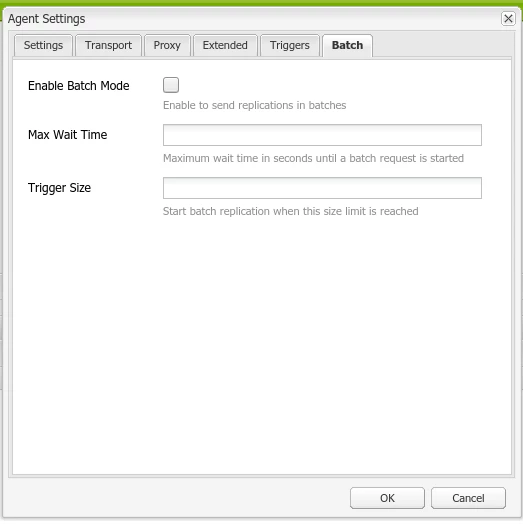


Or as alternative upgrade the architecture with a replication-tier (merely a publish instances) between author and publish as follow:


- one replication agents on author (reduce replication event on author so author could not stuck)

- disable update assets on replication-tier (the assets are already elaborated from author)

- enable replication batch mode on the author and replication tier to stagger performance impact using the threshold level defined


Thanks a lot for any insight


This post is no longer active and is closed to new replies. Need help? Start a new post to ask your question.
Best answer by MarkusBullaAdobe

Hi @tommy9!

First of all, the outlined behavior sounds somewhat abnormal and the root cause should be analyzed and addressed.

That being said, the two approaches to deal with the situation that you mention are:

  1. Enabling batch mode for replication
  2. Moving to a replication-tier architecture

Option 1 is a quick and low-effort approach and therefore I would recommend to give it a try although I'm not convinced that it will lead to a final resolution of the issue (it will probably bring some improvement, though). It also comes with a couple of implication, e. g. pages not being replicated immediately after a content author hits the "publish" button. Depending on the replication traffic, it may take some time until the replication is actually executed. These are implications that need to be discussed with the business side and aligned with according requirements of your project. For more information on batch replication, please refer to the documentation of this feature.

Option 2 is a commonly used pattern for high replication volumes and will definitely address the issue. So if you have high replication traffic, this is a totally valid option to evaluate.


Hope that helps!


3 replies

Dipti_Chauhan
Community Advisor
Community Advisor
June 29, 2021

Hi @tommy9 

   We use batch mode on all our lower environments. If there is no business need for immediate content activation than this is useful feature and it does improve replication performance.


Thanks

Dipti

tommy9Adobe EmployeeAuthor
Adobe Employee
June 29, 2021
Hi @dipti_chauhan thank for you reply. So could be good use batch mode with an activation tree of about 9000 nodes?
Adobe Employee
June 29, 2021

@tommy9 ,


enable replication batch mode on the author and replication tier to stagger performance impact using the threshold level defined as it would be the best approach in current scenerio.


Thanks

MarkusBullaAdobe
Adobe Employee
MarkusBullaAdobeAdobe EmployeeAccepted solution
Adobe Employee
June 29, 2021

Hi @tommy9!

First of all, the outlined behavior sounds somewhat abnormal and the root cause should be analyzed and addressed.

That being said, the two approaches to deal with the situation that you mention are:

  1. Enabling batch mode for replication
  2. Moving to a replication-tier architecture

Option 1 is a quick and low-effort approach and therefore I would recommend to give it a try although I'm not convinced that it will lead to a final resolution of the issue (it will probably bring some improvement, though). It also comes with a couple of implication, e. g. pages not being replicated immediately after a content author hits the "publish" button. Depending on the replication traffic, it may take some time until the replication is actually executed. These are implications that need to be discussed with the business side and aligned with according requirements of your project. For more information on batch replication, please refer to the documentation of this feature.

Option 2 is a commonly used pattern for high replication volumes and will definitely address the issue. So if you have high replication traffic, this is a totally valid option to evaluate.


Hope that helps!


tommy9Adobe EmployeeAuthor
Adobe Employee
June 30, 2021

Hi @markusbullaadobe thank a lot for your vision, in fact first of all I will investigate their currently instances because in my view there is an application issue and the behavior it's only a side effects.