AEM Performance issue in Lucene index in 6.5 SPA | Community
Skip to main content
Level 2
March 4, 2025
Solved

AEM Performance issue in Lucene index in 6.5 SPA

  • March 4, 2025
  • 1 reply
  • 513 views

Hi Everyone,

                I am using query builder api to get search results like below:

fulltext=baggage
group.p.or=true
group.1_group.path=/content/project1/ph/en/home
group.1_group.type=cq:PageContent
group.2_group.path=/content/dam/project1
group.2_group.type=dam:Asset
group.2_group.p.not=true
group.2_group.property=jcr:content/metadata/@dc:format
group.2_group.property.value=application/json
p.limit=-1

When I am checking in http://localhost:4502/libs/granite/operations/content/diagnosistools/queryPerformance.html

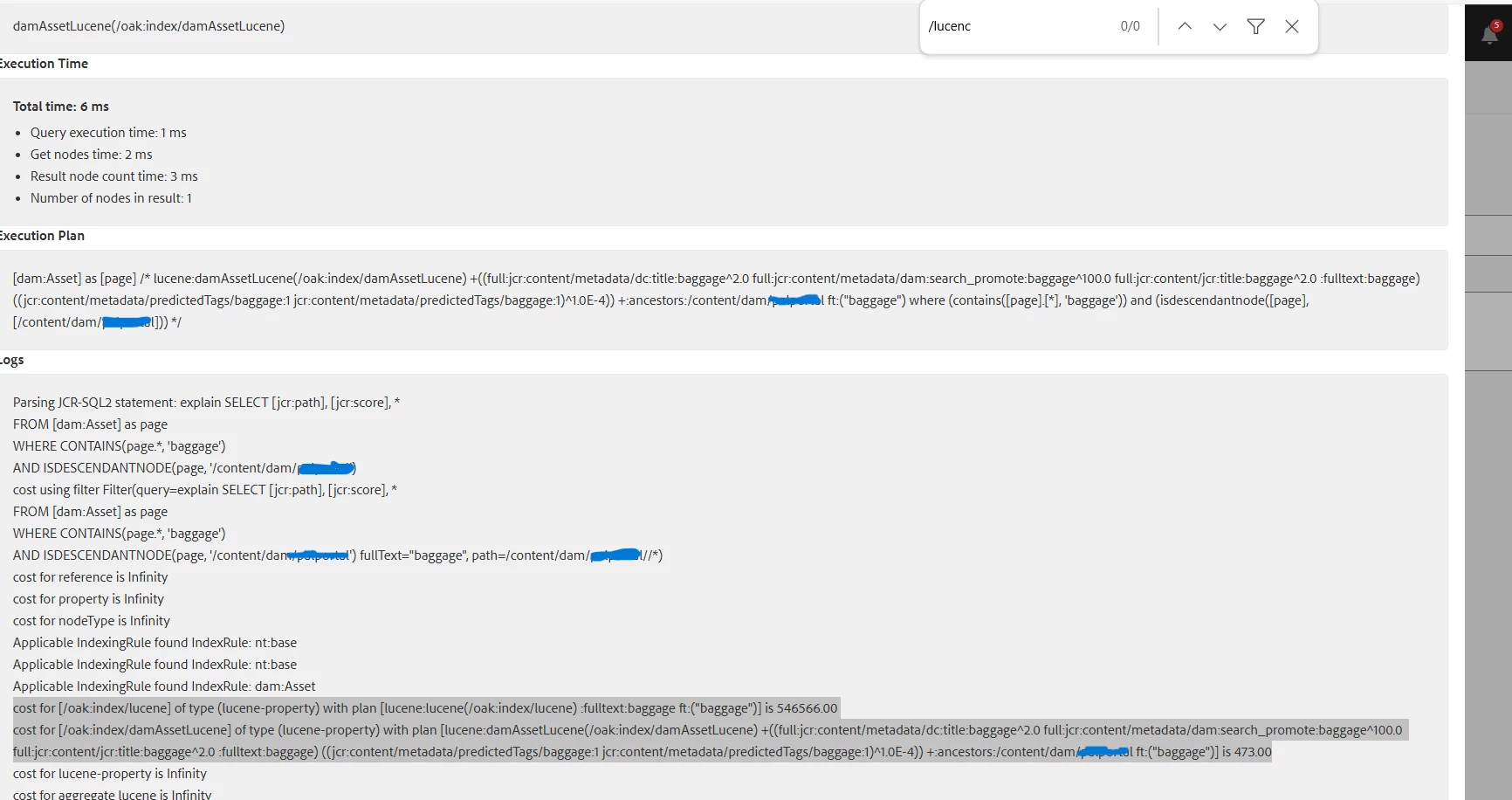
It is showing along with cqPageLucene Lucene index also triggering which is impacting AEM environment performance.


Error log when querying:


Is there any option to resolve this issue? Experts need your solution on this, Thanks in advance!

Best answer by giuseppebaglio

To improve the situation effectively, consider exploring following options.

  • The queryPerformance.html tool indicates the /oak:index/lucene index has a cost of 546,566 , which is significantly higher than the DAM-specific index (damAssetLucene). This suggests that the query is triggering a full-text search across the entire repository via the generic Lucene index. The group.p.or=true condition combines two groups (pages and DAM assets), forcing the query to scan multiple paths.
  • Setting p.limit=-1 fetches all results , which is resource-intensive. Use pagination (e.g., p.limit=20&p.offset=0) to reduce load.
  • If pagination isn’t feasible, ensure the query is as restrictive as possible.
  • You can restructure the query by split the query into two separate queries:
    For pages (cq:PageContent):


fulltext=baggage path=/content/project1/ph/en/home type=cq:PageContent


For DAM assets (exclude JSON files):


fulltext=baggage path=/content/dam/project1 type=dam:Asset property=jcr:content/metadata/@dc:format property.value!=application/json


This ensures the DAM-specific index (damAssetLucene) is used exclusively for assets, avoiding the costly generic Lucene index.


  • You can also define a custom Lucene index for /content/project1 pages to avoid full-repository scans. Example oak:index definition:


<index name="customPageLucene" type="lucene"> <property name="path" value="/content/project1"/> <property name="type" value="cq:PageContent"/> <property name="includePropertyTypes"> <value>metadata/@dc:format</value> <value>jcr:title</value> </property> </index>​


This will ensure the query targets a specific index instead of the generic one.


Further reading:

Query and Indexing Best Practices

Troubleshooting Slow Queries
 

1 reply

giuseppebaglio
giuseppebaglioAccepted solution
Level 10
March 5, 2025

To improve the situation effectively, consider exploring following options.

  • The queryPerformance.html tool indicates the /oak:index/lucene index has a cost of 546,566 , which is significantly higher than the DAM-specific index (damAssetLucene). This suggests that the query is triggering a full-text search across the entire repository via the generic Lucene index. The group.p.or=true condition combines two groups (pages and DAM assets), forcing the query to scan multiple paths.
  • Setting p.limit=-1 fetches all results , which is resource-intensive. Use pagination (e.g., p.limit=20&p.offset=0) to reduce load.
  • If pagination isn’t feasible, ensure the query is as restrictive as possible.
  • You can restructure the query by split the query into two separate queries:
    For pages (cq:PageContent):


fulltext=baggage path=/content/project1/ph/en/home type=cq:PageContent


For DAM assets (exclude JSON files):


fulltext=baggage path=/content/dam/project1 type=dam:Asset property=jcr:content/metadata/@dc:format property.value!=application/json


This ensures the DAM-specific index (damAssetLucene) is used exclusively for assets, avoiding the costly generic Lucene index.


  • You can also define a custom Lucene index for /content/project1 pages to avoid full-repository scans. Example oak:index definition:


<index name="customPageLucene" type="lucene"> <property name="path" value="/content/project1"/> <property name="type" value="cq:PageContent"/> <property name="includePropertyTypes"> <value>metadata/@dc:format</value> <value>jcr:title</value> </property> </index>​


This will ensure the query targets a specific index instead of the generic one.


Further reading:

Query and Indexing Best Practices

Troubleshooting Slow Queries
