AEM Multifield component has limit to nested element | Community
Skip to main content
Level 2
February 1, 2023
Solved

AEM Multifield component has limit to nested element

  • February 1, 2023
  • 2 replies
  • 3545 views

I am working on a AEM dialog multifield granite/ui/components/coral/foundation/form/multifield component.
One multifield contains 15 elements, for examlpe: textarea, checkbox, pathfield, fileupload, textfield, datepicker. When a certain amount of multifields is reached for example if multifield has 15 nested elements then I can create only 76 multifields. After 76 multifields the 'Add button' disappears and after deleting an element, the element is removed but there are still 76 elements in the list and the add button does not appear.
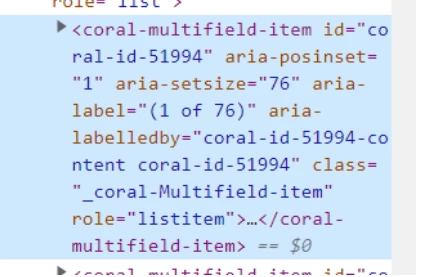
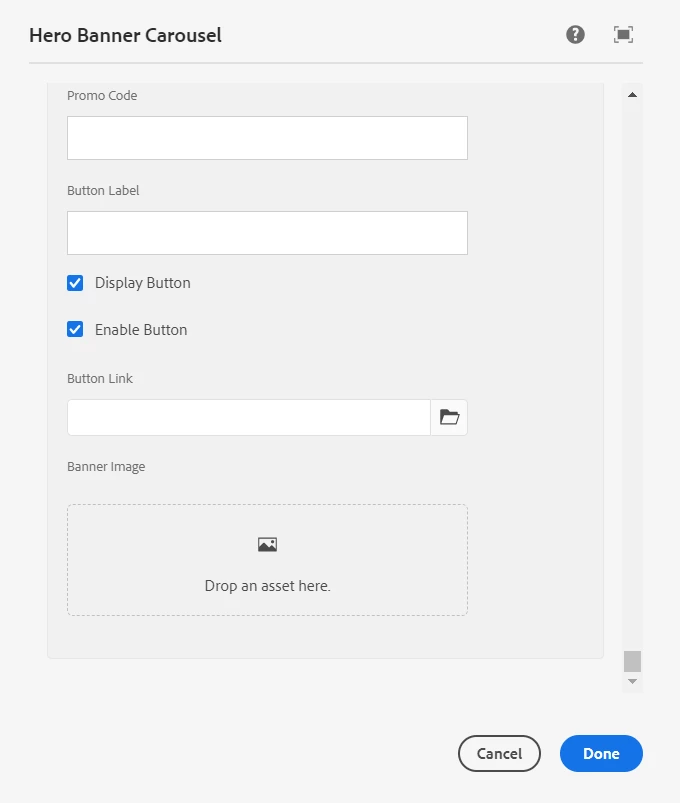
 

 is there a way to create more multifield with nested elements?

This post is no longer active and is closed to new replies. Need help? Start a new post to ask your question.
Best answer by Kiran_Vedantam

Hi @polinavinni 


It is not recommended to use the multi-field to store massive data. Similar question:: https://experienceleaguecommunities.adobe.com/t5/adobe-experience-manager/aem-6-5-multifield-is-there-a-default-limit-on-number-of-items/m-p/429247


Hope it helps!

Thanks,
Kiran Vedantam

2 replies

arunpatidar
Community Advisor
Community Advisor
February 1, 2023

Hi,

there is no limit to multifeld

could you please share the dialog xml?


same question is answered here as well

https://experienceleaguecommunities.adobe.com/t5/adobe-experience-manager/aem-multifield-works-incorrect/td-p/570557 

Arun Patidar
Level 2
February 1, 2023
I use this version Adobe Experience Manager 2021.11.6058

<?
xml version="1.0" encoding="UTF-8"?>
<jcr:root xmlns:jcr="http://www.jcp.org/jcr/1.0"
   xmlns:sling="http://sling.apache.org/jcr/sling/1.0" jcr:primaryType="nt:unstructured" sling:resourceType="cq/gui/components/authoring/dialog" jcr:title="Hero Banner Carousel" extraClientlibs="[toggleinput, hideinputcarousel]">
   <content jcr:primaryType="nt:unstructured" sling:resourceType="granite/ui/components/foundation/container">
      <layout jcr:primaryType="nt:unstructured" sling:resourceType="granite/ui/components/foundation/layouts/tabs" type="nav" />
      <items jcr:primaryType="nt:unstructured">
         <tab_0 jcr:primaryType="nt:unstructured" jcr:title="Slides" sling:resourceType="granite/ui/components/foundation/section">
            <layout jcr:primaryType="nt:unstructured" sling:resourceType="granite/ui/components/foundation/layouts/fixedcolumns" />
            <items jcr:primaryType="nt:unstructured">
               <column jcr:primaryType="nt:unstructured" sling:resourceType="granite/ui/components/foundation/container">
                  <items jcr:primaryType="nt:unstructured">
                     <element_00 jcr:primaryType="nt:unstructured" sling:resourceType="granite/ui/components/coral/foundation/form/multifield" composite="{Boolean}true" fieldLabel="Add Banner Slides">
                        <field jcr:primaryType="nt:unstructured" sling:resourceType="granite/ui/components/coral/foundation/container" name="./slides" fieldLabel="Add Banner Slides">
                           <items jcr:primaryType="nt:unstructured">
                              <column jcr:primaryType="nt:unstructured" sling:resourceType="granite/ui/components/coral/foundation/container">
                                 <items jcr:primaryType="nt:unstructured">
                                    <element_0 jcr:primaryType="nt:unstructured" sling:resourceType="granite/ui/components/coral/foundation/form/checkbox" name="./showWithoutPromoPage" text="Display slide in Hero Banner Carousel without promotion page" uncheckedValue="false" value="true" />
                                    <element_1 jcr:primaryType="nt:unstructured" name="./promotionPage" fieldLabel="Promotion Page" rootPath="/content/eyas-web" sling:resourceType="granite/ui/components/foundation/form/pathfield" granite:class="promotion-page-field" />
                                    <element_2 jcr:primaryType="nt:unstructured" sling:resourceType="granite/ui/components/foundation/form/textarea" name="./heading" fieldLabel="Heading" required="{Boolean}false" fieldDescription="Will display in white by default. To highlight parts of the heading text (yellow) wrap the text in strong tags" granite:class="toggle-carousel-field" />
                                    <element_3 jcr:primaryType="nt:unstructured" sling:resourceType="granite/ui/components/foundation/form/textarea" name="./subHeading" fieldLabel="Sub Heading" granite:class="toggle-carousel-field" />
                                    <element_4 jcr:primaryType="nt:unstructured" sling:resourceType="granite/ui/components/foundation/form/textarea" name="./footer" fieldLabel="Terms and Conditions" granite:class="toggle-carousel-field" />
                                    <element_5 jcr:primaryType="nt:unstructured" sling:resourceType="granite/ui/components/coral/foundation/form/numberfield" name="./bonusId" fieldLabel="Bonus ID" granite:class="toggle-input toggle-carousel-field" />
                                    <element_6 jcr:primaryType="nt:unstructured" sling:resourceType="granite/ui/components/foundation/form/textfield" name="./promoCode" fieldLabel="Promo Code" granite:class="toggle-input toggle-carousel-field" />
                                    <element_7 jcr:primaryType="nt:unstructured" sling:resourceType="granite/ui/components/foundation/form/textfield" name="./buttonLabel" fieldLabel="Button Label" granite:class="toggle-carousel-field" />
                                    <element_8 jcr:primaryType="nt:unstructured" sling:resourceType="granite/ui/components/coral/foundation/form/checkbox" name="./buttonShown" text="Display Button" checked="true" uncheckedValue="false" value="true" granite:class="toggle-carousel-field" />
                                    <element_9 jcr:primaryType="nt:unstructured" sling:resourceType="granite/ui/components/coral/foundation/form/checkbox" name="./buttonEnabled" text="Enable Button" checked="true" uncheckedValue="false" value="true" granite:class="toggle-carousel-field" />
                                    <element_10 jcr:primaryType="nt:unstructured" name="./buttonLink" fieldLabel="Button Link" rootPath="/content/my-web" sling:resourceType="granite/ui/components/coral/foundation/form/pathfield" granite:class="toggle-carousel-field" />
                                    <element_11 fieldLabel="Banner Image" required="{Boolean}false" fileReferenceParameter="./imgSrc" name="./srcField" sling:resourceType="cq/gui/components/authoring/dialog/fileupload" mimeTypes="[image]" allowUpload="{Boolean}false" autoStart="{Boolean}false" class="cq-droptarget" fileNameParameter="./fileName" jcr:primaryType="nt:unstructured" multiple="{Boolean}false" uploadUrl="${suffix.path}" useHTML5="{Boolean}true" granite:class="toggle-carousel-field" />
                                    <element_12 fieldLabel="Mobile Banner Image" fileReferenceParameter="./mobileImgSrc" name="./srcField" sling:resourceType="cq/gui/components/authoring/dialog/fileupload" mimeTypes="[image]" allowUpload="{Boolean}false" autoStart="{Boolean}false" class="cq-droptarget" fileNameParameter="./fileName" jcr:primaryType="nt:unstructured" multiple="{Boolean}false" uploadUrl="${suffix.path}" useHTML5="{Boolean}true" granite:class="toggle-carousel-field" />
                                    <element_13 jcr:primaryType="nt:unstructured" sling:resourceType="granite/ui/components/foundation/form/textfield" name="./imgAlt" fieldLabel="Banner Image Alt Text" required="{Boolean}false" granite:class="toggle-carousel-field" />
                                    <element_14 jcr:primaryType="nt:unstructured" sling:resourceType="granite/ui/components/coral/foundation/form/datepicker" valueFormat="YYYY-MM-DD" name="./displayFrom" fieldLabel="Display From" required="{Boolean}false" granite:class="toggle-carousel-field" />
                                    <element_15 jcr:primaryType="nt:unstructured" sling:resourceType="granite/ui/components/coral/foundation/form/datepicker" valueFormat="YYYY-MM-DD" name="./displayTo" fieldLabel="Display To" required="{Boolean}false" granite:class="toggle-carousel-field" />
                                 </items>
                              </column>
                           </items>
                        </field>
                     </element_00>
                  </items>
               </column>
            </items>
         </tab_0>
      </items>
   </content>
</jcr:root>
arunpatidar
Community Advisor
Community Advisor
February 1, 2023

Can you try using coral3 types at all the places and all the resourcetypes

you are using mix of coral2 and coral3 types

e.g.

Coral2 - granite/ui/components/foundation/container -

Coral3 - granite/ui/components/coral/foundation/container


Example:

https://github.com/arunpatidar02/aemaacs-aemlab/blob/master/ui.apps/src/main/content/jcr_root/apps/aemlab/oneweb/concept/components/multifield-json/_cq_dialog/.content.xml 

Arun Patidar
Kiran_Vedantam
Community Advisor
Kiran_VedantamCommunity AdvisorAccepted solution
Community Advisor
February 1, 2023

Hi @polinavinni 


It is not recommended to use the multi-field to store massive data. Similar question:: https://experienceleaguecommunities.adobe.com/t5/adobe-experience-manager/aem-6-5-multifield-is-there-a-default-limit-on-number-of-items/m-p/429247


Hope it helps!

Thanks,
Kiran Vedantam