
AEM - Maven build cannot resolve dependencies when imported
Hi all,
I am trying to add a 3rd party library to our AEM java project. This project is build in Maven. My Maven build runs successfully, but when I import it in AEM, it crashes and cannot find dependencies that come with said 3rd party.
My question is about my build. I included the 3rd party library as a dependency,
<dependency>
<groupId>com.fasterxml.jackson.dataformat</groupId>
<artifactId>jackson-dataformat-xml</artifactId>
<version>2.9.0</version>
</dependency>
and even add the .jar file as an <Embed-Dependency> package in the pom with <embed-transitive> set.
<Embed-Transitive>true</Embed-Transitive>
<Embed-Dependency>jackson-dataformat-xml;scope=compile|runtime<Embed-Dependency>
This embeds the 3rd party .jar file into my AEM bundle build.

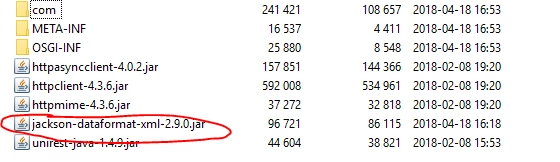
When I import this package and install into AEM, my bundle doesn't start and shows the below error, which basically says that all the dependencies for my 3rd party library cannot be resolved.
I attempted to fix this by adding the extra dependencies under <Import-Package> right below the <Embed-Dependency>
<Import-Package>
com.fasterxml.jackson.*,
org.codehaus.stax2.*,
</Import-Package>
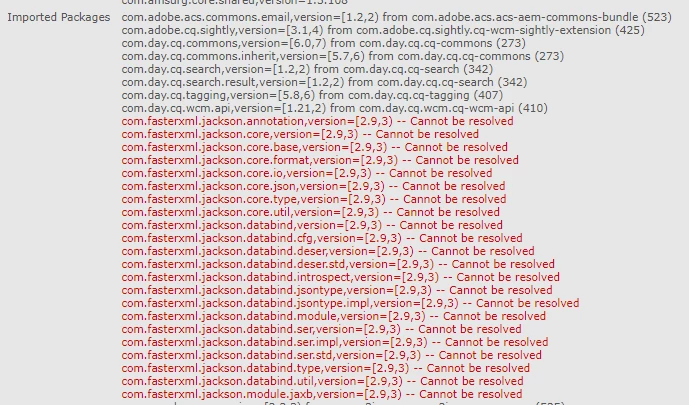
After investigating in the bundles I saw that these bundles are indeed being loaded and even show up in the Maven Manifest MF, but AEM doesn't count them as "Imported Packages", despite them showing up under "Import-Package". They are all clearly there under the Import-Package, correct version and all but AEM does not resolve any of them.

Is there something else AEM needs to run these correctly? I didn't set a version that they should load but, it seems to me that since they are showing up with the correct version AEM is looking for under "Import-Package" that they would be there somewhere.
Any ideas for Maven + AEM builds would definitely help!
Thanks
Brendan