AEM links with more than one # are delete by editor | Community
Skip to main content
anjabed
Level 2
December 10, 2024
Solved

AEM links with more than one # are delete by editor

  • December 10, 2024
  • 2 replies
  • 982 views

Hi,


we want to add Links in a text which have the format:
https://link.html/seite#/content/123/#TM4

If we add the link without the /#TM4 it works but as soon as we add the second # in the Link (and it doesn't matter where in the link) the editor deletes the link while closing.

Here I added it in a Text-Component in WE.Retail in men.html
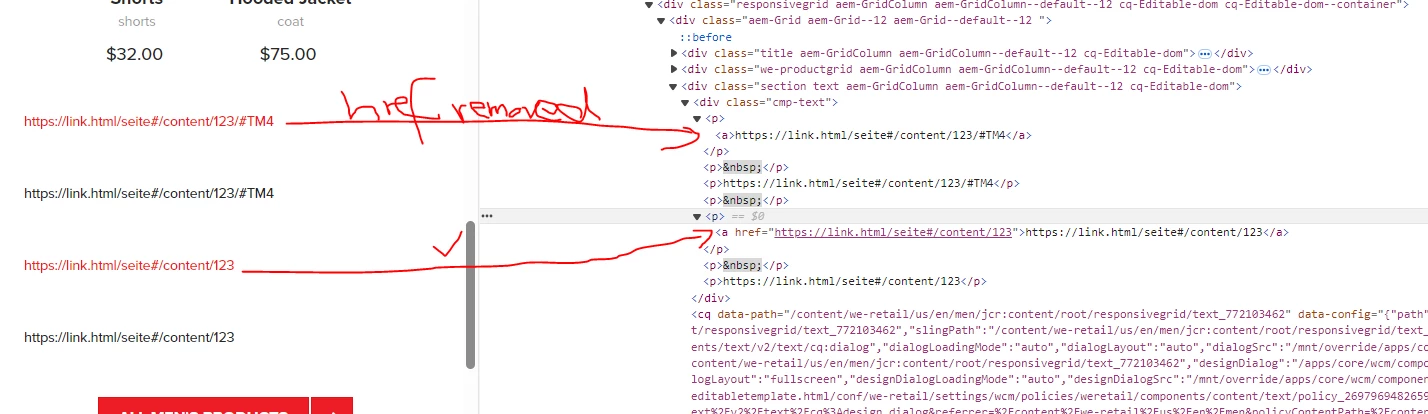


How can I say the editor: This is a correct link do not remove it when two # are in it?


Best Regards,


Anja 


Ps.: we have 6.5.0.18 on premise and the behaviour is in OOTB.

This post is no longer active and is closed to new replies. Need help? Start a new post to ask your question.
Best answer by EstebanBustamante

Hi,


You're simply missing the correct context for the HTML output. If you're not familiar with HTL context, you can check this out: https://github.com/adobe/htl-spec/blob/master/SPECIFICATION.md#121-display-context. If you don't use the right context, the XSS protection will remove the anchor tag, as you've observed.

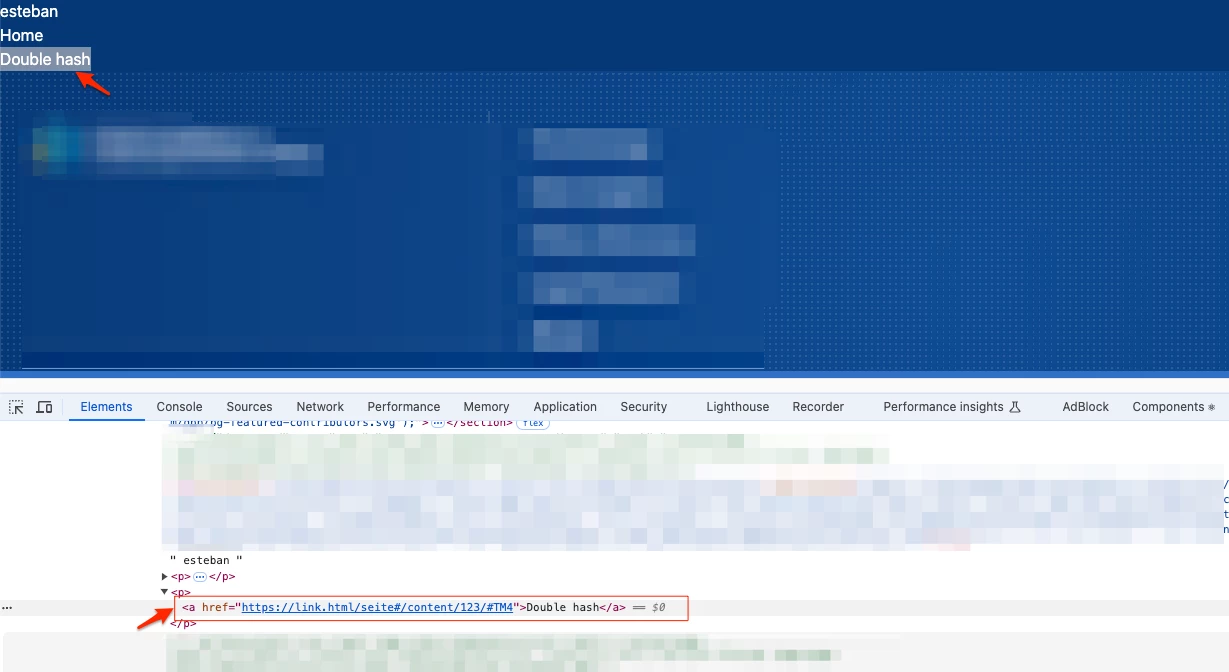
This works just fine — note the context='html'.

<p> <a href="${'https://link.html/seite#/content/123/#TM4' @ context='html'}">Double hash</a> </p>


Alternatively, you could tweak the XSS rules to allow the URL pattern with a double hash. Check my other response here about more details: https://experienceleaguecommunities.adobe.com/t5/adobe-experience-manager/how-xss-protection-works-in-aemaacs/td-p/622274


Hope this helps


2 replies

Kamal_Kishor
Community Advisor
Community Advisor
December 10, 2024

@anjabed : Your url seems different since it has multiple '#' in it. Since # is used to take control to a section with an id on the page (#section-id), it would not make sense to have multiple '#' in the link. Probably that's the reason Text component is removing the anchor tag from it.

Can you please check if you can re-construct your urls?


Kamal_Kishor
Community Advisor
Community Advisor
December 10, 2024

@anjabed : If you still need to have multiple # in your URL, try encoding the subsequent # as %23, so your URL becomes - https://link.html/seite#/content/123/%23TM4

With this, it will remain as a link. Please check if the link still does what you expect it to do.

thanks.

anjabed
anjabedAuthor
Level 2
December 10, 2024

Hi,

the URL with two # ist correct and need to be like this. The first # tells the page seite, that there is something to do with the rest after the # and the last # ist the textmark on the page 123.


It does not work like this:
https://link.html/seite#/content/123/%23TM4

And it does not work like this:
https://link.html/seite%23/content/123/#TM4


I need to configure the "check" if it is a correct URL that two or more # are correct.

EstebanBustamante
Community Advisor and Adobe Champion
EstebanBustamanteCommunity Advisor and Adobe ChampionAccepted solution
Community Advisor and Adobe Champion
December 10, 2024

Hi,


You're simply missing the correct context for the HTML output. If you're not familiar with HTL context, you can check this out: https://github.com/adobe/htl-spec/blob/master/SPECIFICATION.md#121-display-context. If you don't use the right context, the XSS protection will remove the anchor tag, as you've observed.

This works just fine — note the context='html'.

<p> <a href="${'https://link.html/seite#/content/123/#TM4' @ context='html'}">Double hash</a> </p>


Alternatively, you could tweak the XSS rules to allow the URL pattern with a double hash. Check my other response here about more details: https://experienceleaguecommunities.adobe.com/t5/adobe-experience-manager/how-xss-protection-works-in-aemaacs/td-p/622274


Hope this helps


Esteban Bustamante
anjabed
anjabedAuthor
Level 2
December 13, 2024

I am sorry, but this does not work.
I added the string

<p>
<a href="${'https://link.html/seite#/content/123/#TM4' @ context='html'}">Double hash</a>
</p>

into crx/de, save the page and the link is gone:


So this does not work.


But I will have a look at the xxs protection, perhaps this will help.


anjabed
anjabedAuthor
Level 2
December 13, 2024

Adding a rule for urls in the /apps/cq/xssprotection/config.xml helped. Thanks!