AEM design importer Upload Zip Option not working after Service pack 6.5.23 | Community
Skip to main content
Kamal_Kishor
Community Advisor
Community Advisor
October 17, 2025
Solved

AEM design importer Upload Zip Option not working after Service pack 6.5.23

  • October 17, 2025
  • 2 replies
  • 514 views

Issue starts after AEM 6.5.23 service pack installation.

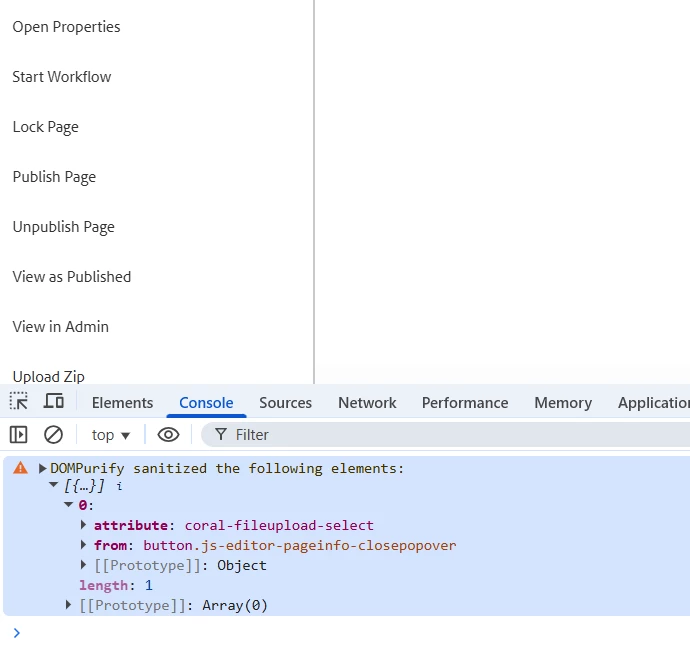
The file upload field stopped popping up on the "Upload Zip" option of design importer.
The error is due to sanitization of html which contained a non standard html attribute "coral-fileupload-select".
Is this something adobe should fix as issue is with coral fields which are used in AEM but are non standard?


Best answer by giuseppebaglio

hi @kamal_kishor,

AEM's XSS protection system sanitizes HTML responses to prevent cross-site scripting attacks. The sanitization is controlled by an attribute allowlist in /libs/granite/ui/components/coral/foundation/clientlibs/foundation/js/xss/xss.js. Maybe after upgrading to SP 6.5.23, the coral-fileupload-select attribute is not included in this allowlist anymore, causing the file upload field to fail to render properly. 


Until Adobe releases an official fix, you can implement a workaround by overlaying the XSS configuration file:

  1. Overlay the XSS configuration: Copy /libs/granite/ui/components/coral/foundation/clientlibs/foundation/js/xss/xss.js to /apps/granite/ui/components/coral/foundation/clientlibs/foundation/js/xss/xss.js​

  2. Add the missing attribute: Locate the ADD_ATTR array and add "coral-fileupload-select" to the allowlist, similar to other coral attributes already present​

  3. Clear browser cache and restart: Clear your browser cache and restart the AEM instance to ensure the changes take effect​


References: 

Protect against Cross-Site Scripting (XSS) 

2 replies

giuseppebaglio
giuseppebaglioAccepted solution
Level 10
October 17, 2025

hi @kamal_kishor,

AEM's XSS protection system sanitizes HTML responses to prevent cross-site scripting attacks. The sanitization is controlled by an attribute allowlist in /libs/granite/ui/components/coral/foundation/clientlibs/foundation/js/xss/xss.js. Maybe after upgrading to SP 6.5.23, the coral-fileupload-select attribute is not included in this allowlist anymore, causing the file upload field to fail to render properly. 


Until Adobe releases an official fix, you can implement a workaround by overlaying the XSS configuration file:

  1. Overlay the XSS configuration: Copy /libs/granite/ui/components/coral/foundation/clientlibs/foundation/js/xss/xss.js to /apps/granite/ui/components/coral/foundation/clientlibs/foundation/js/xss/xss.js​

  2. Add the missing attribute: Locate the ADD_ATTR array and add "coral-fileupload-select" to the allowlist, similar to other coral attributes already present​

  3. Clear browser cache and restart: Clear your browser cache and restart the AEM instance to ensure the changes take effect​


References: 

Protect against Cross-Site Scripting (XSS) 

Kamal_Kishor
Community Advisor
Community Advisor
October 17, 2025

@giuseppebaglio : thank you for your inputs. I do not see "coral-fileupload-select" in AEM 6.5.23
Adding this would probably resolve our issue.

I am wondering if this should be fixed from adobe through a hotfix for 6.5.23 or we need to custom fix this for all such instances.
thanks.


giuseppebaglio
Level 10
October 17, 2025

I believe the best course of action is to open a support ticket with Adobe regarding this issue. You can also inquire if my suggestion could serve as a temporary workaround until/if they will release a patch.

VishalKa5
Level 5
October 17, 2025

Hi @kamal_kishor ,


This issue should ideally be fixed by Adobe via an official hotfix rather than a custom change.

After AEM 6.5.23, stricter HTML sanitization removed non-standard attributes like coral-fileupload-select, which are used internally by Coral UI. As a result, the Design Importer’s “Upload Zip” dialog no longer opens because the attribute required by the file upload field is missing.

Since this attribute is part of Adobe’s Coral UI, the issue is a regression in the service pack, not a problem in your code. The correct approach is to log a support ticket with Adobe for a patch.

Temporary client-side workarounds (e.g., re-adding the attribute via JavaScript) are possible but not recommended for production.

In short, this is a product-level issue introduced in 6.5.23, and Adobe should provide an official fix.


Thanks & Regards,

Vishal

Kamal_Kishor
Community Advisor
Community Advisor
October 17, 2025

@vishalka5 : Thank you for your response. This does help us with our future course of action. We are in the process of raising a support ticket with Adobe. thanks.