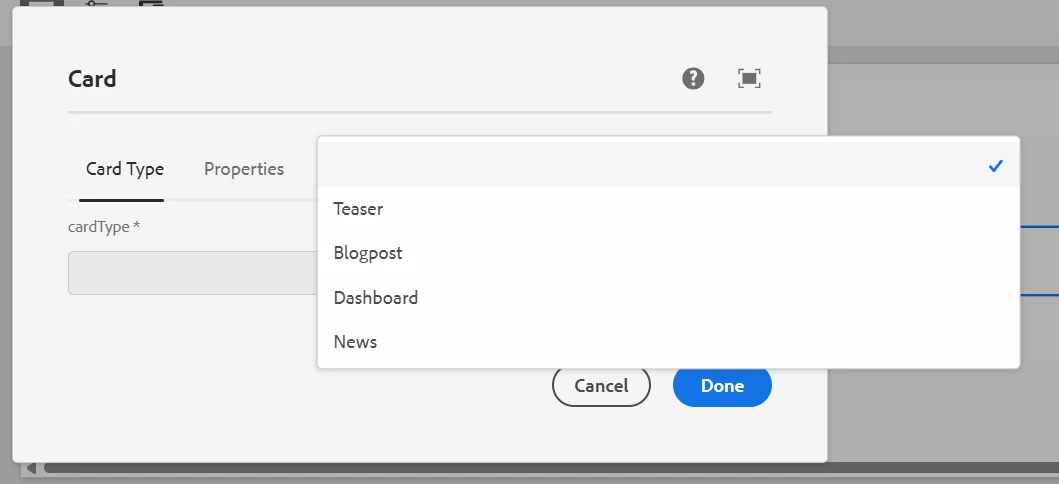
AEM cloud select field dropdown issue | Community
Skip to main content
This post is no longer active and is closed to new replies. Need help? Start a new post to ask your question.
Best answer by PavanGaddam

I think something from your custom client library is causing that issue. Check if you are using any OOTB CSS class in your custom CSS. You may try the elimination method to find the right component CSS that is causing this issue. Try removing one component at a time in your project and verify and see at what point this gets fixed. 

3 replies

PavanGaddamAdobe EmployeeAccepted solution
Adobe Employee
June 26, 2025

I think something from your custom client library is causing that issue. Check if you are using any OOTB CSS class in your custom CSS. You may try the elimination method to find the right component CSS that is causing this issue. Try removing one component at a time in your project and verify and see at what point this gets fixed. 

Karishma_begumSh
Level 4
June 27, 2025

Hi @manchala1 

1. Check for Global CSS Overrides

  • Search your global/project stylesheets for overrides on dropdown-related classes.

  • Example (bad practice):

    select {
      margin: 5px;
      width: 150px;
    }
  • Avoid overriding Coral UI core classes directly.

2. Ensure Proper Dialog Container Styling

  • Parent containers should not have restrictive styles that interfere with Coral dropdown rendering.

  • Fix example:

    .coral3-Select-popover {
      left: 0 !important;
      width: auto !important;
      min-width: 100% !important;
    }

3. Force Correct Width (Quick Fix)

Add scoped styles to align dropdown widths consistently:

.coral3-Select {
  width: 100% !important;
}
.coral3-SelectList {
  min-width: 100% !important;
}

4. Validate in Clean AEM Instance

  • Deploy the same dialog on a clean AEM SDK instance without custom code.

  • If the dropdown appears correctly, the issue originates from project-specific CSS or dialog structure.

5. Use Coral UI JavaScript Hook (Optional)

Ensure dropdowns are initialized properly if added dynamically or affected by JS timing:

Coral.commons.ready(function() { Coral.commons.triggerComponentUpgrade(document.querySelectorAll('.coral-Select')); });


Regards,

Karishma.

kautuk_sahni
Community Manager
Community Manager
July 9, 2025

@manchala1 Just checking in — were you able to resolve your issue?
We’d love to hear how things worked out. If the suggestions above helped, marking a response as correct can guide others with similar questions. And if you found another solution, feel free to share it — your insights could really benefit the community. Thanks again for being part of the conversation!

Kautuk Sahni