AEM Cloud manager - Builds fail on Stage when content package included, but works on Dev environment | Adobe Higher Education
Skip to main content
surenk
Level 4
October 23, 2023
Besvarat

AEM Cloud manager - Builds fail on Stage when content package included, but works on Dev environment

  • October 23, 2023
  • 3 svar
  • 1570 visningar

Having similar issue to this https://experienceleaguecommunities.adobe.com/t5/adobe-experience-manager/cloud-manager-deployment-content-package-not-getting-deployed/m-p/411723 


We need to integrate Phrase for our site translations. And have configured as instructed by Phrase here https://support.phrase.com/hc/en-us/articles/5709667773084-Adobe-Experience-Manager-AEM-TMS- (Open section > AEM as a cloud service)
 
1. in /pom.xml


<memsource.version>3.1.15.5</memsource.version> .. <repositories> <!-- for Phrase Memsource --> <repository> <id>phrase-memsource</id> <name>memsource</name> <url>file:${project.basedir}/repository</url> </repository> </repositories>


2. in /all/pom.xml


<dependency> <groupId>com.memsource</groupId> <artifactId>aem-memsource-plugin.all</artifactId> <version>${memsource.version}</version> <type>zip</type> </dependency>


--and copied "repository" folder (/all/repository) that contains the memsource zip file.
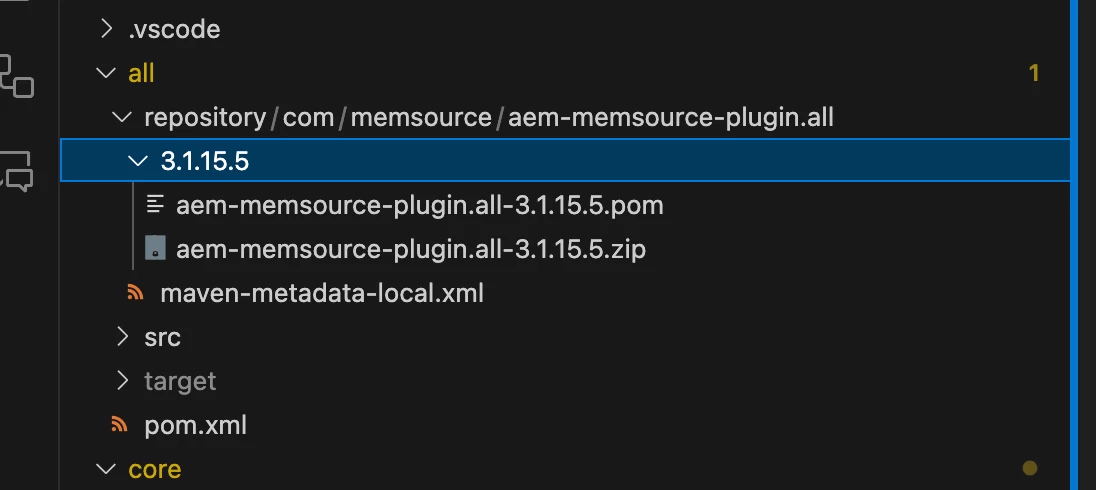
 
-------------------
The same setup, SUCCEEDs on DEV builds, but FAILS on STAGE build.
 
Failed on stage:
Logs show this error on STAGE:
[91mjava.io.IOException: Error while loading package /tmp/cp2fm-converter4471812595875810708/sub-content-packages/aem-memsource-plugin.all-3.1.15.5.zip
[91m at org.apache.jackrabbit.vault.packaging.impl.ZipVaultPackage.<init>(ZipVaultPackage.java:81)
Det här ämnet har stängts för svar.
Bästa svar av surenk

This has been resolved with Adobe tech support help.

1. Adobe support worked with the engineering team to clear the cache and set the CM_DISABLE_BUILD_REUSE (https://experienceleague.adobe.com/docs/experience-manager-cloud-manager/content/getting-started/project-creation/project-setup.html) so that artifacts are not reused.


2. After the above, on redeploying the build, the plugin was installed successfully.

3 svar

Shashi_Mulugu
Community Advisor
Community Advisor
October 24, 2023

@surenk can you cross check your repository folder and place of your entry in pom.xml? I think you need to add dependency also to all pom.xml only and repository folder is inside all module?

surenk
surenkSkribent
Level 4
October 24, 2023

Thanks @shashi_mulugu 

1. I did add the dependency in "/project-root/all/pom.xml"

2. Earlier tried placing "repository" folder in the project root, but think Maven when using 

${project.basedir} is referring to "/project-root/all" so moved "repository" under "/project-root/all".
kautuk_sahni
Community Manager
Community Manager
October 26, 2023

@surenk Did you find the suggestions from users helpful? Please let us know if more information is required. Otherwise, please mark the answer as correct for posterity. If you have found out solution yourself, please share it with the community.

Kautuk Sahni
surenk
surenkSkribent
Level 4
October 30, 2023

Not a solution/answer yet, I have a support ticket with Adobe, working through this issue. Will post the solution the sooner we are able to solve this.

surenk
surenkSkribentSvar
Level 4
November 15, 2023

This has been resolved with Adobe tech support help.

1. Adobe support worked with the engineering team to clear the cache and set the CM_DISABLE_BUILD_REUSE (https://experienceleague.adobe.com/docs/experience-manager-cloud-manager/content/getting-started/project-creation/project-setup.html) so that artifacts are not reused.


2. After the above, on redeploying the build, the plugin was installed successfully.