AEM 6.5.8 Icons not showing on Start page? | Community
Skip to main content
Level 2
September 27, 2021
Solved

AEM 6.5.8 Icons not showing on Start page?

  • September 27, 2021
  • 3 replies
  • 6835 views

Hello,

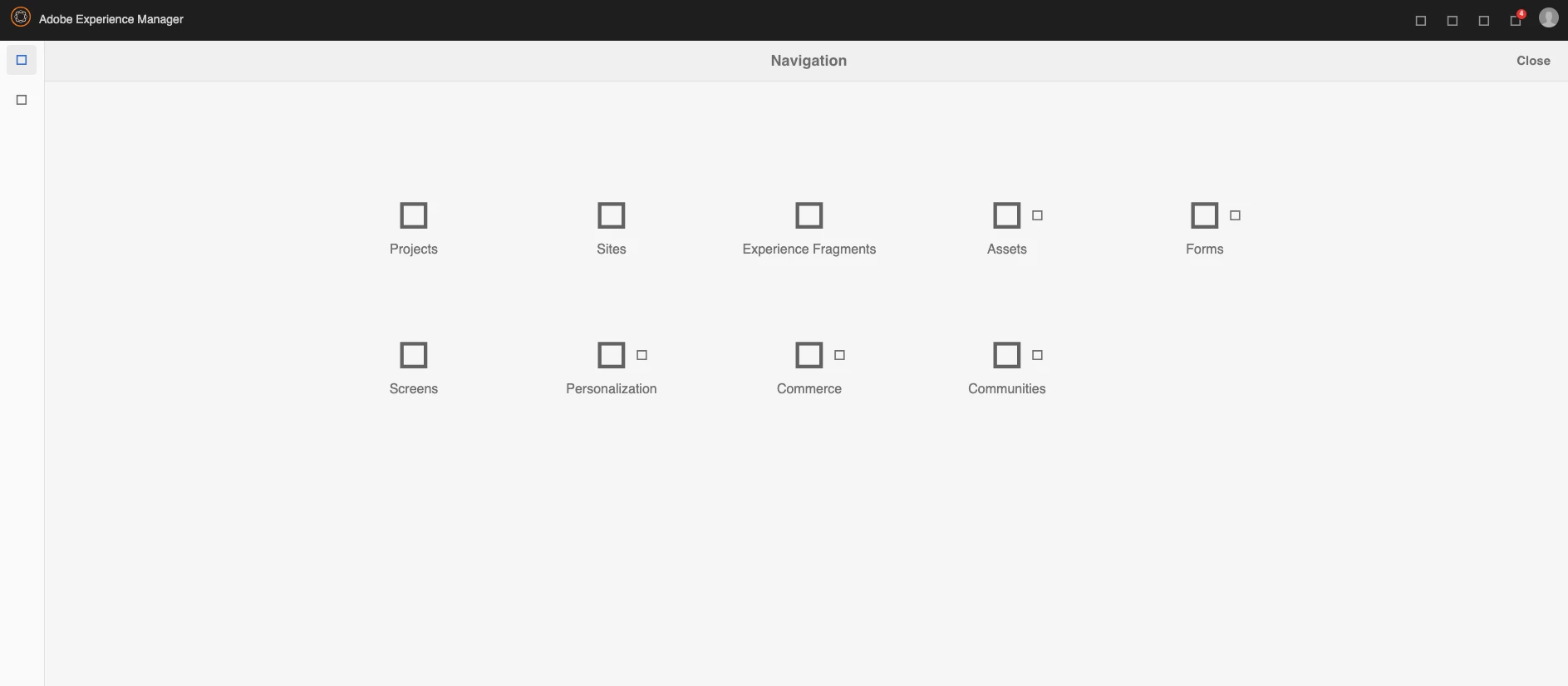
I started my Local AEM instance on 4502 today and all of the Icons are showing as squares? I've tried other browsers to see if the issue was Chrome and the page appears the same way? I've also run my instance in Debug Mode - java -XX:MaxPermSize=256m -Xmx1024M -agentlib:jdwp=transport=dt_socket,server=y,suspend=n,address=5005 -jar aem-author-p4502.jar to see if it was an issue there and they show up as squares as well. How can I fix this?
 

This post is no longer active and is closed to new replies. Need help? Start a new post to ask your question.
Best answer by Asutosh_Jena_

Hi asutosh_jena,


I'm not sure where to start with the first stackoverflow link? There are several solutions in that post. Where can I find the CSS files in the AEM instance?


As for the second link (you provided), it doesn't look like it applies to AEM?


Any more assistance would be greatly appreciated.


Thanks!


Hi @shawnko 


Please access the below URL and click on the "Invalidate Caches" button.

http://localhost:4502/libs/granite/ui/content/dumplibs.rebuild.html?invalidate=true


Then click on the "Rebuild Libraries" and check if the issues are fixed.


What action was taken on the instance which caused this issue? Can you provide some more information.


Thanks!

3 replies

Asutosh_Jena_
Community Advisor
Community Advisor
September 27, 2021

Hi @shawnko 


You must be getting some error on console. Can you check and confirm what error you are getting. Is it file not found? If yes, please check if the files requested are present at the location where it was supposed to be.


Thanks!

ShawnKoAuthor
Level 2
September 27, 2021

Hi Asutosh_jena,


This is what I'm getting in the console:


Refused to apply style from 'http://localhost:4502/etc.clientlibs/clientlibs/granite/typekit/resources/ruf7eed/c/ruf7eed-d.css' because its MIME type ('text/html') is not a supported stylesheet MIME type, and strict MIME checking is enabled.
granite.min.js:259 [Deprecation] Synchronous XMLHttpRequest on the main thread is deprecated because of its detrimental effects to the end user's experience. For more help, check https://xhr.spec.whatwg.org/.
XMLHttpRequest.open @ granite.min.js:259
self.getDictionary @ utils.min.js:999
self.get @ utils.min.js:1026
(anonymous) @ foundation.min.js:74
(anonymous) @ foundation.min.js:93
coralui3.min.css:1 GET http://localhost:4502/etc.clientlibs/clientlibs/granite/coralui3/resources/coralui-component-icon/AdobeSpectrumIcons18.woff2?651453a29a2cf87546cdc6215616731e net::ERR_ABORTED 500 (Server Error)
coralui3.min.css:1 GET http://localhost:4502/etc.clientlibs/clientlibs/granite/coralui3/resources/coralui-component-icon/AdobeSpectrumIcons24.woff2?b750bfd862e4ef0daea700228de3e788 500 (Server Error)
coralui3.min.css:1 GET http://localhost:4502/etc.clientlibs/clientlibs/granite/coralui3/resources/coralui-component-icon/AdobeSpectrumIcons18.woff?651453a29a2cf87546cdc6215616731e net::ERR_ABORTED 500 (Server Error)
coralui3.min.css:1 GET http://localhost:4502/etc.clientlibs/clientlibs/granite/coralui3/resources/coralui-component-icon/AdobeSpectrumIcons24.woff?b750bfd862e4ef0daea700228de3e788 net::ERR_ABORTED 500 (Server Error)
coralui3.min.css:1 GET http://localhost:4502/etc.clientlibs/clientlibs/granite/coralui3/resources/coralui-component-icon/AdobeSpectrumIcons18.ttf?651453a29a2cf87546cdc6215616731e net::ERR_ABORTED 500 (Server Error)
coralui3.min.css:1 GET http://localhost:4502/etc.clientlibs/clientlibs/granite/coralui3/resources/coralui-component-icon/AdobeSpectrumIcons24.ttf?b750bfd862e4ef0daea700228de3e788 net::ERR_ABORTED 500 (Server Error)

Asutosh_Jena_
Community Advisor
Community Advisor
September 28, 2021
Shubham_borole
Community Advisor
Community Advisor
September 28, 2021

@shawnko 

Can you please try to rebuild clientlibraries? Eg: http://host:port/libs/granite/ui/content/dumplibs.rebuild.html?invalidate=true 


Also sometimes reinstalling the last service pack you installed helps. (Do NOT uninstall any SP as an attempt to fix)


ShawnKoAuthor
Level 2
September 28, 2021

Hi snbaem,


I tried the "rebuild clientlibraries" and I'm gettin several "java.io.IOException" errors. Quite a few in fact.


i also tried to reinstall the SP and I get this error: 

java.io.IOException: java.io.IOException: org.apache.jackrabbit.core.data.DataStoreException: Record c6ffba3e2e02730307028d937282bbd5bc2817c4780340c030e31ed8a8bb74a1 does not exist


Level 2
August 4, 2022

Hi there, 

I got the same issue, please let me know if you were able to fix it(I'm using 6.5.0).Thanks a lot, cheers!

B_Sravan
Community Advisor
Community Advisor
August 4, 2022

Please Upgrade to 6.5.8 or above service pack.

Level 2
August 5, 2022

cool, let me check, thanks a lot!