Adding a mandatory custom field while creating experience fragment | Community
Skip to main content
June 3, 2024
Solved

Adding a mandatory custom field while creating experience fragment

  • June 3, 2024
  • 4 replies
  • 966 views

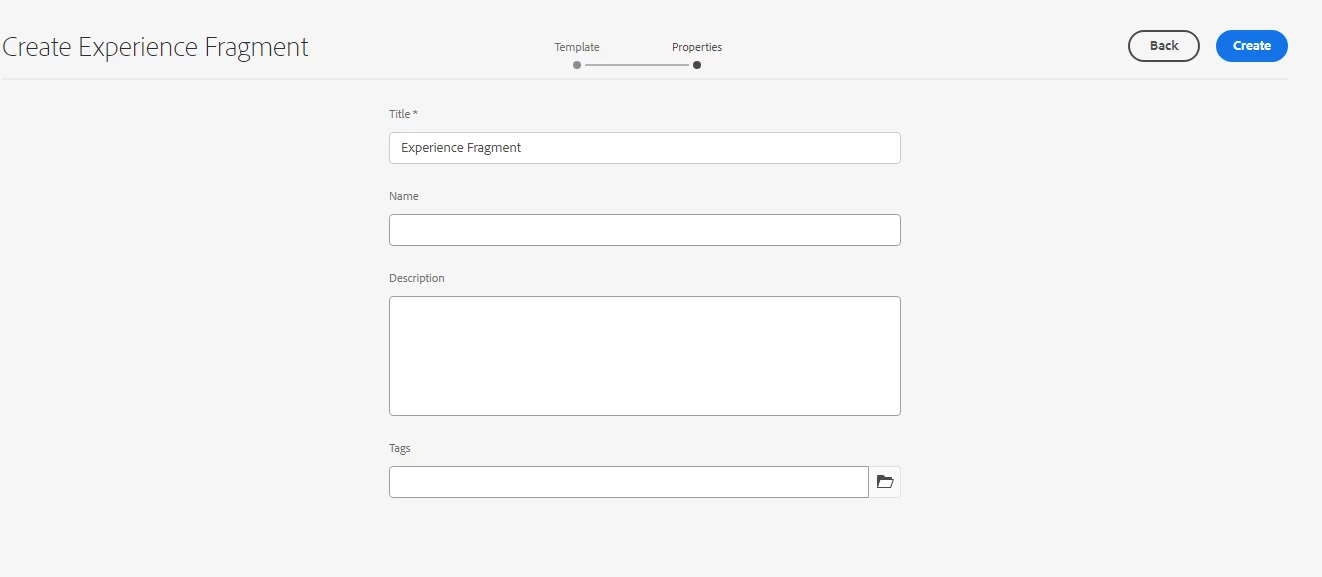
I am looking for a solution on adding a custom mandatory field while creating an experience fragment after the template selection step(PFA screenshot). The requirement is to not allow experience fragment creation until a specific custom field is filled. Is there a way to achieve this?

This post is no longer active and is closed to new replies. Need help? Start a new post to ask your question.
Best answer by sravs

Hi @abhishekti4 ,


Create your custom field at the xf-page component dialog level and add below properties to that field. 

cq:showOnCreate="{Boolean}true"
required="{Boolean}true"   

https://experienceleague.adobe.com/en/docs/experience-manager-65/content/implementing/developing/extending-aem/page-properties-views


  • Page property to be available in the create view (e.g. Create Page wizard):
    • Name: cq:showOnCreate
    • Type: Boolean
  • Page property to be available in the edit view (e.g. View/Edit) Properties option):
    • Name: cq:hideOnEdit
    • Type: Boolean

Hope this helps!!


4 replies

sravs
Community Advisor
sravsCommunity AdvisorAccepted solution
Community Advisor
June 3, 2024

Hi @abhishekti4 ,


Create your custom field at the xf-page component dialog level and add below properties to that field. 

cq:showOnCreate="{Boolean}true"
required="{Boolean}true"   

https://experienceleague.adobe.com/en/docs/experience-manager-65/content/implementing/developing/extending-aem/page-properties-views


  • Page property to be available in the create view (e.g. Create Page wizard):
    • Name: cq:showOnCreate
    • Type: Boolean
  • Page property to be available in the edit view (e.g. View/Edit) Properties option):
    • Name: cq:hideOnEdit
    • Type: Boolean

Hope this helps!!


arunpatidar
Community Advisor
Community Advisor
June 3, 2024

Hi @abhishekti4 
You need to overlay OOTB, create experience fragment node and add a custom node/field.

Please make sure you also write render condition to show this custom field within specific paths/templates.

Arun Patidar
HrishikeshKagne
Community Advisor
Community Advisor
June 3, 2024

Hi @abhishekti4 ,

To add a mandatory custom field when creating an Experience Fragment (XF) in AEM and enforce that the fragment cannot be created until this field is filled, you need to customize the Experience Fragment creation dialog and add validation logic. Here's how you can achieve this:

Steps to Add a Mandatory Custom Field in Experience Fragment Creation Dialog

  1. Create or Modify the Experience Fragment Template:

    • Navigate to /conf/<your-project>/settings/wcm/templates in CRXDE Lite or AEM Console.
    • Create or modify the Experience Fragment template that you are using.
  2. Customize the Experience Fragment Creation Dialog:

    • Locate the Experience Fragment creation dialog at /libs/cq/experience-fragments/content/dialogs/createFragment or overlay it to /apps for customization.
    • Navigate to CRXDE Lite: http://<AEM-HOST>:<PORT>/crx/de/index.jsp.
    • Copy the node structure from /libs/cq/experience-fragments/content/dialogs/createFragment to /apps/cq/experience-fragments/content/dialogs/createFragment if it doesn't already exist.
  3. Add a Custom Field to the Dialog:

    • In the copied dialog structure under /apps/cq/experience-fragments/content/dialogs/createFragment, add your custom field to the items node.
    • Ensure your custom field is marked as mandatory.

    Example structure for the custom field:


/apps /cq /experience-fragments /content /dialogs /createFragment /items /content /items /column /items /customField - jcr:primaryType: "nt:unstructured" - sling:resourceType: "granite/ui/components/coral/foundation/form/textfield" - fieldLabel: "Custom Field" - name: "./customField" - required: true - validation: "foundation-validation"


  1. Add Validation to the Custom Field:

    • Use Granite UI validation to enforce that the field is mandatory. You can use the required property and foundation-validation for basic required field validation.
    • Add the required property to the custom field node.
  2. Update the Experience Fragment Component Model:

    • If necessary, update the underlying model or logic that handles the Experience Fragment creation to ensure the custom field is checked before the fragment is persisted.
    • This might involve customizing the servlet or backend code handling the form submission.

Example Custom Field Node

Here's an example of how your custom field node might look:


/apps /cq /experience-fragments /content /dialogs /createFragment /items /content /items /column /items /customField - jcr:primaryType: "nt:unstructured" - sling:resourceType: "granite/ui/components/coral/foundation/form/textfield" - fieldLabel: "Custom Field" - name: "./customField" - required: true - validation: "foundation-validation"


Verifying the Implementation

  1. Navigate to Create an Experience Fragment:

    • Go to AEM Sites, and try to create a new Experience Fragment using the modified template.
    • Ensure that the custom field appears in the creation dialog and is marked as mandatory.
  2. Test Validation:

    • Attempt to create the Experience Fragment without filling in the custom field.
    • Ensure that the form does not submit and prompts you to fill in the mandatory field.

By following these steps, you can add a custom mandatory field to the Experience Fragment creation dialog in AEM, ensuring that users cannot create an Experience Fragment without filling in the specified field. This approach leverages the flexibility of Granite UI and AEM's extensible dialog system to enforce custom validation rules.

 
Hrishikesh Kagane
kautuk_sahni
Community Manager
Community Manager
June 4, 2024

@abhishekti4 Did you find the suggestions from users helpful? Please let us know if you require more information. Otherwise, please mark the answer as correct for posterity. If you have found out solution yourself, please share it with the community.

Kautuk Sahni