
Add external links in an AEM component | Adobe Higher Education
Skip to main content
Jacket97
Level 2
April 12, 2022
Respondido

Add external links in an AEM component

  • April 12, 2022
  • 1 resposta
  • 5014 Visualizações

Hi everyone,
I'm new to Aem, I'm trying to extend the List component to be able to make it accept external URLs too, since until now I've noticed that it doesn't take external URLs.
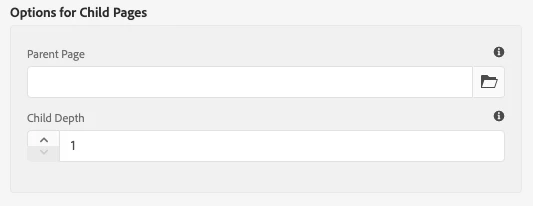
 

I thought of extending the List component by inserting a new Text tab where to insert a string to be printed. But I don't understand why it doesn't print the string to me, nor can I add the "add" button to make it add more fields. If you have ideas on how to make them insert external URLs without having to modify they are welcome

 

Melhor resposta por Anmol_Bhardwaj

OOTB List component can be populated through :

  • Child pages
  • Fixed List

Add the "add" button to make it add more fields:

This is because you are using the child pages option from the dropdown. This will only provide single field which will act as a parent node whose children are traversed.

If you select the fixed list, you would get additional options.

https://www.aemcomponents.dev/content/core-components-examples/library/core-content/list.html 


I don't understand why it doesn't print the string to me:

The string printed in the list is the jcr:title of the page whose path you have authored in the path browser. There is a whole back-end logic in place for that.

If you need external URLs, you would need to add a new column/tab, where you would need to give input for links & text both. And then you would need to write the corresponding HTML.


You can go through the back-end code for OOTB components in the below repo:

https://github.com/adobe/aem-core-wcm-components 

1 Resposta

Anmol_Bhardwaj
Community Advisor
Community Advisor
April 12, 2022

OOTB List component can be populated through :

  • Child pages
  • Fixed List

Add the "add" button to make it add more fields:

This is because you are using the child pages option from the dropdown. This will only provide single field which will act as a parent node whose children are traversed.

If you select the fixed list, you would get additional options.

https://www.aemcomponents.dev/content/core-components-examples/library/core-content/list.html 


I don't understand why it doesn't print the string to me:

The string printed in the list is the jcr:title of the page whose path you have authored in the path browser. There is a whole back-end logic in place for that.

If you need external URLs, you would need to add a new column/tab, where you would need to give input for links & text both. And then you would need to write the corresponding HTML.


You can go through the back-end code for OOTB components in the below repo:

https://github.com/adobe/aem-core-wcm-components 

Jacket97
Level 2
April 12, 2022

Thanks for the answer, if I may ask you: Isn't there a way to insert an external link in the fixed list?

Anmol_Bhardwaj
Community Advisor
Community Advisor
April 12, 2022

We can add external links, but the problem in this scenario is the back-end logic. It is trying to resolve the resource within the given path, and then showing jcr:title as the text and resolved resourcePath as the link. So, if you give an external link, you would not see a element populated in the list because of this.


You can create a modal class with Link through delegation and just override the function to return the link as it is if it is external .( contains http/s or www )

https://aemexplained.wordpress.com/aem-guide/extending-component-using-sling-delegation/