Adaptive Form Table - How to get field(s) to recalculate after removing a Row Instance | Community
Skip to main content
Level 2
April 13, 2018
Solved

Adaptive Form Table - How to get field(s) to recalculate after removing a Row Instance

  • April 13, 2018
  • 12 replies
  • 6837 views

I have a simple table in a draft form - just trying to get the fields to recalculate after removing an instance of a row.

Adding an instance and using the field(s) work just fine - but if I remove a row - the TOTAL OF COLUMN does not recalculate.

I would prefer NOT to use an extra click to solve.  I am hoping I can recalculate upon 'removeInstance'.

How do I accomplish this?

Thanks

John

This post is no longer active and is closed to new replies. Need help? Start a new post to ask your question.
Best answer by johnhodnefield

All,

After working the problem through a little more - I solved it.  Here is how I did it.

  1. Set up the rule in the rule editor.
    1. I wanted the code to fire regardless of how many rows there were – so instead of having code in the ‘row total’ of each instance
      of the row – I added it to the ‘total of sums’ field.
    2. Since I want this code to fire all the time – I set the condition to fire when empty and when not empty.
    3. Then, I set the function result (sum) to add each of the instances of ‘row total’.
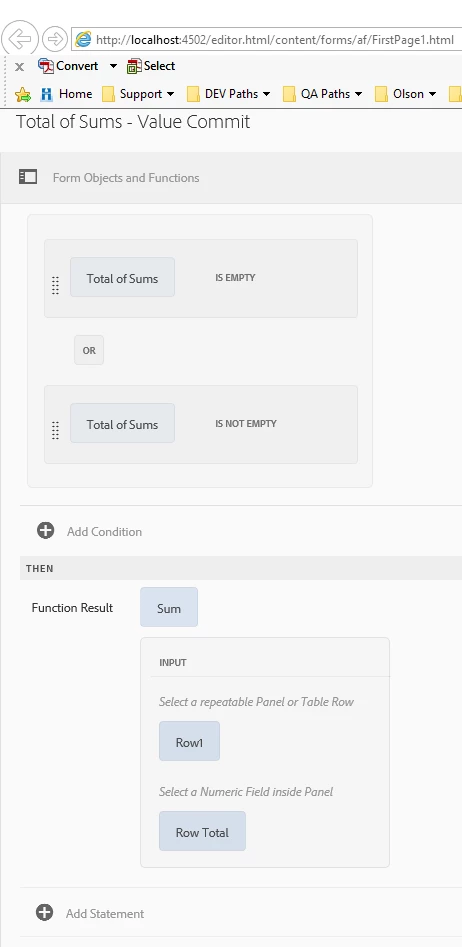


DO NOT Click ‘Done’  !!  If you do – you will need to rewrite half of what AEM deletes when you go back to edit.

This is how AEM wrote the code.

WHEN
Total of Sums is changed
AND
(Total of Sums is empty)
OR
(Total of Sums is not empty)
THEN
(Output of Function Sum)

As written by AEM, this code will never fire
because ‘total of sums’ is readOnly AND is waiting for its value to change.

2.  So then, while we are still in the rule editor screen, we switch from ‘Visual Editor’, to ‘Code Editor’
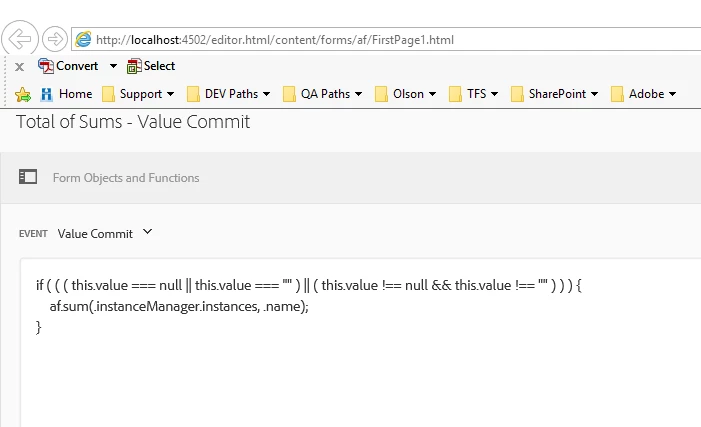
(and)
change the Event from ‘Value Commit’ (or whatever it is) and select ‘Calculate’.
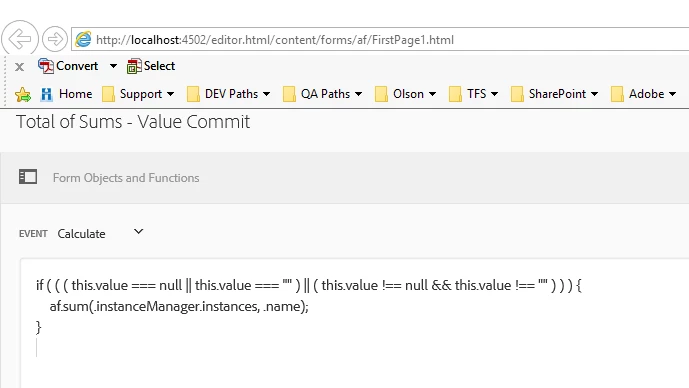


Further Development

If you work through this example – you’ll notice that the calculation field displays “$0.00” when empty or “0”.  To fix that – I added this code the Rule
Editor – following much of the same steps above.


Instead of 'calculate' - I switched it to 'validate'.

if ( ( this.value == 0 || (this.value === null || this.value === "" ) ) )

{  
     this.value = null;

}

12 replies

johnhodnefieldAuthorAccepted solution
Level 2
April 13, 2018

All,

After working the problem through a little more - I solved it.  Here is how I did it.

  1. Set up the rule in the rule editor.
    1. I wanted the code to fire regardless of how many rows there were – so instead of having code in the ‘row total’ of each instance
      of the row – I added it to the ‘total of sums’ field.
    2. Since I want this code to fire all the time – I set the condition to fire when empty and when not empty.
    3. Then, I set the function result (sum) to add each of the instances of ‘row total’.


DO NOT Click ‘Done’  !!  If you do – you will need to rewrite half of what AEM deletes when you go back to edit.

This is how AEM wrote the code.

WHEN
Total of Sums is changed
AND
(Total of Sums is empty)
OR
(Total of Sums is not empty)
THEN
(Output of Function Sum)

As written by AEM, this code will never fire
because ‘total of sums’ is readOnly AND is waiting for its value to change.

2.  So then, while we are still in the rule editor screen, we switch from ‘Visual Editor’, to ‘Code Editor’

(and)
change the Event from ‘Value Commit’ (or whatever it is) and select ‘Calculate’.


Further Development

If you work through this example – you’ll notice that the calculation field displays “$0.00” when empty or “0”.  To fix that – I added this code the Rule
Editor – following much of the same steps above.


Instead of 'calculate' - I switched it to 'validate'.

if ( ( this.value == 0 || (this.value === null || this.value === "" ) ) )

{  
     this.value = null;

}

smacdonald2008
Level 10
April 13, 2018

thanks for the detailed post. I am sure this will help a lot of ppl in the future.