ACS AEM Commons package (Content fragment import) import LinkList field | Community
Skip to main content
ShaggySPFLD
Level 2
April 23, 2024

ACS AEM Commons package (Content fragment import) import LinkList field

  • April 23, 2024
  • 5 replies
  • 1498 views

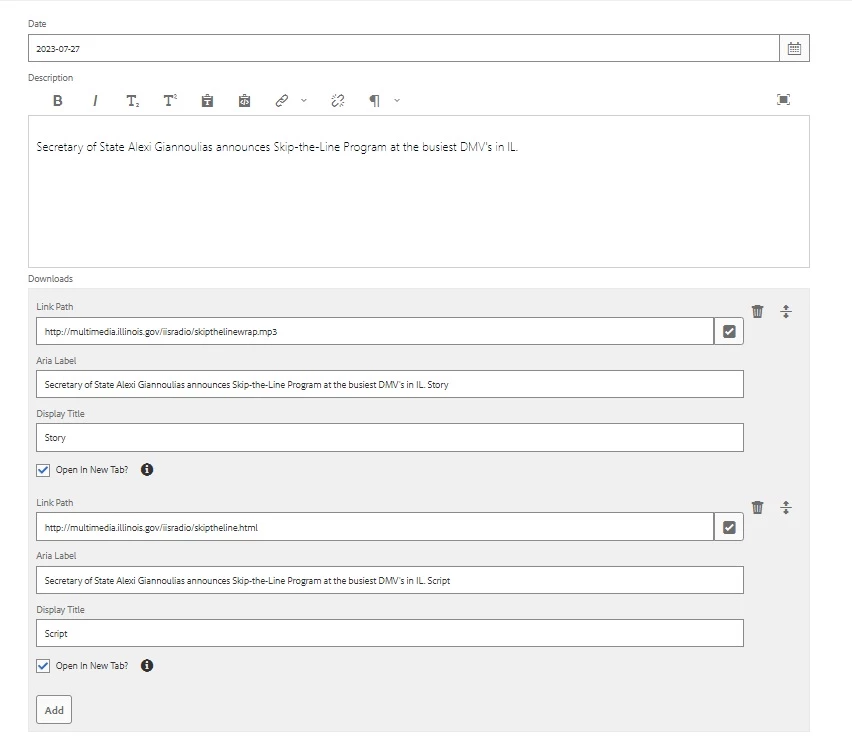
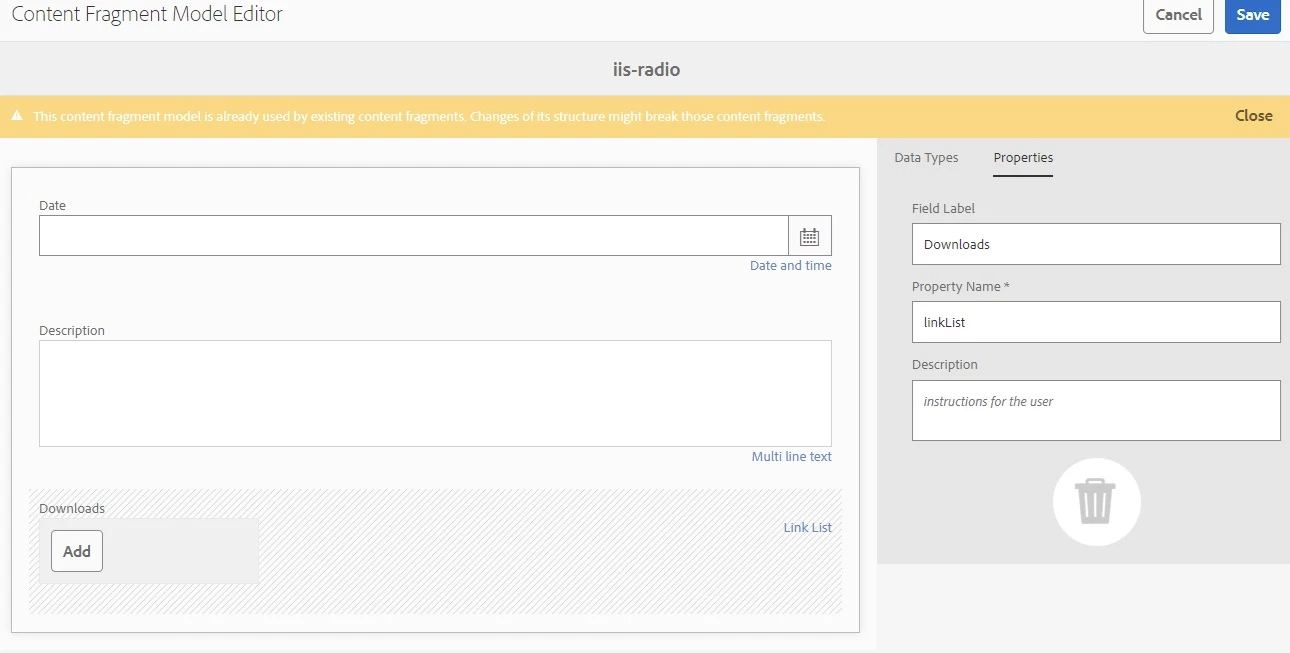
Can anyone tell me if this component is capable of importing a LinkList field?  I've had success importing the basic field types, but now I have need to import a CF model with a field of type "LinkList" and I'm not sure what the formatting of the excel column should be.  Any help on this, or if the component supports it at all would be highly helpful.


Example of the CF Model and an example instance of this is below:
Thanks!


This post is no longer active and is closed to new replies. Need help? Start a new post to ask your question.

5 replies

aanchal-sikka
Community Advisor
Community Advisor
April 24, 2024

@shaggyspfld 


AEM OOTB does not support Composite multifields. 


For using OOTB capabilities:


1. We would need to create separate Content Fragments for:


2. And then use multifield Content Reference to links these CF to parent.


There are few blogs that suggest creating composite multifield in CF, but ITS NOT RECOMMENDED. The GraphQL queries might not work with these fields.


Aanchal Sikka
EstebanBustamante
Community Advisor and Adobe Champion
April 26, 2024

@shaggyspfld Did you find the suggestions from users helpful? Please let us know if more information is required. Otherwise, please mark the answer as correct for posterity. If you have found out solution yourself, please share it with the community

Esteban Bustamante
ShaggySPFLD
Level 2
April 26, 2024

Well while not helpful I understand the answer.  I just think it's a bit short sighted.  What it means is that I'll have to write a custom importer to get the data into the CF Model myself.  I mean it has to be possible since there is a method to output the CF model to JSON, then it has to be possible to import it as well.  If Content Fragments are going to be the answer for flexible user defined data then they will need to further mature and allow more functionality, I can't imagine I'm the only one dealing with this out there and the users needs only advance with time.

EstebanBustamante
Community Advisor and Adobe Champion
April 26, 2024

Everyone is welcome to contribute with their ideas to mature the product, kindly add your thoughts in this section: https://experienceleaguecommunities.adobe.com/t5/adobe-experience-manager-ideas/idb-p/adobe-experience-manager-ideas

Esteban Bustamante
HrishikeshKagne
Community Advisor
Community Advisor
May 5, 2024

Hi @shaggyspfld ,

The ACS AEM Commons package provides various utilities and tools for Adobe Experience Manager (AEM), but as of my last update, it does not have built-in support for importing LinkList fields in content fragments.

To import data into a LinkList field in a content fragment using ACS AEM Commons, you might need to develop a custom solution. Here's a general approach you could take:

  1. Understand LinkList Field Structure: First, understand how the LinkList field is structured within AEM. Typically, it's an array of link objects, each containing properties like URL, text, target, etc.

  2. Prepare Data in Excel: In your Excel spreadsheet, you would need to represent each link in the LinkList field as a separate row, with columns representing properties like URL, text, target, etc. You may need to devise a specific format for this representation based on your requirements.

  3. Custom Import Logic: Develop custom logic to parse the Excel data and populate the LinkList field accordingly. This logic would need to read each row from the Excel spreadsheet, create link objects, and add them to the LinkList field of the content fragment.

  4. Excel Column Formatting: As for the formatting of the Excel column, it would depend on how you decide to represent the link objects. Each column could represent a specific property of the link (e.g., URL, text, target), and each row would represent a separate link in the LinkList.

  5. Testing and Validation: Test your custom import logic thoroughly with different data scenarios to ensure that it correctly parses the Excel data and populates the LinkList field as expected.

  6. Error Handling: Implement error handling and validation in your custom import logic to handle cases where the data in the Excel spreadsheet is invalid or incomplete.

Remember that this approach involves custom development and might require a good understanding of AEM's content structure and ACS AEM Commons utilities. Additionally, consider reaching out to the AEM community or consulting the ACS AEM Commons documentation for any updates or additional guidance on this topic.

Hrishikesh Kagane
kautuk_sahni
Community Manager
Community Manager
May 16, 2024

@shaggyspfld Did you find the suggestions from users helpful? Please let us know if more information is required. Otherwise, please mark the answer as correct for posterity. If you have found out solution yourself, please share it with the community.

Kautuk Sahni