Accordion Component | Community
Skip to main content
July 11, 2021
Solved

Accordion Component

  • July 11, 2021
  • 2 replies
  • 2077 views

Hello Team,


We are trying to use Core components Accordion component in our project to speed up FAQ pages development.

AEM Version: 6.5.2

After configuring all panels and other steps defined, we see as below:
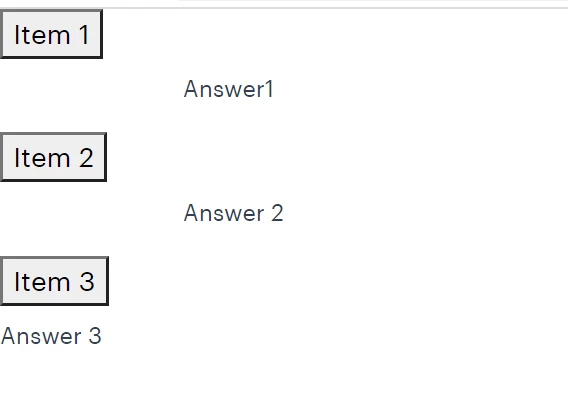
Issue:


It seems styles/JS does not apply by default. Items are not clickable as well.


Do we need to write custom JS/CSS to make it working or at least It should work as  by default implementation and then according to Project req, we can further enhance styles etc.??


Regards,

AP

 

This post is no longer active and is closed to new replies. Need help? Start a new post to ask your question.
Best answer by Bhuwan_B

@arvind-1  Please check if you have embed core.wcm.components.accordion.v1 in your clientlib-base.

2 replies

Bhuwan_B
Community Advisor
Bhuwan_BCommunity AdvisorAccepted solution
Community Advisor
July 12, 2021

@arvind-1  Please check if you have embed core.wcm.components.accordion.v1 in your clientlib-base.

dpimpi-csm
October 2, 2023

What could be other reasons of that behaviour? I checked in my project and it seems that I embedded core.wcm.components.accordion.v1 in my clientlib-base.

Thanks a lot

Vijayalakshmi_S
July 16, 2021

Hi @arvind-1,

Functionality of expand and collapse for an accordion(JS) would work as is with regular proxy pattern.(Can check in Preview or disabled/View as Published mode)

CSS needs to be done per the desired look and feel of the project. 

In order to cross check if you have created proxy component correctly, you can create a sample project in your local using AEM project maven archetype which has proxy accordion component, you can make use of the same. (Compare what needs to be overwritten when creating proxy out of Core component)
