
AEMaaCS GraphQL: Sorting, tags and page reference | Community
Skip to main content
martinkastler
Level 2
February 24, 2023
Solved

AEMaaCS GraphQL: Sorting, tags and page reference

  • February 24, 2023
  • 2 replies
  • 1272 views

Hello!

We are struggling with a GraphQL query on our AEMaaCS publish instance.

For showing certain news on our Android and iOS mobile apps, we'd like to query a list of article content fragments...

  • of a specific path
  • after specific date
  • sorted by date
  • having a particular cq:tags tag set
  • returning the _publishURL of the page that references the content fragment

Current state:

  • Date works.
  • Path works.
  • Sorting by date will be supported with the March 2023 release.
  • Checking for tags did work in AEM 6.5 but now it seems it does not work anymore? Do we miss something?
  • The _references attribute only returns "RTE inline references" and not the page(s) that reference the content fragment. Is there a way to accomplish that?

Our current query:

query { articleList( # does not work # sort: "articleDate DESC", filter: { _path: { _expressions: [ { # Path e.g. /content/dam/gpa/articles value: "/content/dam/oegb/articles" _operator: STARTS_WITH }] }, articleDate: { _expressions: [ { # Datetime of last time queried by client value: "2023-02-15T00:00:00.000Z" _operator: AFTER }] }, # does not work # _tags: {_expressions: [{value: "meinbrapp", _operator: CONTAINS}]} }) { items { _path topic title subtitle articleDate previewText { html } mainText { html } _metadata { stringArrayMetadata { name, value } } }, _references { ... on PageRef { _publishUrl } } } }


Any hint is appreciated.


Thank you!


This post is no longer active and is closed to new replies. Need help? Start a new post to ask your question.
Best answer by sarav_prakash

@martinkastler , you dont need array to check for single value. I test from my local a similar query and this works:


query mySearch($pageSize: Int, $startIndex: Int, $input: String) { releaseNotesMasterList( filter: { input: {_expressions: {_operator: EQUALS, value: $input}}, _path: {_expressions: {_operator: STARTS_WITH, value: "/content/dam/content-fragments/demo"}}, _tags:{_expressions:{_operator:CONTAINS, value:"test1"}} } limit: $pageSize offset: $startIndex sort: "releaseDate DESC" ) { items { _path } } }


When I comment _tags, query returned 2 frags and with _tags filter returned only 1. 


So in your case can you try 

# _tags: {_expressions: [{value: "meinbrapp", _operator: CONTAINS}]}

to 

# _tags: {_expressions: {value: "meinbrapp", _operator: CONTAINS}}

and see if it helps? But honestly with squarebrackets also worked for me.


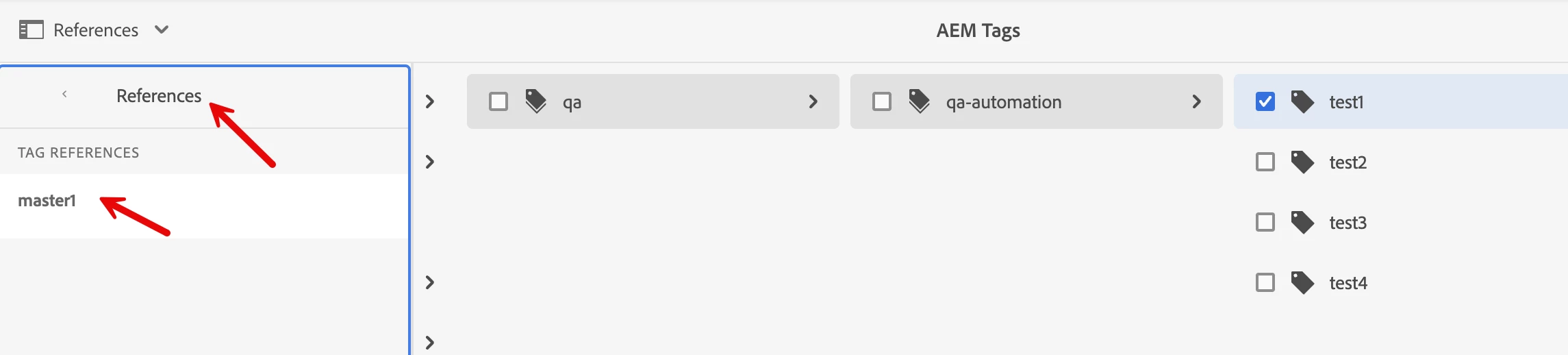
1 more consideration, tag references work ONLY with cq:tags. When you goto Tagging and check references from the tag, your CF must show up under References like this 

Tag references will NOT work for custom tag properties. 


Last consideration, incase you are trying against custom properties, I ran into weird issue and adding `_ignoreCase: true` solved for me. I documented here. https://medium.com/@bsaravanaprakash/how-to-filter-properties-with-custom-namespaces-in-aem-graphql-b08810407bb8


Hope this helps. 

2 replies

kautuk_sahni
Community Manager
Community Manager
June 7, 2023

@asifchowdhury @shiv_prakash_patel @nitesh_kumar-1 @rohit_utreja 

Can you please dedicate some time to review this AEM question and offer your expert insights? Additionally, if you could provide the author with some guidance or direction to tackle the problem, it would be most appreciated.

Kautuk Sahni
sarav_prakash
Community Advisor
sarav_prakashCommunity AdvisorAccepted solution
Community Advisor
September 4, 2024

@martinkastler , you dont need array to check for single value. I test from my local a similar query and this works:


query mySearch($pageSize: Int, $startIndex: Int, $input: String) { releaseNotesMasterList( filter: { input: {_expressions: {_operator: EQUALS, value: $input}}, _path: {_expressions: {_operator: STARTS_WITH, value: "/content/dam/content-fragments/demo"}}, _tags:{_expressions:{_operator:CONTAINS, value:"test1"}} } limit: $pageSize offset: $startIndex sort: "releaseDate DESC" ) { items { _path } } }


When I comment _tags, query returned 2 frags and with _tags filter returned only 1. 


So in your case can you try 

# _tags: {_expressions: [{value: "meinbrapp", _operator: CONTAINS}]}

to 

# _tags: {_expressions: {value: "meinbrapp", _operator: CONTAINS}}

and see if it helps? But honestly with squarebrackets also worked for me.


1 more consideration, tag references work ONLY with cq:tags. When you goto Tagging and check references from the tag, your CF must show up under References like this 

Tag references will NOT work for custom tag properties. 


Last consideration, incase you are trying against custom properties, I ran into weird issue and adding `_ignoreCase: true` solved for me. I documented here. https://medium.com/@bsaravanaprakash/how-to-filter-properties-with-custom-namespaces-in-aem-graphql-b08810407bb8


Hope this helps.