Types not resolved with custom Dita profile | Community
Skip to main content
Level 2
September 19, 2024
Solved

Types not resolved with custom Dita profile

  • September 19, 2024
  • 1 reply
  • 543 views

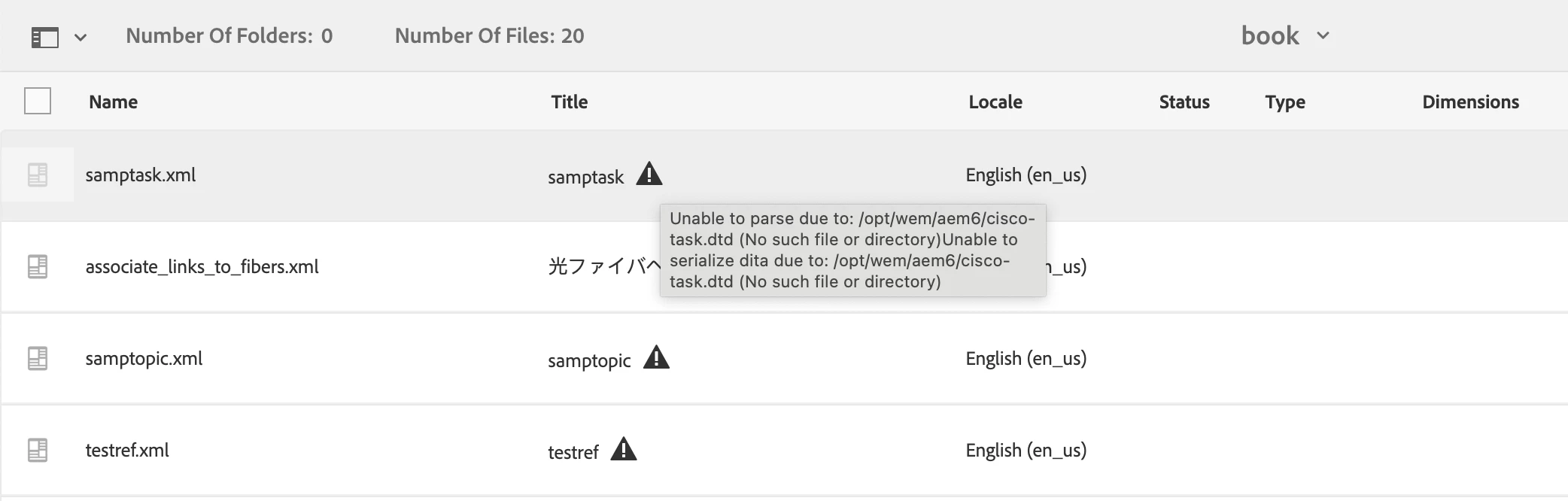
With existing custom profile configuration,  types are not resolved, which were working fine before. Please share the steps to resolve this issue.
This post is no longer active and is closed to new replies. Need help? Start a new post to ask your question.
Best answer by DivrajSingh

@abomma : You can try checking:

  • if the folder in which these files are uploaded is covered under a DITA profile that includes the custom schema catalog 
  • if the DITA profile that covers this folder does not report any error on the UI (generally represented with a warning symbol, and has details of error under it)
  • if the order of catalogs in the custom DITA profile lists the custom catalog on top

If none of above works, you may raise a support ticket to check the scenario on your setup.


Question: have you recently setup this environment or DITA profile or catalog?


1 reply

DivrajSingh
Adobe Employee
DivrajSinghAdobe EmployeeAccepted solution
Adobe Employee
September 20, 2024

@abomma : You can try checking:

  • if the folder in which these files are uploaded is covered under a DITA profile that includes the custom schema catalog 
  • if the DITA profile that covers this folder does not report any error on the UI (generally represented with a warning symbol, and has details of error under it)
  • if the order of catalogs in the custom DITA profile lists the custom catalog on top

If none of above works, you may raise a support ticket to check the scenario on your setup.


Question: have you recently setup this environment or DITA profile or catalog?