
Pasting Data from Excel into a Table (not Simple Table) | Community
Skip to main content
sschnelbach
Level 5
October 31, 2022
Solved

Pasting Data from Excel into a Table (not Simple Table)

  • October 31, 2022
  • 1 reply
  • 978 views

Copying and pasting content from Excel results in a <simpletable> instead of a <table>, and there doesn't seem to be a way to convert it from a simple table after it is in the DITA file.


Has anyone figured out a way around this? I need a table title and I'm not going to retype a large table manually.
This post is no longer active and is closed to new replies. Need help? Start a new post to ask your question.
Best answer by GunjanK

@sschnelbach Guides editor copying and pasting can create <simpletable> or <table>. It depends on the source contents. If you have complex features like merging cells in excel, it will be converted to <table>.

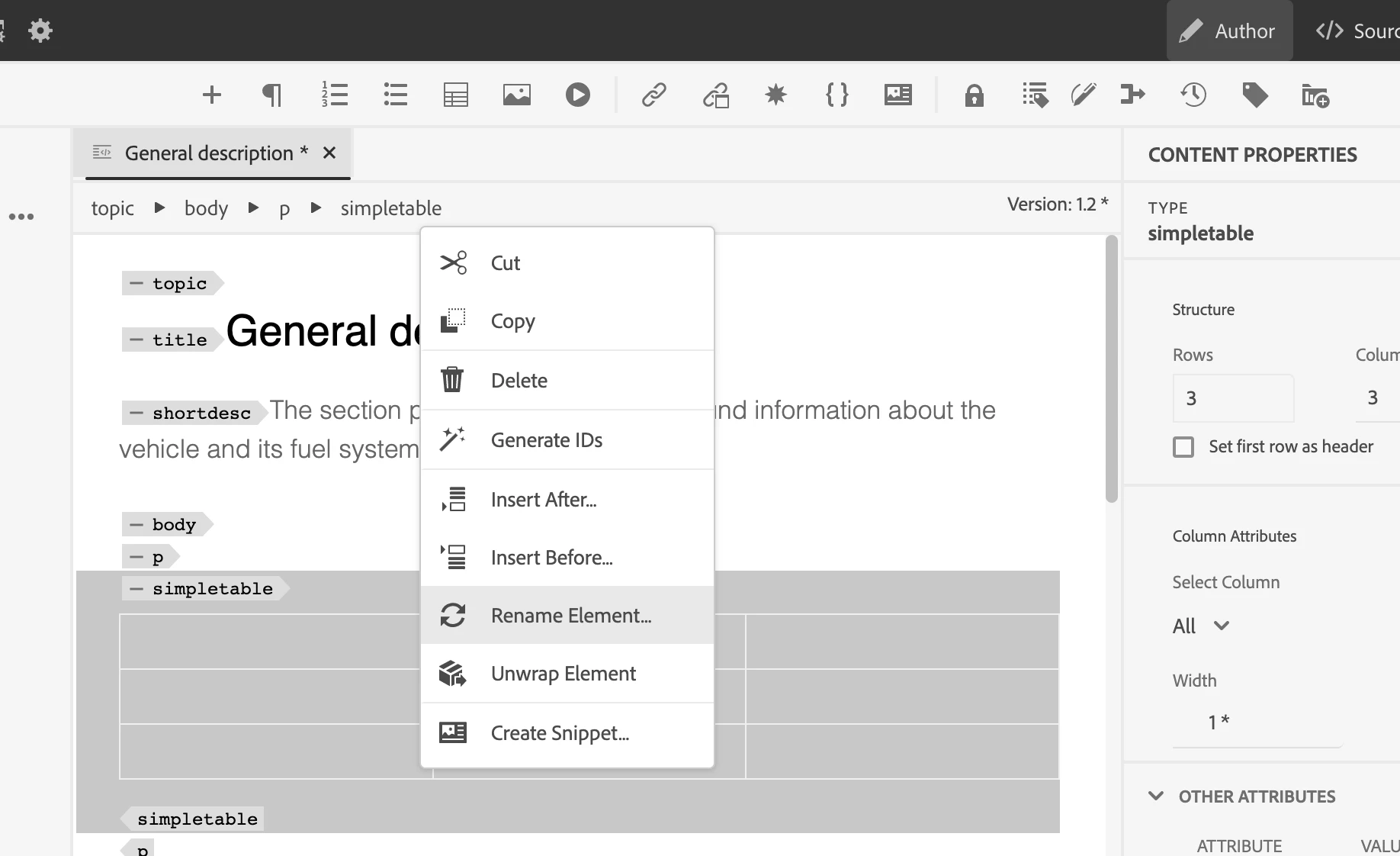
<simpletable> is the default option for the table, but you can always rename it to <table> and add the title afterwards. You can either use the Author view breadcrumbs right-click menu or outline panel right-click menu <Rename Element> option to rename the <simpletable> to <table>

1 reply

GunjanKAdobe EmployeeAccepted solution
Adobe Employee
November 1, 2022

@sschnelbach Guides editor copying and pasting can create <simpletable> or <table>. It depends on the source contents. If you have complex features like merging cells in excel, it will be converted to <table>.

<simpletable> is the default option for the table, but you can always rename it to <table> and add the title afterwards. You can either use the Author view breadcrumbs right-click menu or outline panel right-click menu <Rename Element> option to rename the <simpletable> to <table>

DivrajSingh
Adobe Employee
Adobe Employee
November 7, 2022

@sschnelbach does the recommendation from @gunjank work for you?

sschnelbach
Level 5
November 8, 2022

Yes, renaming the element did convert the <simpletable> to a <table>. And I did notice for the <simpletable> where I had to merge cells, the table automatically converted to a <table> for me.


A big thanks to GunjakK for including the screenshot. It was unclear that "Author view breadcrumbs right-click" meant select the element, then right-click. 


The more I use the Web editor, the more I actually like it, except for its problems with drag/drop from within a table cell and that you cannot easily combine paragraphs by deleting an ending or beginning <p> tag.


Please consider this question answered. 🙂 Thank you.