Native PDF Custom Note Types? | Community
Skip to main content
Level 4
April 15, 2024
Solved

Native PDF Custom Note Types?

  • April 15, 2024
  • 1 reply
  • 1497 views

Hi, all!


I have a question regarding custom note types in Native PDF. 


In our current DITA OT output, we have custom note types set up like this:
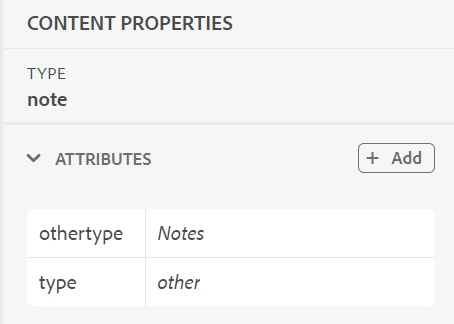
 

The type=other tells the output to use whatever text the author enters in the othertype field. In this case, "Notes" display instead of "Note."


How can I get my AEM Native PDF output to utilize this in the same way?


Thank you!

Josh

This post is no longer active and is closed to new replies. Need help? Start a new post to ask your question.
Best answer by Surbhi_Maheshwari

Hi,


Please try adding the following CSS to your templates's CSS file:


div[data-attr-othertype]>span.prefix-content { display:none; } div[data-attr-othertype]:before{ content: attr(data-attr-othertype)": "; }


In this case it will pick the value of othertype attribute and put it before the prefix-content (e.g. Note) in your example above. It should work for different values of type like danger, caution etc.

Please give it a try and let us know how it goes.


Thanks and Regards,
Surbhi Maheshwari


1 reply

Adobe Employee
April 17, 2024

Hi,


Hope you are doing well.

Can you please share the generated PDF's screenshot for the Content properties screenshot you shared in your query?

That will help us in understanding the requirement clearly.


Thanks and Regards,
Surbhi Maheshwari

Level 4
April 17, 2024

Hi, Surbhi!


Thanks for the response! I'd be happy to clarify.


Here is the OT DITA output for the above scenario. The type=Other and othertype=Notes create this note output:


Here is the Native PDF output using identical DITA and type, othertype:


Hope this helps - let me know if you need anything else!


Thanks!

Josh