
Is there a way to change Document States in bulk? By map? | Community
Skip to main content
sschnelbach
Level 5
September 22, 2023
Solved

Is there a way to change Document States in bulk? By map?

  • September 22, 2023
  • 2 replies
  • 910 views

Is there a way to bulk change objects/assets' Document States? Doing it one topic at a time is okay if your map only has a handful of topics, but this isn't going to be feasible for large maps.


AEM Guides (UUID) v4.2 On-Prem Installation (late April/early May 2023)

AEM 6.5.15 On-Prem Installation

This post is no longer active and is closed to new replies. Need help? Start a new post to ask your question.
Best answer by punagpal

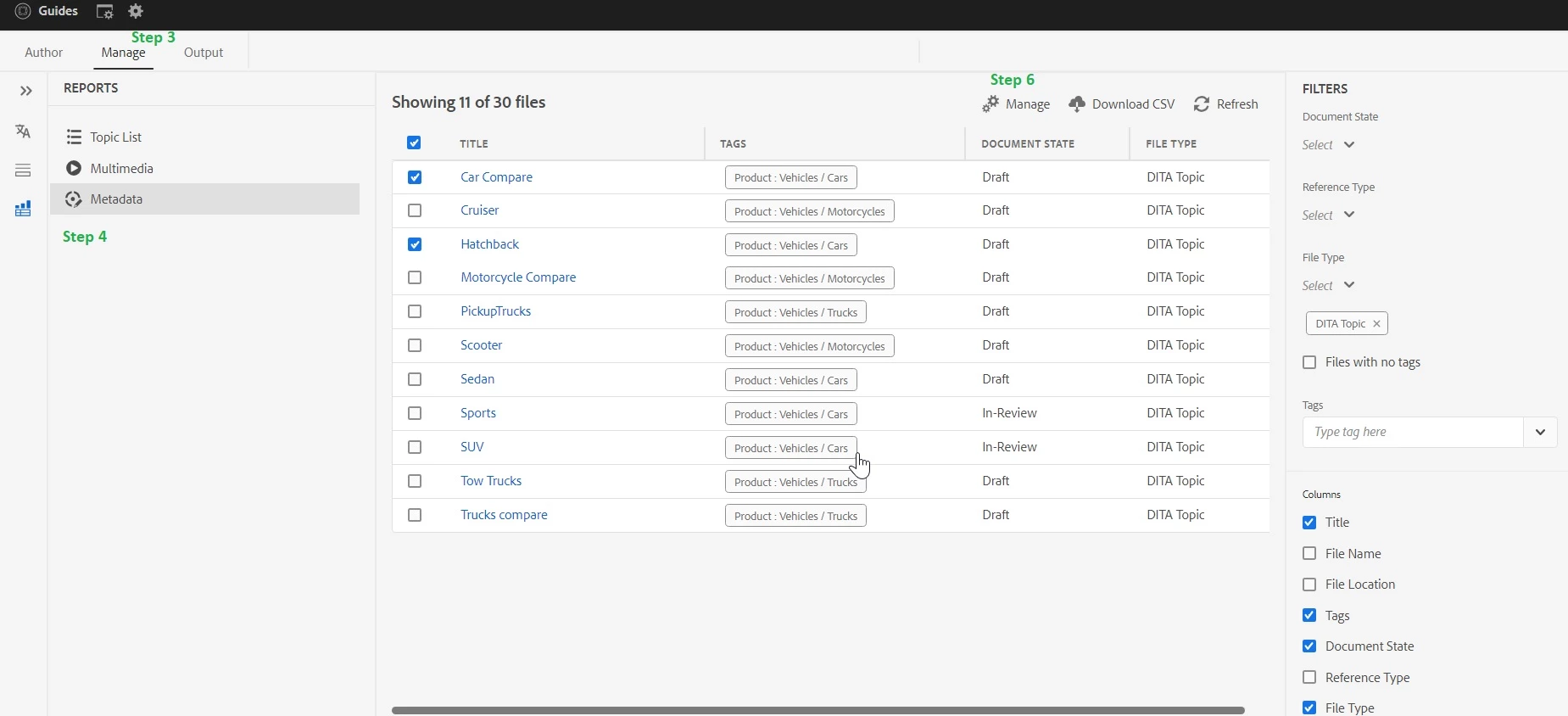
Steps:

  1. Go to repository view in Guides UI
  2. Double-click ditamap and open in map view
  3. Go to Manage Tab
  4. In the Manage tab, Go to the Metadata option
  5. All your direct and indirect ditamap files list loads here.
  6. Select one or more files and click the ‘manage’ icon. Here you can change the document state of your files in Bulk fashion.
     

Ref : Manage metadata( Experience-league article) 

Note: Given features available  for AEM Guides Build 4.2 (on-prem) /Feb 2023 (cloud version ) or higher versions

-Pulkit

2 replies

Adobe Employee
September 23, 2023
punagpal
Adobe Employee
punagpalAdobe EmployeeAccepted solution
Adobe Employee
September 25, 2023

Steps:

  1. Go to repository view in Guides UI
  2. Double-click ditamap and open in map view
  3. Go to Manage Tab
  4. In the Manage tab, Go to the Metadata option
  5. All your direct and indirect ditamap files list loads here.
  6. Select one or more files and click the ‘manage’ icon. Here you can change the document state of your files in Bulk fashion.
     

Ref : Manage metadata( Experience-league article) 

Note: Given features available  for AEM Guides Build 4.2 (on-prem) /Feb 2023 (cloud version ) or higher versions

-Pulkit

sschnelbach
Level 5
September 25, 2023

Neither the Metadata nor the Topics List link does anything in the XML Editor > Manage tab. They are displayed/listed, but do nothing in our installation.


I'm also not seeing anything in the Installation and Configuration documentation that says these two options default to turned off and must be turned on somehow.


AEM Guides (UUID) v4.2 On-Prem Installation (late April/early May 2023)
AEM 6.5.15 On-Prem Installation
Adobe Employee
September 25, 2023

Did you double-click on the listed options?