Level 2
Sep 16, 2022 7:36 PM UTC
Solved

How do I search through my map for all conrefs?

I have a map migrated from another CCMS with a couple hundred topicrefs. Within these are the occasional conref, targeting an element in one of several topics that are not included in the map as topicrefs.
To follow best practices, I want to find all of these conrefs in the map--in whichever topic they may appear--and link these conref targets as "processing-role=resource-only". I can't seem to find a way to search inside the map for these... does anyone know how I can do that?


This post is no longer active and is closed to new replies. Need help? Start a new post to ask your question.
punagpal
punagpalAccepted solution
Adobe Employee
Apr 18, 2023 10:14 AM UTC

If you are using AEM Guides build 4.2 then you can see these in following way :

  • Open Guides editor
  • Open your map
  • Go to manage tab
  • Got to Reports -->TopicList
  • You can see all files which are refereed indirectly i.e (could be conferred files  )


if you are using earlier than AEM Guides build 4.2 then , follow :

  • Open given ditamap in map dashboard
  • Go to Baseline
  • Create new baseline
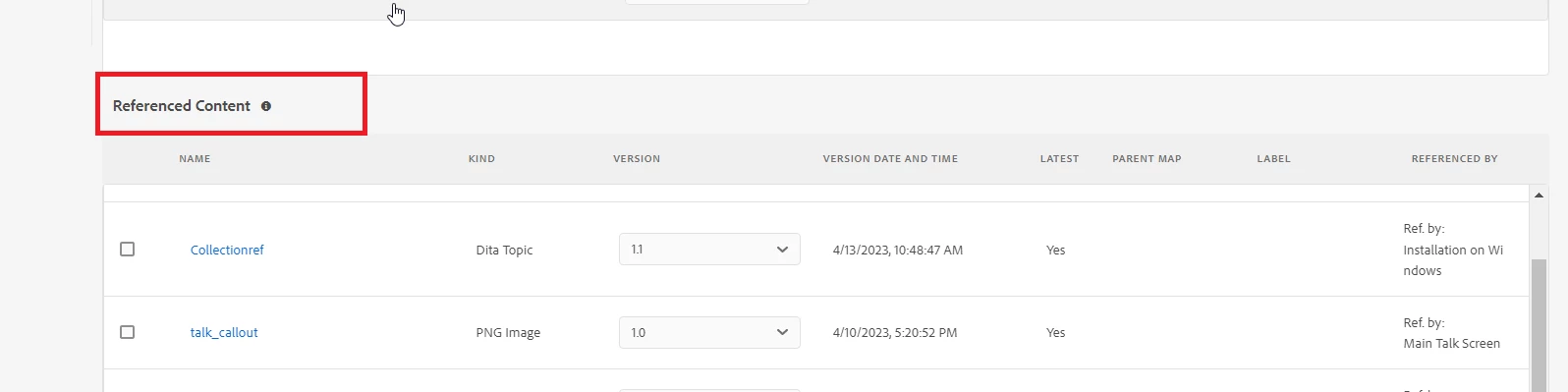
  • Scroll down and you will see section "referenced content " , It will contain all indirectly conferred files in map


4 replies

punagpal
Adobe Employee
Adobe Employee
Jan 6, 2023 8:45 AM UTC

@eric_amble 

Few questions to understand better 

  1. Are you using UUID or Non-UUID AEM Guides?
  2. Are these conref broken or its just that they are not included in Map as topicref?

-Pulkit Nagpal

Translate
Level 2
Jan 19, 2023 10:15 PM UTC

Hi Pulkit,

This is for the UUID version of AEM Guides, and the conrefs are not broken--they just target a variety of 'boilerplate'-type elements in other topics elsewhere in the DAM.

Thanks,
Eric

Translate
punagpal
Adobe Employee
punagpalAdobe EmployeeAccepted solution
Adobe Employee
Apr 18, 2023 10:14 AM UTC

If you are using AEM Guides build 4.2 then you can see these in following way :

  • Open Guides editor
  • Open your map
  • Go to manage tab
  • Got to Reports -->TopicList
  • You can see all files which are refereed indirectly i.e (could be conferred files  )


if you are using earlier than AEM Guides build 4.2 then , follow :

  • Open given ditamap in map dashboard
  • Go to Baseline
  • Create new baseline
  • Scroll down and you will see section "referenced content " , It will contain all indirectly conferred files in map


Translate