footnote cross reference | Community
Skip to main content
Level 2
February 7, 2024
Solved

footnote cross reference

  • February 7, 2024
  • 2 replies
  • 1220 views

Hi,

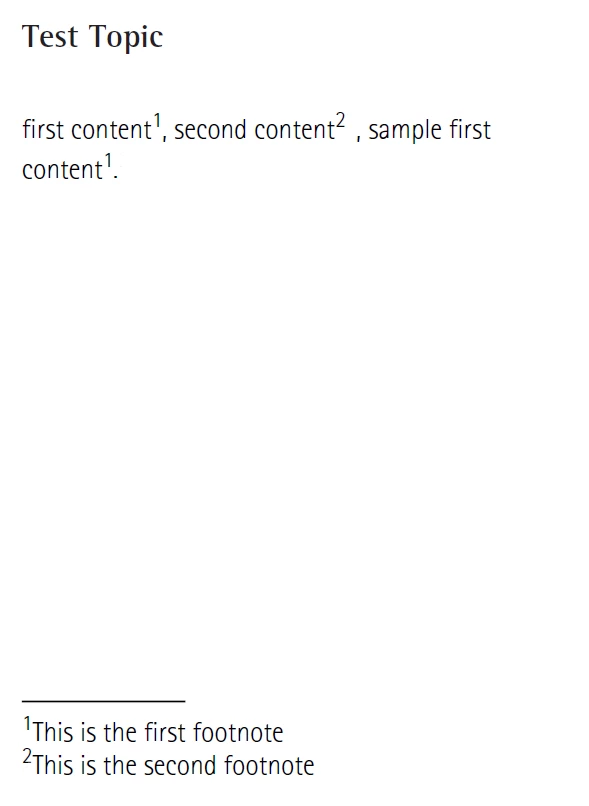
How to refer the same footnote multiple times in topics and need to display footnote-marker once at the bottom.

Want to achieve like below screenshot.
 

This post is no longer active and is closed to new replies. Need help? Start a new post to ask your question.
Best answer by vikchand

Hi @kiruthika_r @sschnelbach 

This feature is available in the latest version (On-prem release 4.4 and cloud release 2310) of AEM Guides. In order to use this feature, follow the steps given below -

  1. Add a footnote
  2. Generate an ID for it (Right Click -> Generate IDs)
  3. Insert an conref to the above footnote where you want to refer to it
  4. Add type attribute to the above conref and set it's value to "fn"
  5. Generate the PDF output

Generated PDF should have the same footnote number for all the footnotes which are referring to same footnote.


Additional step for NativePDF: If you want to hide the original footnote (one with ID) then you can add the CSS style given below in the content.css file of your PDF template


.fn[id]::footnote-call { display: none; }


Please have a look at documentation for more details here.

2 replies

sschnelbach
Level 5
February 7, 2024

I have also filed this request. According to Adobe's tech team, the use-by-reference footnote doesn't work yet in AEM Guides. They are supposed to be working on it.

Level 2
February 7, 2024

Hi @sschnelbach Thanks for the update.

vikchandAdobe EmployeeAccepted solution
Adobe Employee
February 8, 2024

Hi @kiruthika_r @sschnelbach 

This feature is available in the latest version (On-prem release 4.4 and cloud release 2310) of AEM Guides. In order to use this feature, follow the steps given below -

  1. Add a footnote
  2. Generate an ID for it (Right Click -> Generate IDs)
  3. Insert an conref to the above footnote where you want to refer to it
  4. Add type attribute to the above conref and set it's value to "fn"
  5. Generate the PDF output

Generated PDF should have the same footnote number for all the footnotes which are referring to same footnote.


Additional step for NativePDF: If you want to hide the original footnote (one with ID) then you can add the CSS style given below in the content.css file of your PDF template


.fn[id]::footnote-call { display: none; }


Please have a look at documentation for more details here.