
Custom default output presets - pptx and docx | Community
Skip to main content
Rohan_Garg
Community Advisor
Community Advisor
May 18, 2023
Question

Custom default output presets - pptx and docx

  • May 18, 2023
  • 1 reply
  • 1946 views

Hi AEM Community,


AEM Guides supports creating output in the most popular formats like AEM Site, PDF, HTML5, EPUB, JSON, and custom output through DITA-OT, Native PDF, and FMPS.
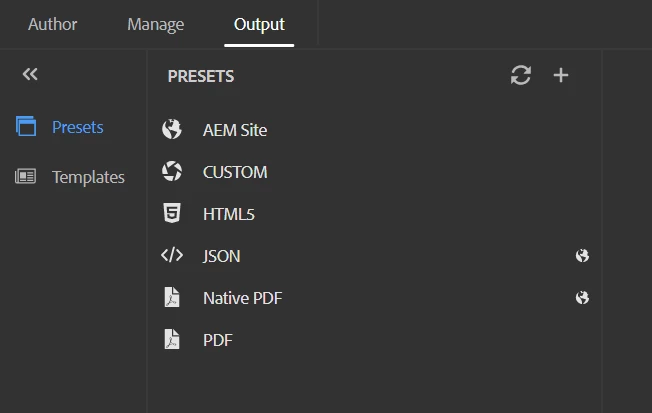


I want to export my output as pptx and docx. Is there any way to do so?

@frameexpert@divrajsingh@vivekkumar@punagpal@aswinilakshminarayanan 


Thanks,

Rohan Garg

This post is no longer active and is closed to new replies. Need help? Start a new post to ask your question.

1 reply

DivrajSingh
Adobe Employee
Adobe Employee
May 18, 2023

@rohan_garg Generation of any output type from DITA content largely depends on the DITA-OT plugins that are configured in the DITA-OT installed. (AEM Sites, JSON, Native PDF are exceptions as they use Adobe Guides engine)


In AEM Guides, the presets which are available on output tab are enabled via plugins which are already installed in it.

  • You can add more plugins if they are available on DITA-OT github plugins library
    • To understand how to add additional plugins in DITA-OT provided by AEM Guides - check this post
  • For DITA to docx - you can refer the plugin available on this page
  • For DITA to PPT - it is generally custom, so
    • you may want to see how to create custom DITA-OT plugins - check this post
    • some thoughts around this are available on partner portals - an example

I hope this helps.


Rohan_Garg
Community Advisor
Community Advisor
May 19, 2023

@divrajsingh - Thanks for the response!

I have added 2 plugins "com.antennahouse.wml" and "com.elovirta.ooxml" to the dita-ot-3.5.

Zipped it and uploaded it to /apps/project/dita_resources/DITA-OT.zip as nt:file

Then created a custom profile with assigned path and AEM DITA-OT Zip Path.


Is there any other step to follow to generate the docx output?

Currently, I am only seeing the default options (AEM Site, Custom, HTML5, JSON, Native PDF and PDF)

There is an option in Custom to configure params like DITA-OT command line arguments and others as shown below but not sure if it is to be configured - 


DivrajSingh
Adobe Employee
Adobe Employee
May 19, 2023

You need to use CUSTOM type preset and use the field "Transformation name" as "docx" (I think) to generate the word output.

The transformation name should be the plugin name - it goes inside the plugins (in plugin.xml) of the plugin you added