conkeyref behaviour in the Attributes panel for Prolog elements | Community
Skip to main content
Level 2
October 28, 2025
Solved

conkeyref behaviour in the Attributes panel for Prolog elements

  • October 28, 2025
  • 2 replies
  • 380 views

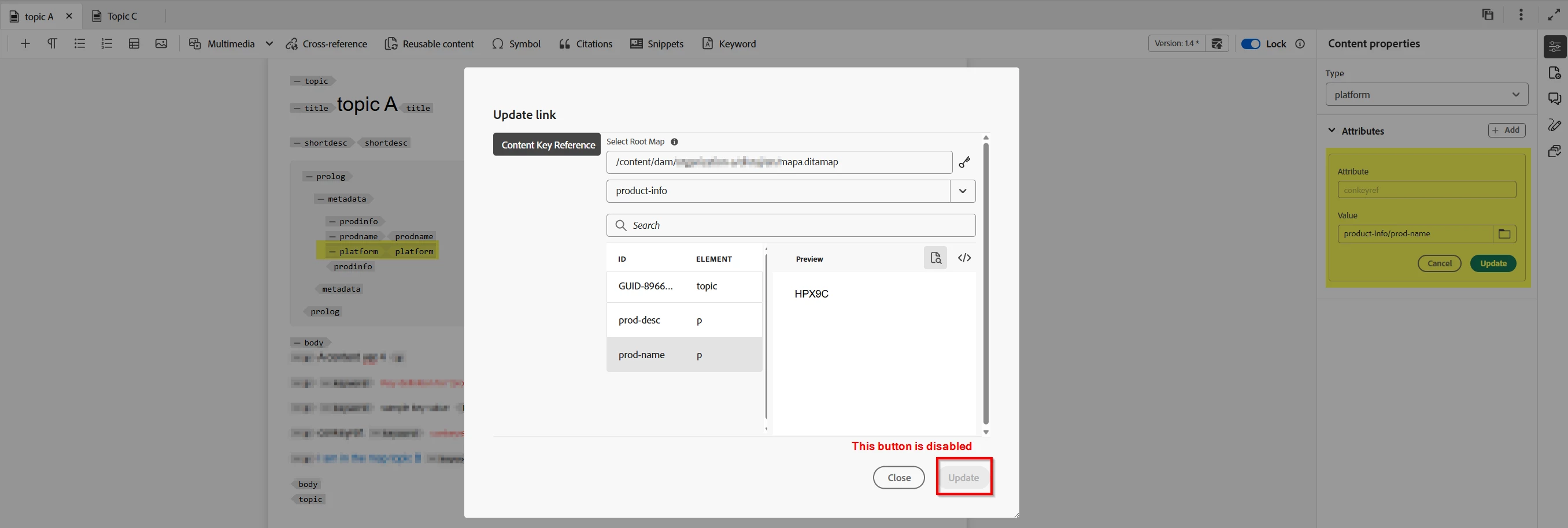
I want to use conkeyref to add values for elements in the prolog, for eample, prodname or category. I have created the required keys and bound it to the map/topic. I am able to add the conkeyref in the content of the topic, say within a <p> tag, but not with the Prolog. The key list is displayed, but upon selection of a key, the Update button in the dialog box is displayed. So, I used the source mode, and added the conkeyref. It picks up as conkeyref within the prodname or category is DITA valid. 


In short, here is the observed behavior:

  • The Attributes panel in Web Editor does not allow updating conkeyref on elements inside <prolog>.

  • Even using “Insert → Reuse Content” or moving the conkeyref to a dedicated attribute on <prodinfo> does not enable the Update button in this context.

Is there a configuration that I am missing? OR is this an out-of-the-box behavior in AEM Guides. There’s no configuration to get the conkeyref working for Prolog from the Author view of Web Editor using the Attributes panel.


@divrajsingh Please confirm. 



Best answer by DivrajSingh

@aravindanand : to understand this - do you mean that:

  • the usage of conkeyref (sample)
  • does not allow you to update the conkeyref in author mode i.e. the "Update" button is disabled? 
  • and you are able to add the expected value in source mode?

See screenshot below [1] from what I understood from your problem statement


Please confirm if this is what you are facing.


[1]


2 replies

lsteinbacher
Adobe Employee
Adobe Employee
October 28, 2025

Hi there, 


By rule, <p> is not allowed in the prolog. 

It is meant for topic-level metadata. 

Try creating a keydef that uses one of the allowed elements within prolog. Then you should be able to conkeyref that element.


I hope this helps. 


Level 2
October 28, 2025

Thanks @lsteinbacher for your input. I will try what you have suggested. On other hand, if <p> or <ph> is not allowed for any of the elements prolog, how is that I am able to add <conkeyref> in source mode. If it is a violoation of DTD structure or AEM constraints, an error should be displayed and the file should not be saved. That is not case. When <conkeyref> is added in the source mode, it seems to accept, but not through the UI dialog box. Any reasons for it? 

lsteinbacher
Adobe Employee
Adobe Employee
October 28, 2025

Can you send me a screenshot of your conkeyref in source mode? When I try to add a <p>, I get an error message. 


Also, <ph> is allowed in some contexts within the prolog. 


DivrajSingh
Adobe Employee
DivrajSinghAdobe EmployeeAccepted solution
Adobe Employee
October 29, 2025

@aravindanand : to understand this - do you mean that:

  • the usage of conkeyref (sample)
  • does not allow you to update the conkeyref in author mode i.e. the "Update" button is disabled? 
  • and you are able to add the expected value in source mode?

See screenshot below [1] from what I understood from your problem statement


Please confirm if this is what you are facing.


[1]


Level 2
October 29, 2025

Thanks @divrajsingh for your response. Yes, the issue is just as you have described. I have attached screenshot for your reference. 

DivrajSingh
Adobe Employee
Adobe Employee
October 29, 2025

Thanks for confirming.

Please raise a support ticket for this - this should be logged as change request in product.