AEM Guides (AEMaaCS): Map to DITA button missing for Unstructured FrameMaker Migration
I am trying to migrate existing unstructured FrameMaker documents (.fm and .book) to DITA following the official documentation here: Migrate unstructured FrameMaker documents
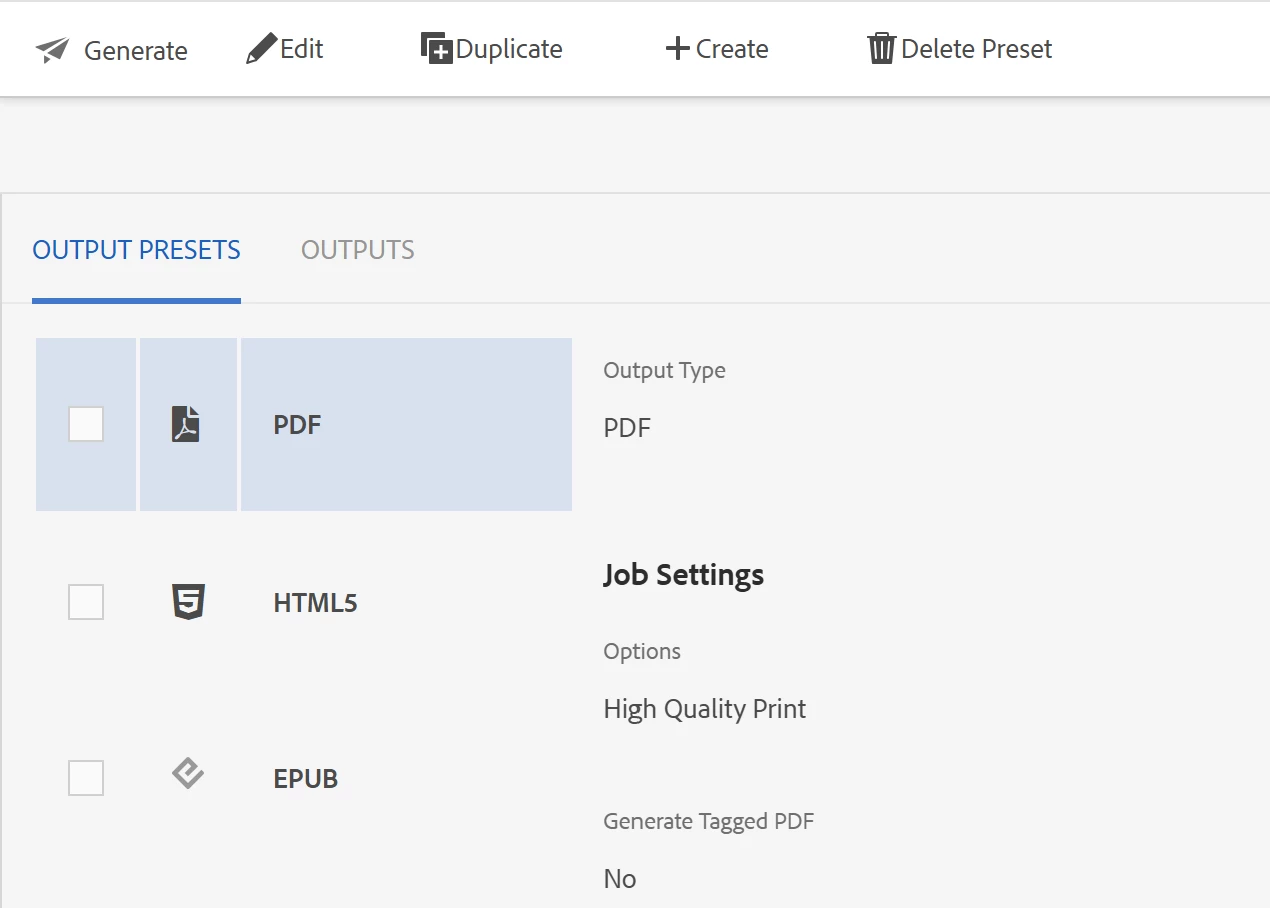
However, I am unable to proceed because the Map to DITA (or Convert to DITA) button is missing from the Assets toolbar when I select my .fm file. When I open the file, I only see options to generate PDF, HTML5, and EPUB (as shown in the attached screenshot), but no option for DITA migration.
Steps to Reproduce:
-
Upload an unstructured FrameMaker file (
.fm) to an AEM Assets folder. -
Select the file.
-
Look at the top toolbar and the Output Presets panel.
-
Actual Result: The Map to DITA button is not visible. Only standard Asset options and Generate (PDF/HTML5/EPUB) are visible.
-
Expected Result: The Map to DITA button should appear to initiate the migration workflow using the
.stsfile.
Environment:
-
Adobe Experience Manager (2025.11.23385.20251113T172403Z)
-
aem-guides (2025.10.0.278)