Level 4
May 12, 2026
Question

Unable to load custom js in edit/preview mode in adaptive form

  • May 12, 2026
  • 1 reply
  • 9 views

Hi,

I am seeing an issue on trying to load a custom js on Adaptive form (edit/preview mode) on AEM author instance, but the same custom js is loading fine on AEM publisher.

Adaptive form in created on AEM 6.5.24 and using foundation component.

The custom js is located here: /apps/<project_name>/clientlibs/clientlib-adaptive-forms/custom.js

I want to initiate this custom.js on a button click on adaptive form.

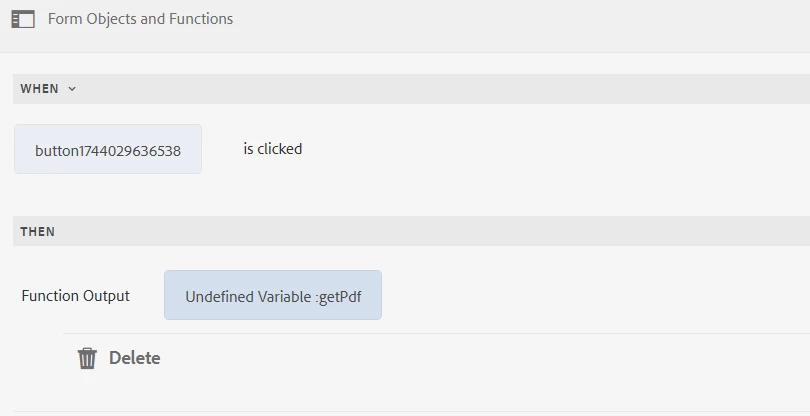
So in the rule editor for the button, I see an error, on trying to search for the custom function within custom.js. It shows as undefined variable. The reason is that, the custom.js is not loading on both edit/preview mode.

All the files within this /apps/<project_name>/clientlibs is not loading on AEM author, but the it loads fine when the adaptive form in published on aem publisher?

Any suggestions please?
 

1 reply

Level 2
May 13, 2026

Hi ​@SmrithiGo ,


This is a classic AEM author vs publisher clientlib loading difference and the root cause is almost always one of two things.
 

The first thing to check is the categories configuration on your clientlib node. For a clientlib to load in the Adaptive Forms rule editor on author, the category needs to be included in the allowlisted categories that AEM Forms loads in edit and preview mode. The standard category for Adaptive Forms custom functions is customfunctions but your clientlib category needs to match exactly what the Forms rule editor is scanning for. Go to your clientlib node at /apps/project_name/clientlibs/clientlib-adaptive-forms and verify the categories property value. If it is set to something custom that isn’t registered with the Forms authoring layer it will load fine on publisher where all clientlibs are served but be invisible to the rule editor on author.


The second thing to check is whether your clientlib has allowProxy set to true. On AEM author, clientlibs under /apps are not directly accessible through the browser for security reasons. Setting allowProxy to true on your clientlib node makes it accessible via the /etc.clientlibs proxy path which is what the author instance uses to serve clientlib content. Publisher has different security constraints which is why it works there without this setting. Add the property allowProxy with a Boolean value of true to your clientlib node and then invalidate the clientlib cache on author by going to /libs/granite/ui/content/dumplibs.rebuild.html and running the rebuild.


If both of those are already configured correctly the next step is to check the browser console on author in edit mode and look for any 403 or 404 errors on the clientlib path which will confirm whether it is a serving issue or a registration issue.