Trying to print form fields only | Adobe Higher Education
Skip to main content
Level 2
March 22, 2010
解決済み

Trying to print form fields only

  • March 22, 2010
  • 29 の返信
  • 28642 ビュー

I have made a fillable form with LiveCycle Designer, it is a 2 page form that my customer will receive by email, fill out and then feeds into a regular ink jet printer to print off fields onto an already pre-printed page they have in their office (they are basically filling out their name, address, etc contact information to print onto a brochure that is pre-printed) My client will use Acrobat Reader to fill in the form. Does anyone know a way to do this? I have read about making the background non-printable, or non-visible, but my background is an already created PDF that I have imported (with the forms built on top of it in LiveCycle). Doesn't seem to work unless I import it as an EPS.

I also have Adobe Acrobat 8 Professional. Is there a different way I should be doing this instead of LiveCycle? I have tried to import the PDF background as an EPS, but the quality makes it really bad and I want the professional quality of the pdf that I already have built, as I have 10 of these to do and the PDFs are already done.

I have been trying to work this out for 2 weeks and still not getting anywhere. Any help would be greatly appreciated.
このトピックへの返信は締め切られました。
ベストアンサー Niall_O_Donovan

Hi,

OK I am back at the desk.

I have checked the help files for Acrobat 8 Pro and Acrobat 9 Pro and it appears that the ability to "import as a layer" was added in version 9. Sorry.

You can check out the help file here: http://help.adobe.com/en_US/Acrobat/8.0/Professional/index.html and go to Editing PDFs > Layers.

If the original PDF was generated from InDesign you may still be able to get the layers into the PDF: Help file

"To retain layers when you convert InDesign CS or later documents to PDF, make sure that Compatibility is set to Acrobat 6 (PDF 1.5) and that Create Acrobat Layers is selected in the Export PDF dialog box"

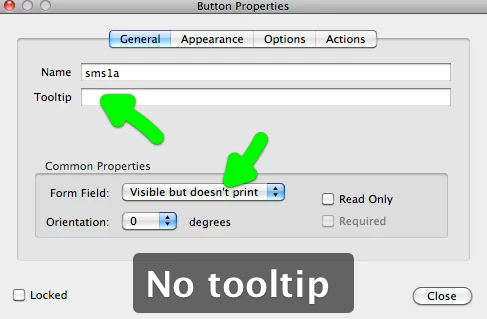
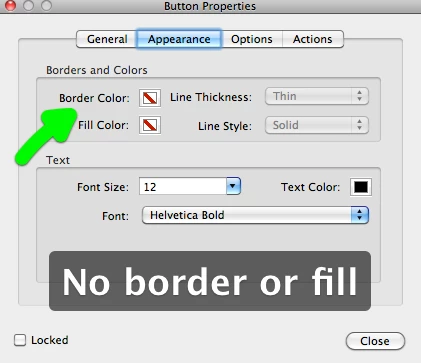
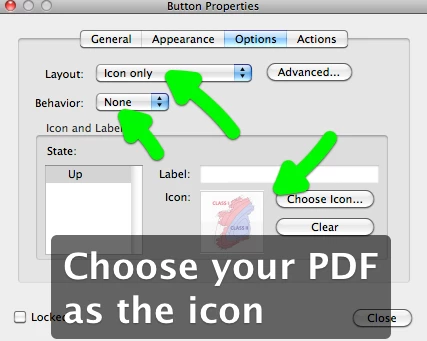
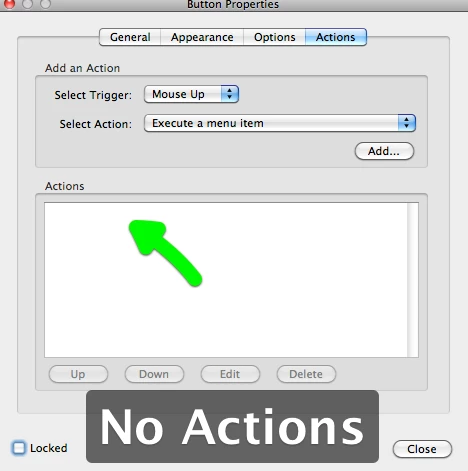
The last thing I can suggest (and I believe you can do this in Acrobat 8) is to start off with the blank PDF and from the Forms menu add a button to the page.

Resize the button to the full page and then right click on the button and get its properties.

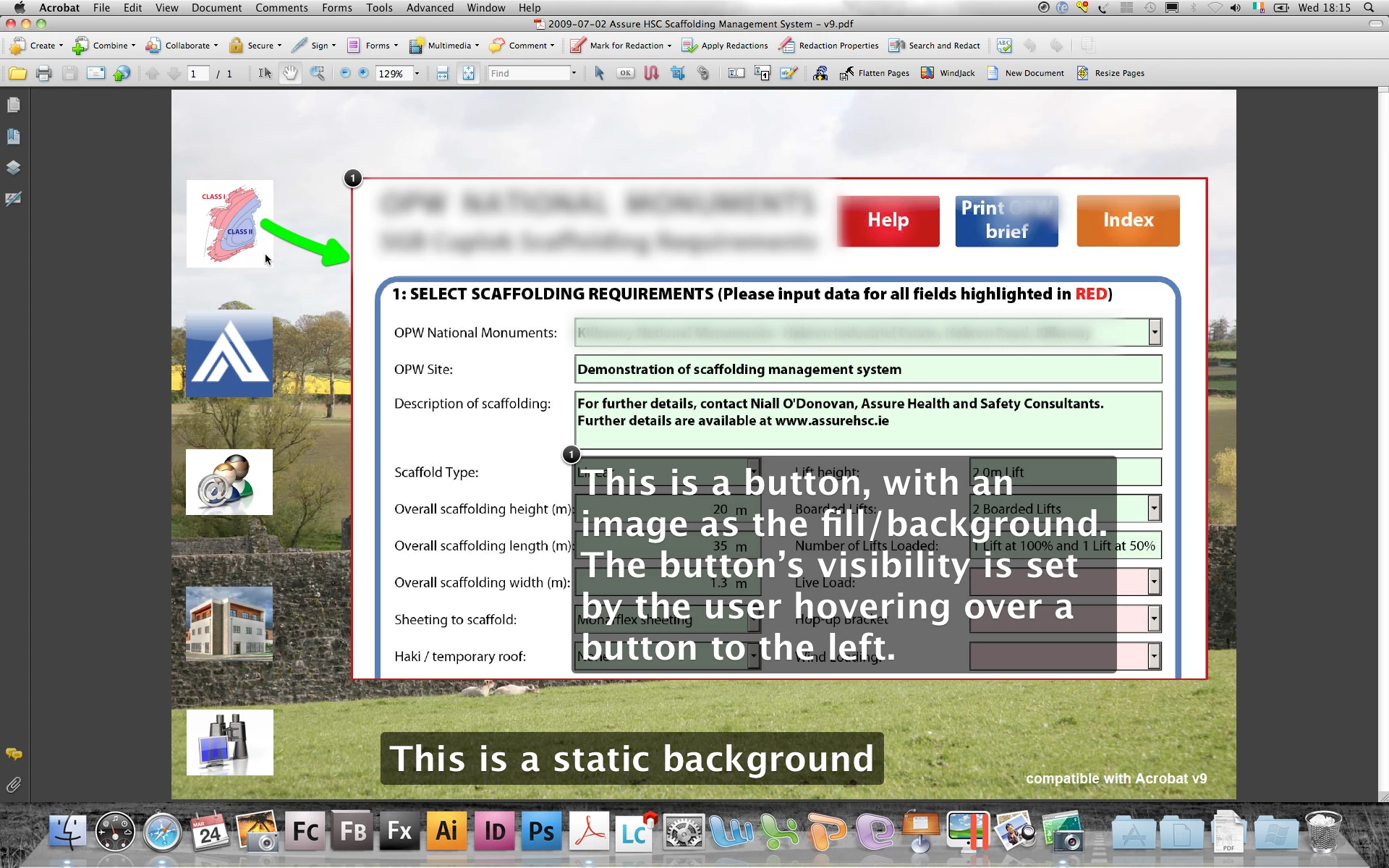
The screen shots should look similar to v8. I am just going to highlight some of the setting you should set for the background button.

In particular make sure that the button behaviour is set to NONE in the Options tab.

Hope that helps,

Niall

29 の返信

Niall_O_Donovan
Level 10
March 23, 2010

Hi,

Following on from your other post, here is an example: https://acrobat.com/#d=ScuvKtp3A5ENTEWvWQaRaA

If you look at the script in the prePrint and postPrint events of the objects, you will see how the borders and captions are made invisible just prior to printing.

As Steve and Paul have suggested I would not import the PDF directly into LC Designer. I would open the PDF in Acrobat and from the File > Export menu, export the pages to JPEG. Then when in LC Designer drag an "Image" objects onto the Master page. If you have two images (one for each page) then you will need to insert a second Master page and in the Design view go to pagination and set the first page to be placed on Page1 and the second pages on Page2. The advantage of putting the background images on the Master pages is that you can extend the image object right to the edge of the page and it doesn't get in the way when designing the form in the Design view.

So, if you go to the Master page in the example and click on the image object you will see that its visibility is set to "visible (screen only)", so it does not need any scripting.

Hope that helps,

Niall

March 23, 2010

There is another possibility ......in my print dialog I can select what I want to print. See if you have the same.

cammag作成者
Level 2
March 23, 2010

In theory, this is probably my best solution, however, I have imported the JPEG by exporting it from Acrobat, added the live text fields in LC, but when I go to preview all I get is a "runtime error" and my program closes. I have worked on this all day yesterday as well, and just keep getting the same error and it keeps crashing, so I assume I am doing something wrong, or the program doesn't like the changes I made.

I am also not sure as I was trying to figure out how I can get the jpeg to the very edge of my page, as I need it to bleed right to the edge. I am concerned also, over the quality of the jpeg and the only real way I can tell if this will display clearly is if I can test it which I can't.

Sorry, anything you think I might be doing wrong to cause this error?

I

cammag作成者
Level 2
March 23, 2010

Love this idea, but don't see this option in Adobe Reader. This is the program that our clients would be using to open up form, fill and print. Thanks for the help though.

March 23, 2010

Its not in the Reader ...it is in the print dialog that comes up when you print.

Paul

cammag作成者
Level 2
March 23, 2010

Yes, I see it in Acrobat only (this doesn't give me this option in Reader), but I actually tried it just to test it in Acrobat, and when I choose Form Fields Only nothing prints out.

Level 8
March 23, 2010

Nothing will print unless you enter something into some of the fields

cammag作成者
Level 2
March 23, 2010

ok, I'm a newb, but not that new! Fields were filled in, but still won't print. I don't think  I will spend much time on this avenue, since I the clients won't have Acrobat to open/fill/print with, they will only be using Reader. I just thought I would like to try it to see if I could get anything to work!!

Niall_O_Donovan
Level 10
March 23, 2010

Hi,

Another option is to stay in Acrobat all together (and not use LC Designer).

Here is an example: https://acrobat.com/#d=38o9RxBn64QSG*rXHcUGgQ

Start off with a blank PDF. Import the background as a layer.

Then in the layer properties set the printing to "never".

Then add fields in Acrobat.

When the user prints in either Acrobat or Reader, the background will not print.

Hope that helps,

Niall

cammag作成者
Level 2
March 23, 2010

Thanks so much! I will try this option too. I have tried exporting my PDF into a jpg. in LC and then placing the forms on top of it. This so far is working for me, but it's just another step and would like to be able to use the PDFs because it looks so much more crisper.