Text field content limits | Community
Skip to main content
June 12, 2020
Solved

Text field content limits

  • June 12, 2020
  • 2 replies
  • 3797 views

I have a form with a few fields where my users will enter content.  It is my intent to limit the amount to text entered, but rather than add a character limit, I would like add some word count counter feature with the field.  Something like (150 of 300 words used) so the user knows they are approaching the word limit.  I would prefer a word limit over a character limit as I want to provide guidance rather than forced limitation.

Thanks


This post is no longer active and is closed to new replies. Need help? Start a new post to ask your question.
Best answer by Nupur_Jain

Hi @jmackesy 


You will have to use Granite validator to apply this check. I have  created a sample code for the same functionality. 


Follow these steps:

1. Create clientlibs with category "cq.authoring.dialog"

2. Add this js


(function ($) { 'use strict'; $(window).adaptTo("foundation-registry").register("foundation.validation.validator", { selector: ".custom-word-limit", validate: function(element) { var elementValue = element.value; var wordLimit = element.dataset.wordLimit; if(elementValue && wordLimit && elementValue.split(' ').filter(function(n) { return n != '' }).length > wordLimit){ return "Word limit for the field is " + wordLimit; } } }); }(Granite.$));


3. Add granite:class property with value "custom-word-limit" to the textfield where you want to apply this word limit check like this:
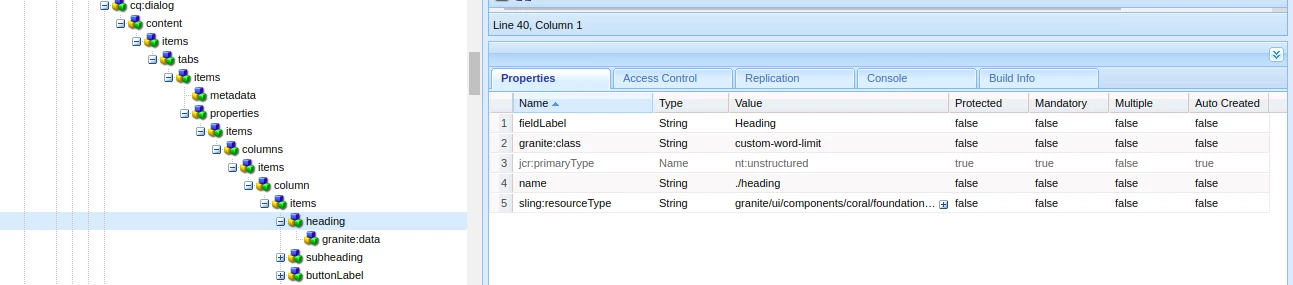
4. Then add a "granite:data" node under the textfield of type nt:unstructured and add property word-limit = 100. Change this number to any number of which you want to apply the limit for this particular field like this

5. The author will get message like this
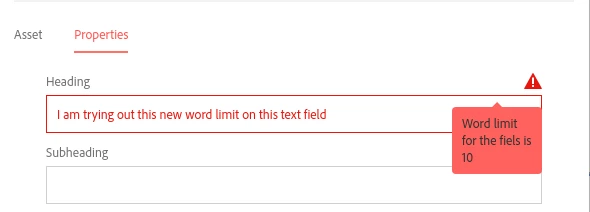
 

Try this and let me know if it works for you.

Thanks,

Nupur

2 replies

Level 8
June 12, 2020

You will probably have to use custom JavaScript to get the word count and display the appropriate message in the fields long description 

jmackesyAuthor
June 15, 2020

Thanks. Your input is appreciated.

Nupur_Jain
Adobe Employee
Nupur_JainAdobe EmployeeAccepted solution
Adobe Employee
June 16, 2020

Hi @jmackesy 


You will have to use Granite validator to apply this check. I have  created a sample code for the same functionality. 


Follow these steps:

1. Create clientlibs with category "cq.authoring.dialog"

2. Add this js


(function ($) { 'use strict'; $(window).adaptTo("foundation-registry").register("foundation.validation.validator", { selector: ".custom-word-limit", validate: function(element) { var elementValue = element.value; var wordLimit = element.dataset.wordLimit; if(elementValue && wordLimit && elementValue.split(' ').filter(function(n) { return n != '' }).length > wordLimit){ return "Word limit for the field is " + wordLimit; } } }); }(Granite.$));


3. Add granite:class property with value "custom-word-limit" to the textfield where you want to apply this word limit check like this:

4. Then add a "granite:data" node under the textfield of type nt:unstructured and add property word-limit = 100. Change this number to any number of which you want to apply the limit for this particular field like this

5. The author will get message like this


Try this and let me know if it works for you.

Thanks,

Nupur